Missing values (NA) in R: find, count, remove and replace
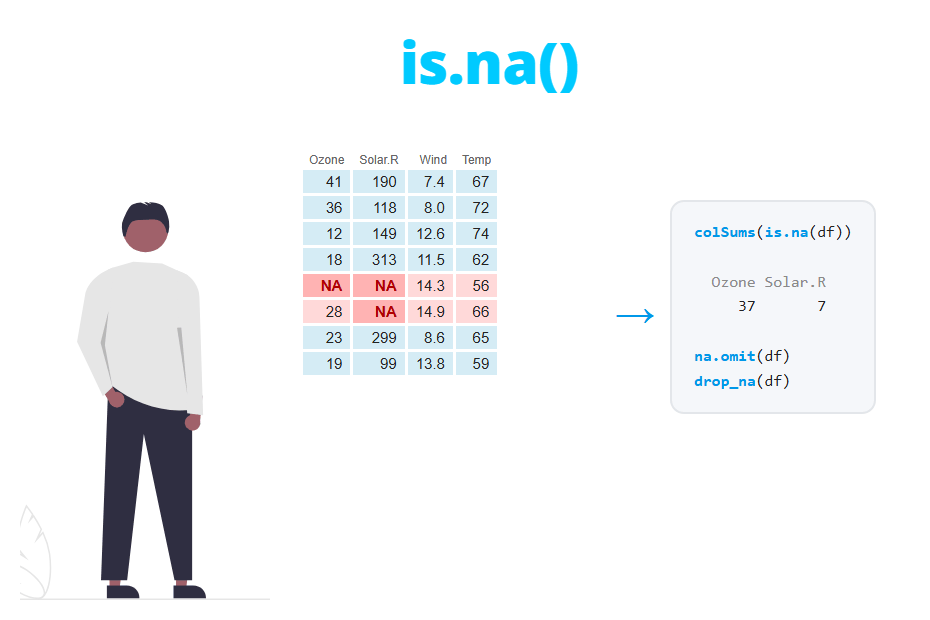
In R, missing values are represented by NA (Not Available). In this tutorial you will learn how to detect NA values with is.na, how to count them by column and by row, why functions like mean return NA and how to fix it with na.rm = TRUE, how to remove rows with NA using na.omit, complete.cases or drop_na and how to replace NA with 0, the mean or the median, both in base R and with dplyr and tidyr.
What is NA in R?
NA is a special value that means that a value exists but is unknown. For instance, a sensor that failed one day or a question that a respondent left blank. It is important not to confuse it with other similar values:
NA: missing value. It can appear in any vector type (numeric, character, logical…).NaN: Not a Number, the result of an undefined mathematical operation, such as0/0.NULL: the absence of an object. It has length 0, so it doesn’t take any position inside a vector."NA": a character string with the letters N and A. It is not a missing value for R.
0/0
is.na(NaN)   # NaN is also considered NA
is.nan(NA)   # but NA is not NaN

length(NULL)
length(NA)
c(1, NULL, 3) # NULL disappears

y <- c("a", "NA", NA)
is.na(y)      # only the real NA is TRUE
[1] NaN
[1] TRUE
[1] FALSE
[1] 0
[1] 1
[1] 1 3
[1] FALSE FALSE TRUEThe last example is very common when importing data: the text "NA" inside a character column is not detected as missing. You will see how to solve it when reading a CSV.
Why x == NA doesn’t work
The most common mistake when looking for missing values is to compare with ==. As NA is an unknown value, any comparison with NA returns NA, because R can’t know whether an unknown value equals 5 or not.
x <- c(5, NA, 3, NA, 8)

# Wrong
x == NA

# Right
is.na(x)
[1] NA NA NA NA NA
[1] FALSE TRUE FALSE TRUE FALSEThe same happens when you filter: x[x > 4] returns 5 NA NA 8, because the NA positions of the condition are also NA. Use x[which(x > 4)] or exclude the missing values first if you only want the values that meet the condition.
Detect NA values
In the rest of the tutorial we will use the airquality dataset, which contains daily air quality measurements in New York from May to September 1973. It has 153 rows and missing values in two of its columns.
head(airquality) Ozone Solar.R Wind Temp Month Day
1 41 190 7.4 67 5 1
2 36 118 8.0 72 5 2
3 12 149 12.6 74 5 3
4 18 313 11.5 62 5 4
5 NA NA 14.3 56 5 5
6 28 NA 14.9 66 5 6The is.na function returns TRUE for each missing element and FALSE otherwise. If you only want to know whether there is any NA in the whole object, anyNA is faster and more direct:
anyNA(airquality)

# Positions of the NA values of a column
which(is.na(airquality$Ozone))
[1] TRUE
[1] 5 10 25 26 27 32 33 34 35 36 37 39 42 43 45 46 52 53 54
[20] 55 56 57 58 59 60 61 65 72 75 83 84 102 103 107 115 119 150Note that the summary function also reports the number of missing values of each numeric column in the NA's field:
summary(airquality$Ozone) Min. 1st Qu. Median Mean 3rd Qu. Max. NA's
1.00 18.00 31.50 42.13 63.25 168.00 37Count NA values
As TRUE counts as 1 and FALSE as 0, you can count missing values by adding the output of is.na. The total number of NA in the data frame is:
sum(is.na(airquality))[1] 44Count NA per column
When applied to a data frame, is.na returns a logical matrix, so you can use colSums to get the count of NA in each column and colMeans to get the proportion:
# Number of NA per column
colSums(is.na(airquality))

# Percentage of NA per column
round(colMeans(is.na(airquality)) * 100, 1)
Ozone Solar.R Wind Temp Month Day
37 7 0 0 0 0
Ozone Solar.R Wind Temp Month Day
24.2 4.6 0.0 0.0 0.0 0.0The output tells you that 24.2% of the ozone values are missing, while Solar.R only has 7 missing values (4.6%). This difference is key to decide what to do: removing every row with NA in Ozone means losing almost a quarter of the data.
Count NA per row
In the same way, rowSums returns how many missing values each row has. Combining it with table you get a summary of the rows:
na_row <- rowSums(is.na(airquality))

table(na_row)
na_row
0 1 2
111 40 2There are 111 complete rows, 40 rows with one missing value and 2 rows with missing values in both Ozone and Solar.R.
If you need to count missing values by group (for example, by month) you can use group_by and summarise:
library(dplyr)

airquality %>%
  group_by(Month) %>%
  summarise(n_na = sum(is.na(Ozone)),
            mean_ozone = mean(Ozone, na.rm = TRUE))
# A tibble: 5 × 3
Month n_na mean_ozone
<int> <int> <dbl>
1 5 5 23.6
2 6 21 29.4
3 7 5 59.1
4 8 5 60.0
5 9 1 31.4June concentrates 21 of the 37 missing ozone values, so the missing data is not evenly spread over time.
Calculations with NA: the na.rm argument
If a vector contains at least one NA, most summary functions such as mean, sum, median, max or sd return NA. This is not a bug: if one value is unknown, the mean of all values is unknown too.
To compute the result ignoring the missing values you need to set na.rm = TRUE (NA remove):
mean(airquality$Ozone)
mean(airquality$Ozone, na.rm = TRUE)
median(airquality$Ozone, na.rm = TRUE)
sum(airquality$Solar.R, na.rm = TRUE)
[1] NA
[1] 42.12931
[1] 31.5
[1] 27146Not all functions use na.rm. For instance, cor uses the use argument and returns NA by default if there are missing values:
cor(airquality$Ozone, airquality$Temp)
cor(airquality$Ozone, airquality$Temp, use = "complete.obs")
[1] NA
[1] 0.6983603Watch out when all the values are missing: mean(c(NA, NA), na.rm = TRUE) returns NaN and sum(c(NA, NA), na.rm = TRUE) returns 0. When working by groups, a group with only NA can produce these values without any error message.
Remove NA values
Remove NA from a vector
The simplest way to remove the missing values from a vector is to keep the elements that are not NA, negating is.na with !:
x <- c(5, NA, 3, NA, 8)

x[!is.na(x)]
[1] 5 3 8You can also use na.omit, but note that it adds an attribute with the positions of the removed values. If you want a clean vector, wrap it with as.vector:
na.omit(x)

as.vector(na.omit(x))
[1] 5 3 8
attr(,"na.action")
[1] 2 4
attr(,"class")
[1] "omit"
[1] 5 3 8Remove rows with NA in any column
na.omit applied to a data frame removes every row that contains at least one NA, in any column. complete.cases returns TRUE for the rows without missing values, so you can use it to subset and get the same result:
aq <- na.omit(airquality)
dim(aq)

aq2 <- airquality[complete.cases(airquality), ]
nrow(aq2)

# Number of incomplete rows
sum(!complete.cases(airquality))
[1] 111 6
[1] 111
[1] 42The new data frame has 111 rows: you have lost 42 of the 153 observations (27%). Note that the original row names are kept (5 and 6 are missing in the output below). If you want to renumber them use rownames(aq) <- NULL.
head(aq) Ozone Solar.R Wind Temp Month Day
1 41 190 7.4 67 5 1
2 36 118 8.0 72 5 2
3 12 149 12.6 74 5 3
4 18 313 11.5 62 5 4
7 23 299 8.6 65 5 7
8 19 99 13.8 59 5 8Remove rows with NA in specific columns
Often you only care about missing values in the columns you are going to analyze. If you are studying ozone, there is no reason to remove a row because Solar.R is missing. In base R, subset by the column:
aq_ozone <- airquality[!is.na(airquality$Ozone), ]
nrow(aq_ozone)
[1] 116The drop_na function from tidyr does the same in a more readable way. Without arguments it checks all the columns (like na.omit) and if you pass one or more column names it only checks those:
library(tidyr)

nrow(drop_na(airquality))                  # all columns
nrow(drop_na(airquality, Ozone))           # only Ozone
nrow(drop_na(airquality, Ozone, Solar.R))  # Ozone and Solar.R
[1] 111
[1] 116
[1] 111Keeping only the rows with a valid Ozone value you keep 116 rows instead of 111. You can also use filter with !is.na(Ozone), which is equivalent.
Replace NA values
Instead of removing the rows, you can replace the missing values. For the examples we will use the first six rows of airquality, which contain three NA:
df <- head(airquality, 6)Replace NA with 0
In base R you can assign a value to all the positions where is.na is TRUE. This works both on vectors and on whole data frames:
df0 <- df
df0[is.na(df0)] <- 0

df0
Ozone Solar.R Wind Temp Month Day
1 41 190 7.4 67 5 1
2 36 118 8.0 72 5 2
3 12 149 12.6 74 5 3
4 18 313 11.5 62 5 4
5 0 0 14.3 56 5 5
6 28 0 14.9 66 5 6For a vector, ifelse is another option: ifelse(is.na(x), 0, x) returns 5 0 3 0 8.
Replace NA with 0 only when the missing value really means zero (for instance, no sales on a day without records). In airquality an NA means that the measurement was not taken, not that ozone was 0, so this replacement would bias the mean downward.
Replace NA with the mean or the median
To impute a single column, compute the statistic with na.rm = TRUE and assign it to the missing positions:
df1 <- df
df1$Ozone[is.na(df1$Ozone)] <- mean(df1$Ozone, na.rm = TRUE)

df1
Ozone Solar.R Wind Temp Month Day
1 41 190 7.4 67 5 1
2 36 118 8.0 72 5 2
3 12 149 12.6 74 5 3
4 18 313 11.5 62 5 4
5 27 NA 14.3 56 5 5
6 28 NA 14.9 66 5 6If you want to do it for several columns, loop over them. In this case we use the median, which is more robust when the variable is skewed:
df2 <- df
for (col in c("Ozone", "Solar.R")) {
  df2[[col]][is.na(df2[[col]])] <- median(df2[[col]], na.rm = TRUE)
}

df2
Ozone Solar.R Wind Temp Month Day
1 41 190.0 7.4 67 5 1
2 36 118.0 8.0 72 5 2
3 12 149.0 12.6 74 5 3
4 18 313.0 11.5 62 5 4
5 28 169.5 14.3 56 5 5
6 28 169.5 14.9 66 5 6Mean imputation is quick, but it has a cost you should know: it keeps the mean but reduces the variability, because all the missing values take the same value. With the full Ozone column, the standard deviation goes from 32.99 to 28.69 after the imputation:
aqm <- airquality
aqm$Ozone[is.na(aqm$Ozone)] <- mean(aqm$Ozone, na.rm = TRUE)

sd(airquality$Ozone, na.rm = TRUE)
sd(aqm$Ozone)
[1] 32.98788
[1] 28.69337The following histograms show the effect: the 37 imputed values pile up in a single bar around 42, creating a peak that didn’t exist in the original data.
aqm <- airquality
aqm$Ozone[is.na(aqm$Ozone)] <- mean(aqm$Ozone, na.rm = TRUE)

par(mfrow = c(1, 2))
hist(airquality$Ozone, breaks = 20, col = 4,
     main = "Original (NA removed)", xlab = "Ozone")
hist(aqm$Ozone, breaks = 20, col = 2,
     main = "NA replaced with the mean", xlab = "Ozone")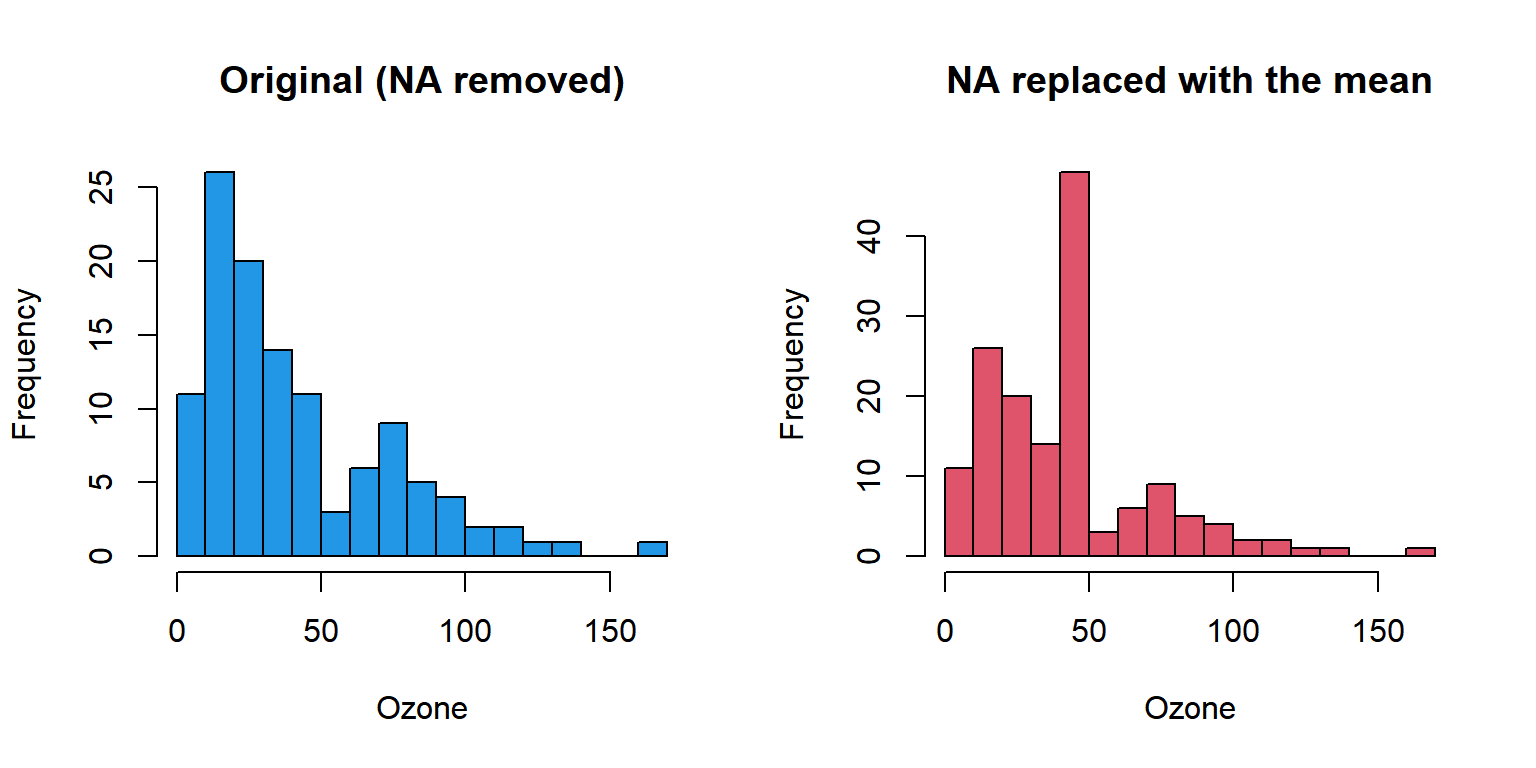
That’s why mean or median imputation is fine for exploring data or when there are few missing values, but with a high percentage of NA (like the 24% of Ozone) it can distort variances, correlations and tests.
Replace NA with dplyr and tidyr
The replace_na function from tidyr allows you to specify a different replacement value for each column with a named list:
library(dplyr)
library(tidyr)

df %>%
  replace_na(list(Ozone = 0, Solar.R = 0))
Ozone Solar.R Wind Temp Month Day
1 41 190 7.4 67 5 1
2 36 118 8.0 72 5 2
3 12 149 12.6 74 5 3
4 18 313 11.5 62 5 4
5 0 0 14.3 56 5 5
6 28 0 14.9 66 5 6It can also be used inside mutate on a single column, and combined with across to replace the NA of several columns with their median:
df %>%
  mutate(across(c(Ozone, Solar.R),
                ~ replace_na(as.numeric(.x), median(.x, na.rm = TRUE))))
Ozone Solar.R Wind Temp Month Day
1 41 190.0 7.4 67 5 1
2 36 118.0 8.0 72 5 2
3 12 149.0 12.6 74 5 3
4 18 313.0 11.5 62 5 4
5 28 169.5 14.3 56 5 5
6 28 169.5 14.9 66 5 6as.numeric is needed because Ozone and Solar.R are integer columns and the median of Solar.R is 169.5. Without it, replace_na refuses to change the type of the column and fails with the error Can't convert from 'replace' <double> to 'data' <integer> due to loss of precision.
Finally, coalesce from dplyr returns, for each position, the first value that is not NA among several vectors. With a single value as the last argument it works as a replacement, and with several vectors it allows you to fill the gaps of a column with the values of another:
coalesce(c(NA, 2, NA), c(10, 20, NA), 0)[1] 10 2 0The first element takes 10 from the second vector, the second keeps its 2, and the third is NA in both vectors, so it takes the 0.
NA when importing a CSV file
When you read a CSV file, R only considers as missing the cells containing NA. Empty cells of character columns, or codes such as n/a or -99, are read as regular values. Consider this file:
writeLines(c("id,score,city",
             "1,8.5,Madrid",
             "2,,Paris",
             "3,-99,",
             "4,n/a,Rome"), "scores.csv")

d <- read.csv("scores.csv")
str(d)
'data.frame': 4 obs. of 3 variables:
$ id : int 1 2 3 4
$ score: chr "8.5" "" "-99" "n/a"
$ city : chr "Madrid" "Paris" "" "Rome"The score column has been read as character instead of numeric because of the n/a text, and no value is recognized as missing. The solution is to list all the codes that mean “missing” in the na.strings argument:
d2 <- read.csv("scores.csv", na.strings = c("", "NA", "n/a", "-99"))
str(d2)
'data.frame': 4 obs. of 3 variables:
$ id : int 1 2 3 4
$ score: num 8.5 NA NA NA
$ city : chr "Madrid" "Paris" NA "Rome"Now score is numeric and the missing values are detected correctly. If you use readr::read_csv, the equivalent argument is na.
Which method should I use?
The following table summarizes the options shown in this tutorial:
| Goal | Base R | dplyr / tidyr |
|---|---|---|
| Check if there is any NA | anyNA(df) |
|
| Count NA per column | colSums(is.na(df)) |
summarise(across(everything(), ~ sum(is.na(.x)))) |
| Ignore NA in a calculation | mean(x, na.rm = TRUE) |
summarise(m = mean(x, na.rm = TRUE)) |
| Remove rows with NA in any column | na.omit(df) or df[complete.cases(df), ] |
drop_na(df) |
| Remove rows with NA in some columns | df[!is.na(df$col), ] |
drop_na(df, col) or filter(!is.na(col)) |
| Replace NA with 0 | df[is.na(df)] <- 0 |
replace_na(list(col = 0)) |
| Replace NA with the mean/median | x[is.na(x)] <- mean(x, na.rm = TRUE) |
mutate(col = replace_na(col, mean(col, na.rm = TRUE))) |
| Fill NA with values from another column | ifelse(is.na(a), b, a) |
coalesce(a, b) |
As a general rule:
- If the percentage of NA is small and the missing values are random, removing the rows (only checking the columns you need) is the simplest and most honest option.
- If removing them would mean losing a lot of data, consider imputing, but keep in mind that the mean or the median reduce the variability.
- Replace with 0 only when the missing value really means zero.