Group data in R with the group_by() function from dplyr
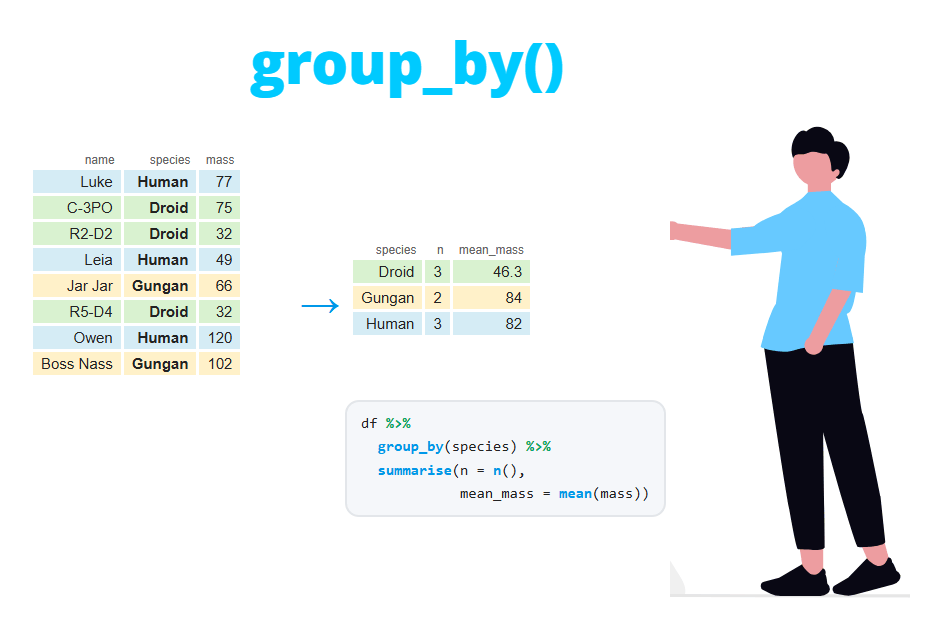
The group_by function from dplyr splits a data frame into groups based on the values of one or more columns, so that the next verbs (summarise, mutate, filter, slice or arrange) are applied to each group separately. In this tutorial you will learn how grouping really works, what the "has grouped output by" message means, why you should ungroup your data and when to use the .by argument instead.
Sample data
In this tutorial we will use a subset of the starwars dataset from dplyr: the characters of three species (humans, droids and gungans) with known mass. The resulting data frame contains 26 rows and five columns. The code uses the pipe operator %>% to chain the steps.
library(dplyr)

df <- starwars %>%
  select(name, species, sex, height, mass) %>%
  filter(species %in% c("Human", "Droid", "Gungan"), !is.na(mass))

df
# A tibble: 26 × 5
name species sex height mass
<chr> <chr> <chr> <int> <dbl>
1 Luke Skywalker Human male 172 77
2 C-3PO Droid none 167 75
3 R2-D2 Droid none 96 32
4 Darth Vader Human male 202 136
5 Leia Organa Human female 150 49
6 Owen Lars Human male 178 120
7 Beru Whitesun Lars Human female 165 75
8 R5-D4 Droid none 97 32
9 Biggs Darklighter Human male 183 84
10 Obi-Wan Kenobi Human male 182 77
# ℹ 16 more rowsWhat does group_by do?
A common surprise is that group_by doesn’t change the data at all. If you print a grouped data frame you will see exactly the same rows in the same order. The only difference is a new line in the header, # Groups: species [3], which tells you the grouping variable and the number of groups.
df_g <- df %>%
  group_by(species)

df_g
# A tibble: 26 × 5
# Groups: species [3]
name species sex height mass
<chr> <chr> <chr> <int> <dbl>
1 Luke Skywalker Human male 172 77
2 C-3PO Droid none 167 75
3 R2-D2 Droid none 96 32
4 Darth Vader Human male 202 136
5 Leia Organa Human female 150 49
6 Owen Lars Human male 178 120
7 Beru Whitesun Lars Human female 165 75
8 R5-D4 Droid none 97 32
9 Biggs Darklighter Human male 183 84
10 Obi-Wan Kenobi Human male 182 77
# ℹ 16 more rowsInternally, the data frame becomes a grouped_df object that stores which rows belong to each group. Nothing happens until a verb uses that information. You can inspect the groups with n_groups, group_vars and group_keys:
class(df_g)
n_groups(df_g)
group_vars(df_g)
group_keys(df_g)
[1] "grouped_df" "tbl_df" "tbl" "data.frame"
[1] 3
[1] "species"
# A tibble: 3 × 1
species
<chr>
1 Droid
2 Gungan
3 HumanThe following table summarizes how each dplyr verb behaves when the data is grouped:
| Verb | Without groups | With group_by |
|---|---|---|
summarise() |
One row for the whole data | One row per group |
mutate() |
Calculations use the whole column | Calculations use the rows of each group |
filter() |
Conditions use the whole column | Conditions are evaluated within each group |
slice_*() |
Selects rows of the whole data | Selects rows of each group |
arrange() |
Sorts the whole data | Ignores groups unless .by_group = TRUE |
group_by with summarise
The most common use of group_by is together with the summarise function, which collapses each group into a single row. The n function returns the number of rows of each group, so the following code counts the observations per species:
df %>%
  group_by(species) %>%
  summarise(n = n())
# A tibble: 3 × 2
species n
<chr> <int>
1 Droid 4
2 Gungan 2
3 Human 20You can calculate as many statistics per group as you want inside the same summarise call. Note that the groups are sorted alphabetically in the output.
df %>%
  group_by(species) %>%
  summarise(n = n(),
            mean_height = mean(height),
            mean_mass = mean(mass),
            max_mass = max(mass))
# A tibble: 3 × 5
species n mean_height mean_mass max_mass
<chr> <int> <dbl> <dbl> <dbl>
1 Droid 4 140 69.8 140
2 Gungan 2 210 74 82
3 Human 20 180. 81.3 136If a group contains missing values, functions like mean or sum will return NA for that group. For instance, with the full starwars data, summarise(mean_mass = mean(mass)) returns NA for all three species. Use mean(mass, na.rm = TRUE) to ignore them. Check the post about NA values in R for more details.
You can also group by an expression instead of an existing column. In the example below the characters are split into tall (more than 180 cm) and not tall:
df %>%
  group_by(tall = height > 180) %>%
  summarise(n = n(), mean_mass = mean(mass))
# A tibble: 2 × 3
tall n mean_mass
<lgl> <int> <dbl>
1 FALSE 12 70.8
2 TRUE 14 85.9Group by multiple columns
To group by more than one variable, pass all of them to group_by separated by commas. Each combination of values that appears in the data becomes a group:
res <- df %>%
  group_by(species, sex) %>%
  summarise(n = n(), mean_mass = mean(mass))

res
`summarise()` has grouped output by 'species'. You can override using the `.groups` argument.
# A tibble: 4 × 4
# Groups: species [3]
species sex n mean_mass
<chr> <chr> <int> <dbl>
1 Droid none 4 69.8
2 Gungan male 2 74
3 Human female 3 56.3
4 Human male 17 85.7What does “summarise() has grouped output by” mean?
The message is not an error nor a warning. Each summarise call removes the last grouping variable (sex in this case) and keeps the rest. The message just tells you that the result is still grouped by species, as the # Groups: species [3] line shows.
This matters because any verb you apply next will work within species. For instance, if you try to calculate the percentage of characters of each row, the denominator sum(n) is the total of each species, not the total of the data:
res %>%
  mutate(pct = n / sum(n) * 100)
# A tibble: 4 × 5
# Groups: species [3]
species sex n mean_mass pct
<chr> <chr> <int> <dbl> <dbl>
1 Droid none 4 69.8 100
2 Gungan male 2 74 100
3 Human female 3 56.3 15
4 Human male 17 85.7 85This output is correct if you wanted the percentage of each sex within each species (15% of the humans are female). If you wanted the percentage over the 26 characters, set .groups = "drop" to remove all the groups after summarising:
df %>%
  group_by(species, sex) %>%
  summarise(n = n(), .groups = "drop") %>%
  mutate(pct = n / sum(n) * 100)
# A tibble: 4 × 4
species sex n pct
<chr> <chr> <int> <dbl>
1 Droid none 4 15.4
2 Gungan male 2 7.69
3 Human female 3 11.5
4 Human male 17 65.4The possible values of .groups are:
"drop_last": drops the last grouping variable. This is the default behaviour and the one that prints the message."drop": drops all the groups. The result is an ungrouped tibble. This is the safest choice in most cases."keep": keeps the same groups as the input (# Groups: species, sex [4])."rowwise": each row becomes its own group.
Setting .groups explicitly, even to "drop_last", also silences the message.
group_by with mutate
When the data is grouped, the mutate function keeps all the rows but the calculations use only the values of the group of each row. This is useful to compare each observation with its group. In the following example mean(mass) is the mean of each species, so diff_mean is the difference between the mass of each character and the average mass of its species:
df %>%
  group_by(species) %>%
  mutate(mean_mass = mean(mass),
         diff_mean = mass - mean_mass) %>%
  select(name, species, mass, mean_mass, diff_mean)
# A tibble: 26 × 5
# Groups: species [3]
name species mass mean_mass diff_mean
<chr> <chr> <dbl> <dbl> <dbl>
1 Luke Skywalker Human 77 81.3 -4.31
2 C-3PO Droid 75 69.8 5.25
3 R2-D2 Droid 32 69.8 -37.8
4 Darth Vader Human 136 81.3 54.7
5 Leia Organa Human 49 81.3 -32.3
6 Owen Lars Human 120 81.3 38.7
7 Beru Whitesun Lars Human 75 81.3 -6.31
8 R5-D4 Droid 32 69.8 -37.8
9 Biggs Darklighter Human 84 81.3 2.69
10 Obi-Wan Kenobi Human 77 81.3 -4.31
# ℹ 16 more rowsNotice that mean_mass takes the value 81.3 for all the humans and 69.8 for all the droids. Without group_by, the column would contain the overall mean (79.0) in every row.
In the same way, you can compute the percentage of the group total or the rank within each group. Below, pct_mass is the percentage that each character represents over the total mass of its species and rank_height is the position of each character in its species when sorted from tallest to shortest:
df %>%
  group_by(species) %>%
  mutate(pct_mass = mass / sum(mass) * 100,
         rank_height = min_rank(desc(height))) %>%
  select(name, species, height, mass, pct_mass, rank_height)
# A tibble: 26 × 6
# Groups: species [3]
name species height mass pct_mass rank_height
<chr> <chr> <int> <dbl> <dbl> <int>
1 Luke Skywalker Human 172 77 4.73 16
2 C-3PO Droid 167 75 26.9 2
3 R2-D2 Droid 96 32 11.5 4
4 Darth Vader Human 202 136 8.36 1
5 Leia Organa Human 150 49 3.01 20
6 Owen Lars Human 178 120 7.38 13
7 Beru Whitesun Lars Human 165 75 4.61 19
8 R5-D4 Droid 97 32 11.5 3
9 Biggs Darklighter Human 183 84 5.17 8
10 Obi-Wan Kenobi Human 182 77 4.73 11
# ℹ 16 more rowsDarth Vader is the tallest human (rank 1) and C-3PO is the second tallest droid. Unlike summarise, mutate doesn’t remove any grouping variable, so the result is still grouped by species.
group_by with filter
The filter function evaluates the conditions within each group when the data is grouped. This makes it possible to keep, for instance, the characters that are heavier than the average of their own species:
df %>%
  group_by(species) %>%
  filter(mass > mean(mass))
# A tibble: 9 × 5
# Groups: species [3]
name species sex height mass
<chr> <chr> <chr> <int> <dbl>
1 C-3PO Droid none 167 75
2 Darth Vader Human male 202 136
3 Owen Lars Human male 178 120
4 Biggs Darklighter Human male 183 84
5 Anakin Skywalker Human male 188 84
6 IG-88 Droid none 200 140
7 Qui-Gon Jinn Human male 193 89
8 Roos Tarpals Gungan male 224 82
9 Mace Windu Human male 188 84C-3PO weighs 75 kg, which is less than the overall mean, but it is kept because it is heavier than the average droid (69.8 kg).
You can also filter whole groups. Using n() inside filter you can keep only the groups with more than a given number of rows:
df %>%
  group_by(species) %>%
  filter(n() > 2) %>%
  summarise(n = n())
# A tibble: 2 × 2
species n
<chr> <int>
1 Droid 4
2 Human 20Top rows per group with slice
To get the top N rows of each group the easiest option is slice_max (or slice_min for the lowest values). The following code returns the two heaviest characters of each species:
df %>%
  group_by(species) %>%
  slice_max(mass, n = 2)
# A tibble: 6 × 5
# Groups: species [3]
name species sex height mass
<chr> <chr> <chr> <int> <dbl>
1 IG-88 Droid none 200 140
2 C-3PO Droid none 167 75
3 Roos Tarpals Gungan male 224 82
4 Jar Jar Binks Gungan male 196 66
5 Darth Vader Human male 202 136
6 Owen Lars Human male 178 120Keep in mind that slice_max returns all the tied rows by default, so you can get more than n rows per group. Set with_ties = FALSE if you need exactly n rows. Other slice functions also work per group: slice_head(n = 1) returns the first row of each group and slice_sample draws a random sample of each group. Read more about selecting rows by position.
df %>%
  group_by(species) %>%
  slice_head(n = 1)
# A tibble: 3 × 5
# Groups: species [3]
name species sex height mass
<chr> <chr> <chr> <int> <dbl>
1 C-3PO Droid none 167 75
2 Jar Jar Binks Gungan male 196 66
3 Luke Skywalker Human male 172 77group_by with arrange
The arrange function is the exception: it ignores the groups by default and sorts the whole data frame. If you want the rows sorted within each group (and the groups next to each other) set .by_group = TRUE:
df %>%
  group_by(species) %>%
  arrange(desc(height), .by_group = TRUE)
# A tibble: 26 × 5
# Groups: species [3]
name species sex height mass
<chr> <chr> <chr> <int> <dbl>
1 IG-88 Droid none 200 140
2 C-3PO Droid none 167 75
3 R5-D4 Droid none 97 32
4 R2-D2 Droid none 96 32
5 Roos Tarpals Gungan male 224 82
6 Jar Jar Binks Gungan male 196 66
7 Darth Vader Human male 202 136
8 Qui-Gon Jinn Human male 193 89
9 Dooku Human male 193 80
10 Anakin Skywalker Human male 188 84
# ℹ 16 more rowsWithout .by_group = TRUE the first rows would be Roos Tarpals, Darth Vader and IG-88, the three tallest characters regardless of their species.
ungroup: remove the groups
The groups are kept until you remove them. mutate, filter, slice and arrange return grouped data and summarise only drops one level. That is why forgetting to ungroup is one of the most common bugs with dplyr: you save a grouped data frame and, later, an operation that should use the whole data is applied by group without any warning.
In the following example the data was grouped to compute mean_mass. Later, you want the heaviest character of the data, but as the data is still grouped you get the heaviest character of each species:
df_g <- df %>%
  group_by(species) %>%
  mutate(mean_mass = mean(mass))

df_g %>% slice_max(mass, n = 1)
# A tibble: 3 × 6
# Groups: species [3]
name species sex height mass mean_mass
<chr> <chr> <chr> <int> <dbl> <dbl>
1 IG-88 Droid none 200 140 69.8
2 Roos Tarpals Gungan male 224 82 74
3 Darth Vader Human male 202 136 81.3Calling ungroup removes all the groups and the result is the expected one:
df_g %>%
  ungroup() %>%
  slice_max(mass, n = 1)
# A tibble: 1 × 6
name species sex height mass mean_mass
<chr> <chr> <chr> <int> <dbl> <dbl>
1 IG-88 Droid none 200 140 69.8A good habit is to end every grouped pipeline with ungroup() (or with .groups = "drop" in summarise) before saving the result. If you are not sure whether a data frame is grouped, print it and look for the # Groups: line or run group_vars(df).
The .by argument (dplyr 1.1.0 or newer)
Since dplyr 1.1.0, summarise, mutate, filter and slice accept a .by argument (in slice_max, slice_head and the other slice_* helpers it is called by). It groups the data only for that operation and always returns an ungrouped data frame, so you don’t need to ungroup and you won’t see the .groups message.
df %>%
  summarise(n = n(), mean_mass = mean(mass), .by = species)
# A tibble: 3 × 3
species n mean_mass
<chr> <int> <dbl>
1 Human 20 81.3
2 Droid 4 69.8
3 Gungan 2 74The results are the same as with group_by, but note that the groups keep the order in which they first appear in the data instead of being sorted alphabetically. To group by several columns use c():
df %>%
  summarise(n = n(), mean_mass = mean(mass), .by = c(species, sex))
# A tibble: 4 × 4
species sex n mean_mass
<chr> <chr> <int> <dbl>
1 Human male 17 85.7
2 Droid none 4 69.8
3 Human female 3 56.3
4 Gungan male 2 74You can’t combine both approaches. If the data is already grouped and you pass .by, you will get the following error:
Error in `summarise()`:
! Can't supply `.by` when `.data` is a grouped data frame.
So, which one should you use? Use .by for a single grouped operation, as it is shorter and can’t leave groups behind. Use group_by when several consecutive verbs share the same groups or when you need arrange(.by_group = TRUE) or functions such as group_keys.
Count rows by group with count
Counting observations per group is so common that dplyr provides a shortcut. count(species) is equivalent to group_by(species) %>% summarise(n = n()), but it also returns an ungrouped data frame:
df %>%
  count(species)
# A tibble: 3 × 2
species n
<chr> <int>
1 Droid 4
2 Gungan 2
3 Human 20You can count by several variables, sort the output from the largest to the smallest count with sort = TRUE and change the name of the new column with the name argument:
df %>%
  count(species, sex, sort = TRUE)
# A tibble: 4 × 3
species sex n
<chr> <chr> <int>
1 Human male 17
2 Droid none 4
3 Human female 3
4 Gungan male 2If you want to keep all the rows and add the size of the group as a new column use add_count(species) instead.
Base R equivalents
If you don’t want to use dplyr you can obtain grouped summaries in base R. The aggregate function returns a data frame and the tapply function returns a named vector:
aggregate(mass ~ species, data = df, FUN = mean)

tapply(df$mass, df$species, mean)
species mass
1 Droid 69.75
2 Gungan 74.00
3 Human 81.31
Droid Gungan Human
69.75 74.00 81.31For counts by group, the table function is the base R alternative to count. However, dplyr is more convenient when you need grouped mutate or filter operations, which require more code in base R.
If you load the plyr package after dplyr, plyr::summarise masks dplyr::summarise and the groups are ignored: you will get a single row for the whole data or an error saying that n() must only be used inside data-masking verbs. Load plyr before dplyr or call dplyr::summarise explicitly.