Linear regression in R with lm()
The lm function is used to fit linear regression models in R. It estimates how a numeric response variable changes with one or more explanatory variables, and summary gives you the coefficients, their p-values and the R squared of the model. In this tutorial you will learn how to fit a simple and a multiple linear regression, how to read every line of the output, how to make predictions with predict, how to check the assumptions of the model and which mistakes you should avoid.
Simple linear regression in R
A simple linear regression models a numeric response \(y\) as a straight line of a single explanatory variable \(x\):
\[y = \beta_0 + \beta_1 x + \varepsilon\]
where \(\beta_0\) is the intercept (the value of \(y\) when \(x = 0\)), \(\beta_1\) is the slope (how much \(y\) changes when \(x\) increases by one unit) and \(\varepsilon\) is the random error. lm estimates \(\beta_0\) and \(\beta_1\) by ordinary least squares, that is, it finds the line that minimizes the sum of the squared vertical distances between the points and the line.
For this example we are going to use the mtcars data set, which contains 32 cars. We will explain the fuel consumption in miles per gallon (mpg) with the weight of the car in thousands of pounds (wt). Before fitting anything, a scatter plot tells you if a straight line makes sense:
# Fit the model
fit <- lm(mpg ~ wt, data = mtcars)

# Scatter plot and fitted line
plot(mpg ~ wt, data = mtcars, pch = 19, col = 4,
     xlab = "Weight (1000 lbs)", ylab = "Miles per gallon")
abline(fit, col = 2, lwd = 2)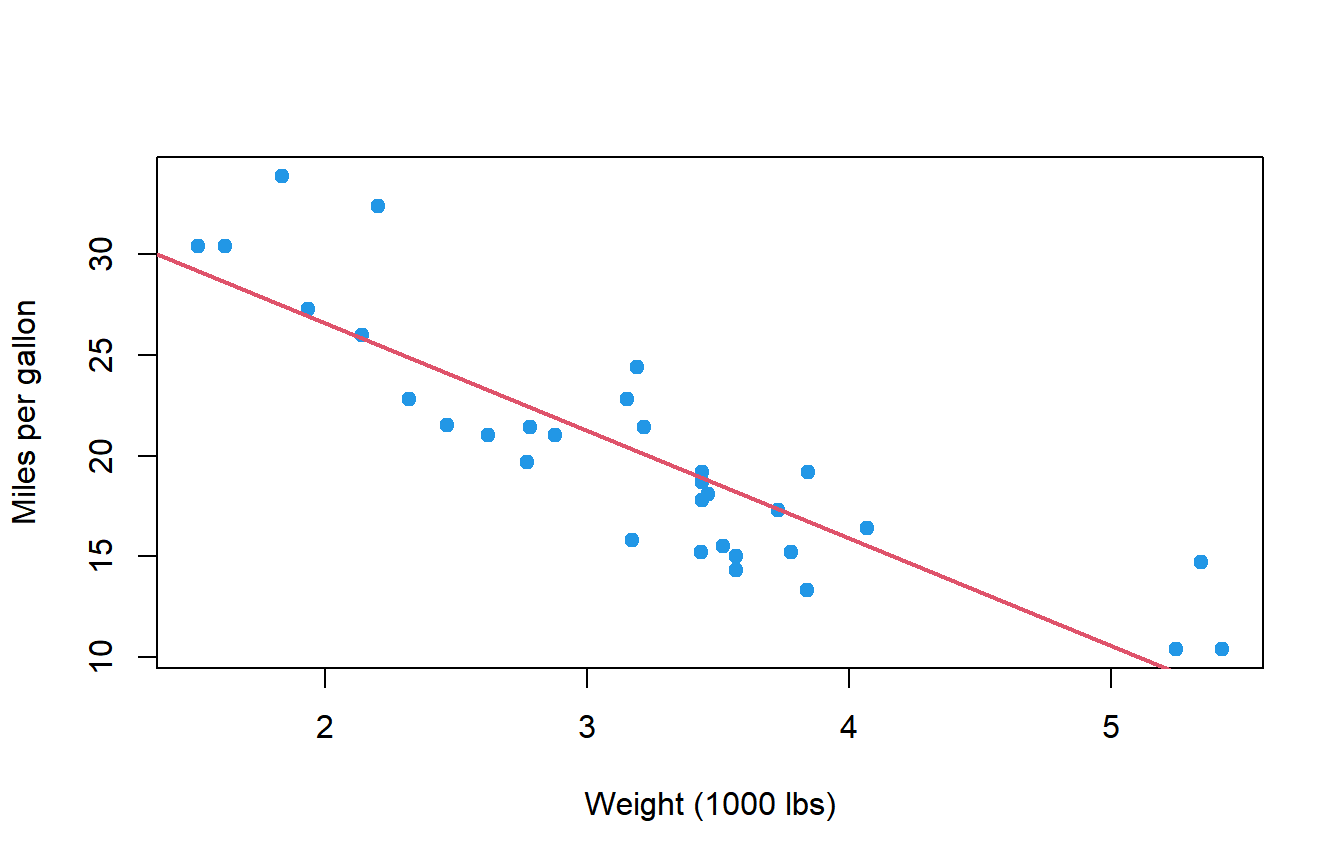
The relationship is clearly negative and roughly linear: heavier cars travel fewer miles per gallon. The correlation between both variables, which you can compute with cor as explained in the covariance and correlation tutorial (or test with cor.test), measures the strength of this linear relationship, while the regression goes one step further and gives you the equation of the line.
The formula syntax of lm is response ~ explanatory, and the data argument indicates the data frame where the variables are. If you print the model you will only see the estimated coefficients:
# Simple linear regression
fit <- lm(mpg ~ wt, data = mtcars)
fit
Call:
lm(formula = mpg ~ wt, data = mtcars)
Coefficients:
(Intercept) wt
37.285 -5.344So the fitted line is \(\widehat{mpg} = 37.285 - 5.344 \cdot wt\). To know if these coefficients are significant and how well the line fits the data you need summary.
How to interpret the output of summary(lm)
Pass the fitted model to summary to obtain the full regression output:
summary(fit)Call:
lm(formula = mpg ~ wt, data = mtcars)
Residuals:
Min 1Q Median 3Q Max
-4.5432 -2.3647 -0.1252 1.4096 6.8727
Coefficients:
Estimate Std. Error t value Pr(>|t|)
(Intercept) 37.2851 1.8776 19.858 < 2e-16 ***
wt -5.3445 0.5591 -9.559 1.29e-10 ***
---
Signif. codes: 0 '***' 0.001 '**' 0.01 '*' 0.05 '.' 0.1 ' ' 1
Residual standard error: 3.046 on 30 degrees of freedom
Multiple R-squared: 0.7528, Adjusted R-squared: 0.7446
F-statistic: 91.38 on 1 and 30 DF, p-value: 1.294e-10Let’s go through it block by block.
Residuals
The residuals are the differences between the observed values and the values predicted by the line, \(e_i = y_i - \hat{y}_i\). The output shows their five-number summary. If the model is reasonable, the median should be close to 0 and the first and third quartiles (and the minimum and maximum) should be roughly symmetric. Here the median is -0.13 and the maximum (6.87) is somewhat larger in absolute value than the minimum (-4.54), so there are a few cars that consume less than the line predicts. This is only a first hint: the assumptions are checked properly with the diagnostic plots below.
Coefficients
The coefficients table has one row per parameter and four columns:
- Estimate: the estimated value of the coefficient. The intercept is 37.285 and the slope of
wtis -5.345. - Std. Error: the standard error of the estimate, that is, how much the estimate would vary from sample to sample. The smaller, the more precise.
- t value: the estimate divided by its standard error, \(t = -5.3445 / 0.5591 = -9.559\). It is the statistic used to test \(H_0: \beta = 0\).
- Pr(>|t|): the p-value of that test, computed from a Student’s t distribution with the residual degrees of freedom (\(n - 2 = 30\) here). A small p-value means that the variable has a significant linear effect on the response.
The p-value of wt (1.29e-10) is much lower than 0.05, so the weight has a significant effect on the fuel consumption. In plain words, the slope is interpreted as follows:
For every additional 1000 lbs of weight, the expected fuel consumption decreases by 5.34 miles per gallon on average.
Always phrase the slope in the units of your variables: “one unit more of \(x\)” is “1000 lbs more” here because wt is measured in thousands of pounds.
The intercept would be the expected mpg of a car with a weight of 0, which is meaningless. This is very common: the intercept is often just an anchor for the line and you don’t need to interpret it unless \(x = 0\) is a value that makes sense in your data.
Residual standard error
The residual standard error (3.046) is the estimate of the standard deviation of the error term \(\varepsilon\). It is in the same units as the response, so you can read it as the typical distance between the observed values and the regression line: the predictions of this model are usually off by about 3 miles per gallon. The 30 degrees of freedom are the number of observations minus the number of estimated coefficients (\(32 - 2\)).
Multiple and adjusted R squared
The multiple R squared (\(R^2\)) is the proportion of the variability of the response explained by the model. Here \(R^2 = 0.7528\), so the weight explains about 75% of the variability of mpg. In a simple linear regression it is exactly the square of the correlation coefficient between \(x\) and \(y\).
The problem of \(R^2\) is that it never decreases when you add a variable, even if the variable is pure noise. The adjusted R squared (0.7446) penalizes the number of predictors:
\[R^2_{adj} = 1 - (1 - R^2) \frac{n - 1}{n - p - 1}\]
where \(n\) is the number of observations and \(p\) the number of predictors. Use the adjusted \(R^2\) when you compare models with a different number of variables.
There is no universal “good” value of R squared. In physics or engineering an \(R^2\) of 0.75 may be low, while in social sciences 0.3 can be a useful model. A low \(R^2\) with significant coefficients means that the variable has an effect, but there is a lot of variability that the model doesn’t explain.
F-statistic
The last line tests whether the model as a whole explains something, that is, \(H_0\): all the slopes are 0 (the model is no better than predicting the mean of \(y\) for every observation). The statistic follows an F distribution with \(p\) and \(n - p - 1\) degrees of freedom, 1 and 30 here. The p-value (1.294e-10) is tiny, so the model is significant.
With a single predictor the F test is equivalent to the t test of the slope: the p-values are the same and \(F = t^2\) (\(9.559^2 = 91.38\)). With several predictors the F test becomes useful, because it tests all of them at once.
Extracting the results of the model
You will often need the numbers of the model, not the printed output. These are the most useful functions:
| Function | Returns |
|---|---|
coef(fit) |
Estimated coefficients |
confint(fit) |
Confidence intervals of the coefficients |
fitted(fit) |
Fitted (predicted) values for the observations |
residuals(fit) |
Residuals of each observation |
summary(fit)$r.squared |
\(R^2\) ($adj.r.squared for the adjusted one) |
summary(fit)$coefficients |
The whole coefficients table as a matrix |
coef(fit)(Intercept) wt
37.285126 -5.344472The confidence intervals are often more informative than the p-values, because they tell you the range of plausible values of the effect. By default they are 95% intervals; change it with the level argument:
confint(fit) 2.5 % 97.5 %
(Intercept) 33.450500 41.119753
wt -6.486308 -4.202635With 95% confidence, each additional 1000 lbs reduces the fuel consumption between 4.2 and 6.5 miles per gallon. The interval doesn’t contain 0, which agrees with the significant p-value.
The fitted values and the residuals are named vectors with one element per observation:
head(fitted(fit))
head(residuals(fit))
Mazda RX4 Mazda RX4 Wag Datsun 710 Hornet 4 Drive
23.28261 21.91977 24.88595 20.10265
Hornet Sportabout Valiant
18.90014 18.79325
Mazda RX4 Mazda RX4 Wag Datsun 710 Hornet 4 Drive
-2.2826106 -0.9197704 -2.0859521 1.2973499
Hornet Sportabout Valiant
-0.2001440 -0.6932545Finally, summary returns a list, so you can extract any element of the output with $:
summary(fit)$r.squared
summary(fit)$adj.r.squared
summary(fit)$sigma # Residual standard error
[1] 0.7528328
[1] 0.7445939
[1] 3.045882Multiple linear regression
A multiple linear regression includes several explanatory variables. In the formula you add them with +. In the following example we explain mpg with the weight and the horsepower (hp) of the car:
# Multiple linear regression
fit2 <- lm(mpg ~ wt + hp, data = mtcars)
summary(fit2)
Call:
lm(formula = mpg ~ wt + hp, data = mtcars)
Residuals:
Min 1Q Median 3Q Max
-3.941 -1.600 -0.182 1.050 5.854
Coefficients:
Estimate Std. Error t value Pr(>|t|)
(Intercept) 37.22727 1.59879 23.285 < 2e-16 ***
wt -3.87783 0.63273 -6.129 1.12e-06 ***
hp -0.03177 0.00903 -3.519 0.00145 **
---
Signif. codes: 0 '***' 0.001 '**' 0.01 '*' 0.05 '.' 0.1 ' ' 1
Residual standard error: 2.593 on 29 degrees of freedom
Multiple R-squared: 0.8268, Adjusted R-squared: 0.8148
F-statistic: 69.21 on 2 and 29 DF, p-value: 9.109e-12In a multiple regression each coefficient is the effect of its variable holding the rest of the variables constant:
wt: for two cars with the same horsepower, 1000 lbs more of weight reduce the consumption by 3.88 miles per gallon on average.hp: for two cars with the same weight, each additional horsepower reduces it by 0.032 miles per gallon, that is, about 3.2 mpg per 100 hp.
Note that the effect of wt went from -5.34 to -3.88. Heavier cars also tend to be more powerful, so in the simple model part of the effect of the horsepower was attributed to the weight. Both variables are significant and the adjusted \(R^2\) increased from 0.7446 to 0.8148, so adding hp improves the model.
Categorical predictors and the reference level
You can also include categorical variables. For instance, the number of cylinders (cyl) takes the values 4, 6 and 8. As it is stored as a number, you must convert it to a factor so lm treats it as groups:
fit3 <- lm(mpg ~ wt + factor(cyl), data = mtcars)
summary(fit3)
Call:
lm(formula = mpg ~ wt + factor(cyl), data = mtcars)
Residuals:
Min 1Q Median 3Q Max
-4.5890 -1.2357 -0.5159 1.3845 5.7915
Coefficients:
Estimate Std. Error t value Pr(>|t|)
(Intercept) 33.9908 1.8878 18.006 < 2e-16 ***
wt -3.2056 0.7539 -4.252 0.000213 ***
factor(cyl)6 -4.2556 1.3861 -3.070 0.004718 **
factor(cyl)8 -6.0709 1.6523 -3.674 0.000999 ***
---
Signif. codes: 0 '***' 0.001 '**' 0.01 '*' 0.05 '.' 0.1 ' ' 1
Residual standard error: 2.557 on 28 degrees of freedom
Multiple R-squared: 0.8374, Adjusted R-squared: 0.82
F-statistic: 48.08 on 3 and 28 DF, p-value: 3.594e-11A factor with \(k\) levels becomes \(k - 1\) coefficients. The first level (4 cylinders) is the reference level and doesn’t appear in the table: the coefficients of the other levels are differences with respect to it. For the same weight, a car with 6 cylinders consumes 4.26 mpg less than a car with 4 cylinders, and a car with 8 cylinders 6.07 mpg less.
If you prefer another reference level, change it with relevel. For instance, mtcars$cyl <- relevel(factor(mtcars$cyl), ref = "8") makes the 8-cylinder cars the reference, and the coefficients become the differences with respect to them.
Interactions
The model above assumes that the effect of the weight is the same for all the cars. If you think it depends on another variable, add an interaction with *. The formula wt * am is a shortcut for wt + am + wt:am, where am is 0 for automatic and 1 for manual transmission:
fit4 <- lm(mpg ~ wt * am, data = mtcars)
summary(fit4)$coefficients
Estimate Std. Error t value Pr(>|t|)
(Intercept) 31.416055 3.0201093 10.402291 4.001043e-11
wt -3.785908 0.7856478 -4.818836 4.551182e-05
am 14.878423 4.2640422 3.489277 1.621034e-03
wt:am -5.298360 1.4446993 -3.667449 1.017148e-03The coefficient wt is now the slope for automatic cars (-3.79 mpg per 1000 lbs) and wt:am is how much the slope changes for manual cars: \(-3.79 - 5.30 = -9.08\) mpg per 1000 lbs. The interaction is significant, so the weight penalizes the consumption much more in manual cars. When there is an interaction, don’t interpret the main effects on their own.
Predictions with predict
To predict the response for new observations use predict with the newdata argument. It must be a data frame with the same variable names used in the formula:
new_cars <- data.frame(wt = c(2.5, 3.5))

predict(fit, newdata = new_cars)
1 2
23.92395 18.57948A car of 2500 lbs is expected to travel 23.9 miles per gallon. Setting the interval argument you can also get an interval around each prediction, and there are two very different types:
predict(fit, newdata = new_cars, interval = "confidence")
predict(fit, newdata = new_cars, interval = "prediction")
fit lwr upr
1 23.92395 22.55284 25.29506
2 18.57948 17.43342 19.72553
fit lwr upr
1 23.92395 17.55411 30.29378
2 18.57948 12.25426 24.90469| Interval | Question it answers | Width |
|---|---|---|
"confidence" |
Where is the mean mpg of all the cars of 2500 lbs? |
Narrow |
"prediction" |
Where will the mpg of one new car of 2500 lbs fall? |
Wide |
The confidence interval only includes the uncertainty of the estimated line, while the prediction interval also includes the variability of the individual cars around the line (the residual standard error). That is why the prediction interval (17.6 to 30.3) is much wider than the confidence interval (22.6 to 25.3). If you want to predict a single new value, the prediction interval is the right one.
Avoid predicting outside the range of the data used to fit the model (extrapolation). The weights in mtcars go from about 1500 to 5400 lbs: nothing guarantees that the relationship is still linear for a car of 8000 lbs, and the model could even predict negative consumptions.
Assumptions and model diagnostics
The p-values and intervals of lm are only reliable if the following assumptions hold:
- Linearity: the relationship between the predictors and the mean of the response is linear.
- Independence: the errors are independent of each other (for instance, no repeated measures of the same subject or time series correlation). This one depends on how the data was collected.
- Homoscedasticity: the variance of the errors is constant for all the fitted values.
- Normality: the errors are normally distributed. This is the least important with large samples.
All of them are checked on the residuals. The quickest way is to call plot on the model, which creates four diagnostic plots. Use par(mfrow = c(2, 2)) to see them together:
fit2 <- lm(mpg ~ wt + hp, data = mtcars)

par(mfrow = c(2, 2))
plot(fit2, pch = 19, col = 4)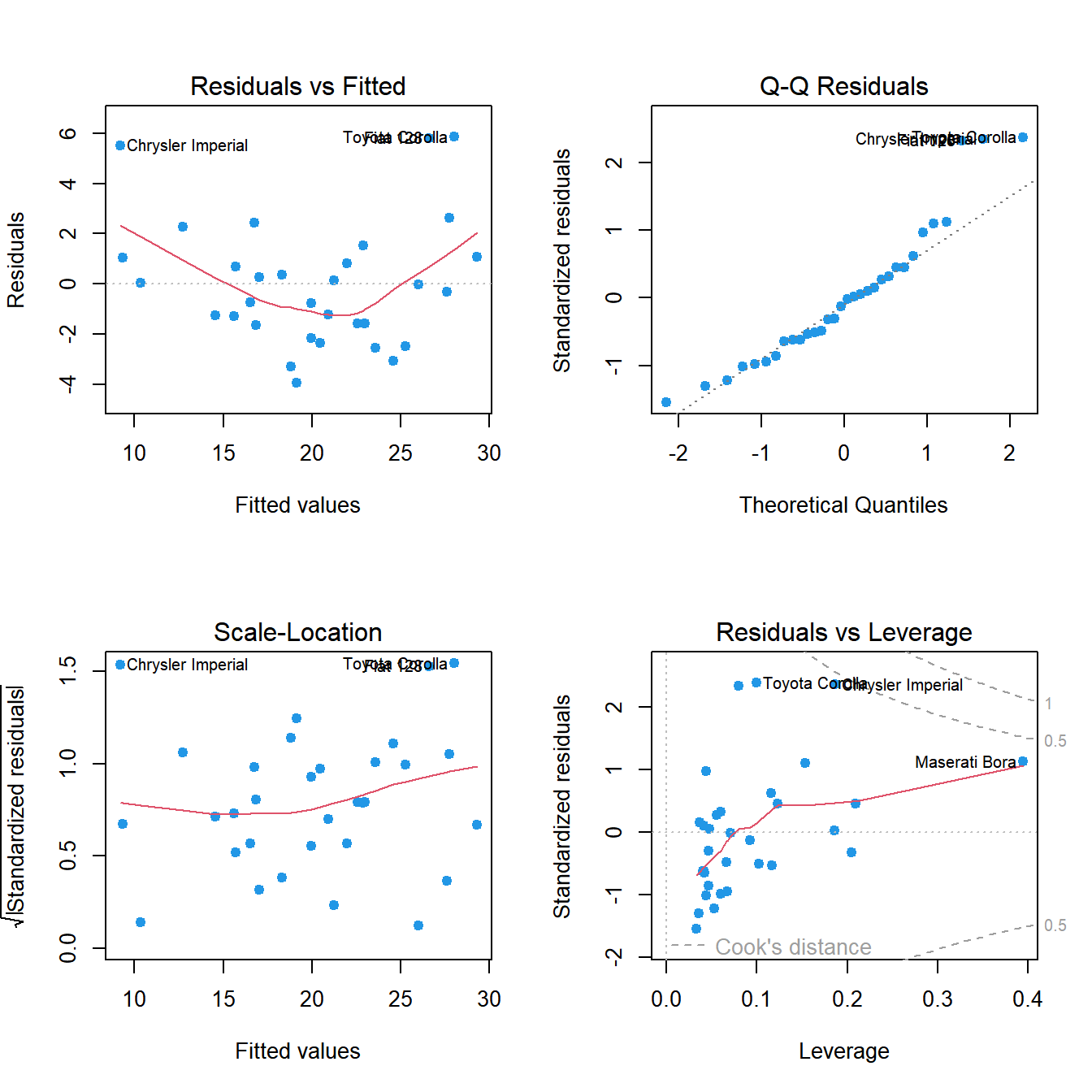
par(mfrow = c(1, 1))This is how to read each panel:
- Residuals vs Fitted (top left): checks linearity. The points should be randomly scattered around 0 with a flat red line. Here the red line has a clear U shape: the model overestimates the consumption of the cars in the middle and underestimates it at both ends, a sign that the relationship is curved.
- Q-Q Residuals (top right): checks normality. The points should lie on the dashed line. Most of them do, but the upper tail moves away from it.
- Scale-Location (bottom left): checks homoscedasticity. The red line should be roughly horizontal and the spread of the points constant. Here it rises slightly, but nothing dramatic.
- Residuals vs Leverage (bottom right): detects influential observations. Points beyond the dashed Cook’s distance lines (0.5 and 1) have a big influence on the coefficients. Chrysler Imperial and Maserati Bora are the most influential cars, but none of them crosses the line of 1.
The labelled points (Toyota Corolla, Fiat 128 and Chrysler Imperial) are the observations with the largest residuals. It is worth looking at them, but don’t remove observations only because they are labelled.
To check the normality formally, apply the Shapiro-Wilk test to the residuals:
shapiro.test(residuals(fit2)) Shapiro-Wilk normality test
data: residuals(fit2)
W = 0.92792, p-value = 0.03427The p-value (0.034) is lower than 0.05, so there is some evidence against normality, which agrees with the Q-Q plot and with the curvature of the first panel.
What to do if the assumptions are not met
The solution depends on the problem:
- Curvature: transform the response or the predictors (
log(y),log(x)) or add a quadratic term withI(x^2). - Non-constant variance or skewed residuals: a transformation of the response, such as the logarithm or a Box-Cox transformation, usually fixes both. Another option is to keep the model and use robust standard errors.
- Non-independent observations: you need another type of model (mixed models or time series models).
For this model, MASS::boxcox(fit2) suggests a \(\lambda\) close to 0, which corresponds to the logarithm. Fitting the model with log(mpg) removes most of the problem:
fit_log <- lm(log(mpg) ~ wt + hp, data = mtcars)

coef(fit_log)
shapiro.test(residuals(fit_log))
(Intercept) wt hp
3.829102987 -0.200536801 -0.001543496
Shapiro-Wilk normality test
data: residuals(fit_log)
W = 0.95973, p-value = 0.2701The residuals are now compatible with normality (p-value = 0.27). Note that the interpretation changes: with a logarithmic response, the coefficients are approximately relative changes. As \(e^{-0.2005} = 0.818\), each additional 1000 lbs reduces the miles per gallon by about 18%, holding the horsepower constant. Also, the \(R^2\) of models with different responses (\(mpg\) and \(\log(mpg)\)) can’t be compared directly.
Comparing nested models with anova
To decide whether adding variables improves a model significantly, fit both models and pass them to anova. The models must be nested (the small one contains a subset of the variables of the large one) and fitted on the same observations:
anova(fit, fit2)Analysis of Variance Table
Model 1: mpg ~ wt
Model 2: mpg ~ wt + hp
Res.Df RSS Df Sum of Sq F Pr(>F)
1 30 278.32
2 29 195.05 1 83.274 12.381 0.001451 **
---
Signif. codes: 0 '***' 0.001 '**' 0.01 '*' 0.05 '.' 0.1 ' ' 1RSS is the residual sum of squares of each model. Adding hp reduces it from 278.32 to 195.05, and the F test says that this reduction is significant (p-value = 0.0015), so the model with both variables is better. When you add a single variable, this p-value is the same as the p-value of its t test in summary(fit2). The comparison is more useful when you add several variables or a factor at once.
lm vs aov vs glm
lm is the general function for linear models, but there are related functions for specific cases:
| Function | Use it when |
|---|---|
lm |
The response is numeric and you want the coefficients, \(R^2\) and predictions |
aov |
The predictors are factors and the goal is to compare group means (ANOVA) |
glm |
The response is binary, a count, etc. For a yes/no response use a logistic regression |
An ANOVA is in fact a linear model with categorical predictors: aov calls lm internally, and anova(lm(y ~ group)) gives the same table as summary(aov(y ~ group)).
Common errors with lm
Using data$ inside the formula
It is very common to write the formula as lm(mtcars$mpg ~ mtcars$wt). The model is fitted correctly, but the variables are now called mtcars$wt, so predict can’t find them in newdata and silently returns the 32 fitted values instead of your predictions, with only a warning:
bad_fit <- lm(mtcars$mpg ~ mtcars$wt)
predict(bad_fit, newdata = data.frame(wt = c(2.5, 3.5)))
Warning message:
'newdata' had 2 rows but variables found have 32 rowsAlways use the column names in the formula and the data frame in the data argument: lm(mpg ~ wt, data = mtcars).
Forgetting the data argument
If you use the column names but forget data, R looks for the variables in the global environment and doesn’t find them:
lm(mpg ~ wt)Error in eval(predvars, data, env) : object 'mpg' not foundIf you work with pipes, remember that the data goes to the second argument, so you need a placeholder, as explained in the pipe operator tutorial: mtcars |> lm(mpg ~ wt, data = _).
Factors coded as numbers
If a categorical variable is coded with numbers, lm treats it as numeric and fits a single slope. lm(mpg ~ wt + cyl, data = mtcars) returns a single coefficient for cyl (-1.51), which assumes that going from 4 to 6 cylinders has exactly the same effect as going from 6 to 8. Use factor(cyl) as shown above and check that the number of coefficients is the number of levels minus one.
Missing values
By default lm removes the rows with missing values in any of the variables of the model (na.action = na.omit). summary warns you about it, but it is easy to overlook:
fit_aq <- lm(Ozone ~ Temp, data = airquality)
summary(fit_aq)
Call:
lm(formula = Ozone ~ Temp, data = airquality)
Residuals:
Min 1Q Median 3Q Max
-40.729 -17.409 -0.587 11.306 118.271
Coefficients:
Estimate Std. Error t value Pr(>|t|)
(Intercept) -146.9955 18.2872 -8.038 9.37e-13 ***
Temp 2.4287 0.2331 10.418 < 2e-16 ***
---
Signif. codes: 0 '***' 0.001 '**' 0.01 '*' 0.05 '.' 0.1 ' ' 1
Residual standard error: 23.71 on 114 degrees of freedom
(37 observations deleted due to missingness)
Multiple R-squared: 0.4877, Adjusted R-squared: 0.4832
F-statistic: 108.5 on 1 and 114 DF, p-value: < 2.2e-16The model was fitted with 116 of the 153 rows, so the residuals vector has only 116 elements and you can’t add it as a new column of the data frame:
df <- airquality
df$res <- residuals(fit_aq)
Error in `$<-.data.frame`(`*tmp*`, res, value = c(`1` = 25.2723695469062, :
replacement has 116 rows, data has 153The solution is to fit the model with na.action = na.exclude. The model is the same, but residuals and fitted are padded with NA in the positions of the removed rows:
fit_aq <- lm(Ozone ~ Temp, data = airquality, na.action = na.exclude)

df$res <- residuals(fit_aq)
head(df)
Ozone Solar.R Wind Temp Month Day res
1 41 190 7.4 67 5 1 25.272370
2 36 118 8.0 72 5 2 8.128853
3 12 149 12.6 74 5 3 -20.728554
4 18 313 11.5 62 5 4 14.415886
5 NA NA 14.3 56 5 5 NA
6 28 NA 14.9 66 5 6 14.701073Be also careful when you compare models with anova: if the variables of the large model have more missing values, both models are fitted with different rows and anova stops with the error “models were not all fitted to the same size of dataset”. Remove the rows with missing values in all the variables before fitting the models, as explained in the tutorial about NA values in R.