The pipe operator in R: %>% and |> explained
The pipe operator takes the result of the expression on its left and passes it as the first argument of the function on its right, so x %>% f(y) is the same as f(x, y). In R there are two pipes: %>% from the magrittr package (loaded by dplyr and the tidyverse) and the native pipe |>, available in base R since version 4.1. In this tutorial you will learn how both work, how they differ, how to send the result to a different argument and how to fix the most common errors.
What does %>% mean in R?
The pipe can be read as “and then”. It takes the value on the left and inserts it as the first argument of the function call on the right. Any other argument you write inside the call is placed after it:
library(magrittr) # Also loaded with library(dplyr)

x <- c(1, 5, 12, 20, 33)

head(x, 3)
x %>% head(3) # Equivalent to head(x, 3)
x |> head(3)  # Equivalent to head(x, 3)
[1] 1 5 12
[1] 1 5 12
[1] 1 5 12The three lines return exactly the same. The pipe doesn’t add any new functionality, it only changes the way you write the code. You can find a short introduction to the pipe together with the rest of operators in the R operators tutorial.
Why use the pipe? Nested vs piped code
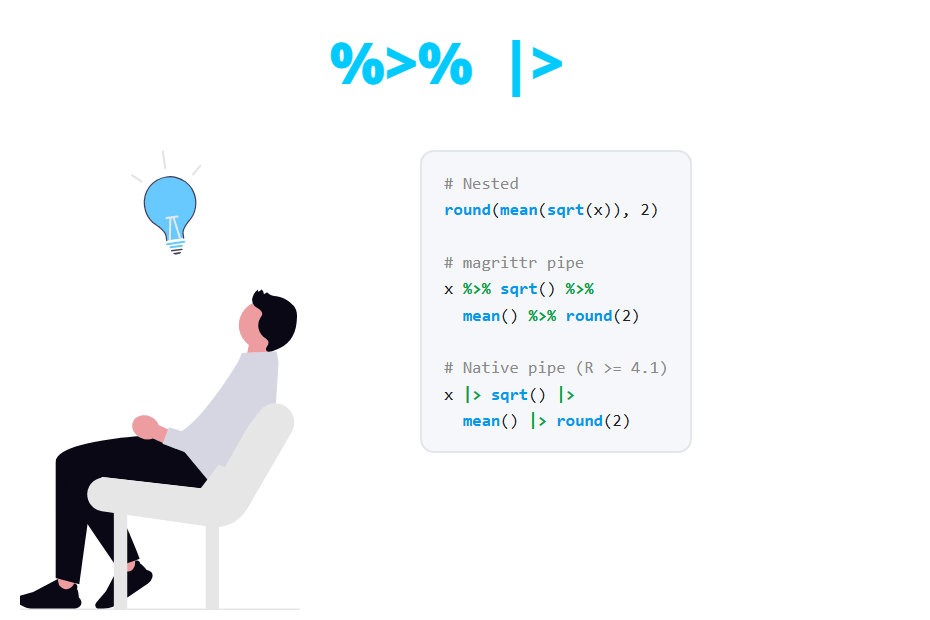
Suppose you want to calculate the square root of x, then the mean of the result and finally round it to two decimals. Without pipes you have to nest the function calls, so the code must be read from the inside out: the first operation (sqrt) is the last one you read.
x <- c(1, 5, 12, 20, 33)

# Nested calls
round(mean(sqrt(x)), 2)

# With the pipe: read from left to right
x %>% sqrt() %>% mean() %>% round(2)
[1] 3.38
[1] 3.38With the pipe the operations appear in the same order in which they are executed, and the extra arguments (the 2 of round) stay next to their function. The alternative is to save each step in an intermediate object, which works but fills your workspace with variables you won’t use again.
The advantage is clearer with longer chains. When the code has several steps, write each one on its own line, with the pipe at the end of the line:
x %>%
  sqrt() %>%
  mean() %>%
  round(2)
magrittr %>% vs native |> pipe
The %>% operator comes from the magrittr package. You can use it after loading magrittr, dplyr or the tidyverse. Since R 4.1.0 base R also includes the native pipe |>, which doesn’t need any package. Both are used in the same way in most cases:
x %>% sqrt() %>% mean() %>% round(2)

x |> sqrt() |> mean() |> round(2)
[1] 3.38
[1] 3.38However, there are some differences that you should know:
magrittr %>%
|
Native |>
|
|
|---|---|---|
| Requires | magrittr, dplyr or tidyverse | R 4.1.0 or newer |
| Placeholder |
.
|
_ (R 4.2.0 or newer)
|
| Placeholder in an unnamed argument | Yes | No, it must be named |
Function without parentheses (x %>% sqrt)
|
Yes | No, error |
| Placeholder inside nested calls | Yes | No |
Extra pipes (%<>%, %T>%, %$%)
|
Yes | No |
| Speed | Small overhead | No overhead |
The native pipe is not a function. R rewrites the code when it is parsed, so x |> f(y) becomes f(x, y) before it runs. You can check it with quote:
quote(x |> sqrt() |> mean() |> round(2))round(mean(sqrt(x)), 2)That is why |> is as fast as nested code. In contrast, %>% is a regular function that runs each time you call it. The difference is measured in microseconds, as you can see with the microbenchmark package:
library(microbenchmark)

microbenchmark(
  nested   = round(mean(sqrt(x)), 2),
  native   = x |> sqrt() |> mean() |> round(2),
  magrittr = x %>% sqrt() %>% mean() %>% round(2),
  times = 10000
)
Unit: microseconds
expr min lq mean median uq max neval cld
nested 2.6 2.9 3.50698 3.1 3.5 1045.9 10000 a
native 2.6 2.9 3.48518 3.1 3.5 1065.3 10000 a
magrittr 3.9 4.3 5.34356 4.5 5.2 1111.3 10000 bThe exact times will depend on your computer, but look at the median: the nested code and the native pipe take the same time, while the magrittr pipe takes a bit more than 1 extra microsecond per call (the cld column marks with different letters the expressions that differ). In practice this doesn’t matter, unless you call a pipe millions of times inside a loop.
So, which one should you use? If your code requires R 4.1 or newer, the native pipe |> is the default choice: it doesn’t depend on any package and it is the one used in the recent dplyr and R documentation. Keep %>% if your code must run on older versions of R or if you need its extra features, such as the . placeholder in nested calls.
How to type the pipe in RStudio
In RStudio you can insert the pipe with the keyboard shortcut Ctrl + Shift + M (Cmd + Shift + M on macOS). By default it inserts %>%. If you prefer the native pipe, go to Tools → Global Options → Code and check the option Use native pipe operator, |> (requires R 4.1+). From then on, the same shortcut will insert |>.
Pass the result to an argument other than the first
The pipe always uses the first argument, but many functions expect the data in another position. For instance, the first argument of lm is the formula and the data goes to the data argument. In these cases you need a placeholder that indicates where the left-hand side should go: . with %>% and _ with |>.
# magrittr: the dot
mtcars %>% lm(mpg ~ wt, data = .) %>% coef()

# Native pipe: the underscore (R >= 4.2.0)
mtcars |> lm(mpg ~ wt, data = _) |> coef()
(Intercept) wt
37.285126 -5.344472
(Intercept) wt
37.285126 -5.344472The native placeholder _ has some restrictions: it must be passed to a named argument and it can appear only once. Since R 4.3.0 it can also be used at the start of an extraction, such as mtcars |> _$mpg. If you need something more flexible with |>, you can pipe into an anonymous function, written as \(z) (a short form of function(z)) and followed by ():
x |> (\(z) z[z > 15])()[1] 20 33Check the tutorial on how to create functions in R to learn more about functions.
The dot inside nested calls
With %>% there is a rule that surprises many users. If the . only appears inside another function call, magrittr still passes the left-hand side as the first argument. In the following example the intention is to paste the length of x, but x is also used as the first argument of paste:
x %>% paste(length(.))[1] "1 5" "5 5" "12 5" "20 5" "33 5"To avoid it, wrap the right-hand side between curly braces. Then the left-hand side is only used where the . is:
x %>% {paste(length(.))}[1] "5"Pipes with dplyr
The pipe is especially popular with dplyr because all its functions take a data frame as the first argument and return a data frame. This allows you to chain operations such as filter, group_by, summarise and arrange. The following code keeps the cars with more than 100 horsepower, groups them by the number of cylinders, calculates the number of cars and the average consumption, and sorts the result:
library(dplyr)

mtcars %>%
  filter(hp > 100) %>%
  group_by(cyl) %>%
  summarise(n = n(), mean_mpg = mean(mpg)) %>%
  arrange(desc(mean_mpg))
# A tibble: 3 × 3
cyl n mean_mpg
<dbl> <int> <dbl>
1 4 2 25.9
2 6 7 19.7
3 8 14 15.1Now compare it with the same code without pipes. The result is identical, but it is much harder to see which arguments belong to each function:
arrange(summarise(group_by(filter(mtcars, hp > 100), cyl),
                  n = n(), mean_mpg = mean(mpg)), desc(mean_mpg))
You can replace every %>% with |> in the chain above and you will get the same output.
Other magrittr pipes
The magrittr package includes three more pipes. They are not loaded by dplyr, so you have to call library(magrittr) to use them.
- Assignment pipe
%<>%: pipes the object and assigns the result back to it.y %<>% sqrt()is equivalent toy <- y %>% sqrt(). - Tee pipe
%T>%: returns the left-hand side instead of the result of the function. It is useful for functions called for their side effects, such as plots orprint, in the middle of a chain. - Exposition pipe
%$%: exposes the columns of a data frame to the function, likewith. It is handy for functions that don’t have adataargument, such ascor.
library(magrittr)

# Assignment pipe
y <- c(1, 5, 12, 20, 33)
y %<>% sqrt()
y

# Tee pipe: draws a histogram and then returns the summary
mtcars$mpg %T>% hist() %>% summary()

# Exposition pipe: equivalent to cor(mtcars$mpg, mtcars$wt)
mtcars %$% cor(mpg, wt)
[1] 1.000000 2.236068 3.464102 4.472136 5.744563
Min. 1st Qu. Median Mean 3rd Qu. Max.
10.40 15.43 19.20 20.09 22.80 33.90
[1] -0.8676594Without the tee pipe, the summary would receive the output of hist (an object of class histogram) instead of the data.
The assignment pipe %<>% overwrites the original object without asking. Many style guides recommend avoiding it and writing the assignment explicitly with <-, as it makes the code easier to read.
When not to use pipes and how to debug them
Pipes are great for a linear sequence of transformations of a single object, but they are not always the best option:
- Very long chains (more than ten steps or so) are hard to debug. Split them saving meaningful intermediate objects.
- Several inputs or outputs. If a step needs two different objects, or you need to keep intermediate results, use regular assignments.
- Functions that don’t take the data as the first argument and need complex placeholders. Sometimes a plain function call is more readable.
When a chain returns an unexpected result, run it step by step. In RStudio, select the code up to the end of a line (without the last pipe) and run it with Ctrl + Enter to see the intermediate result. You can also save part of the chain and inspect it:
step1 <- mtcars %>% filter(hp > 100)
nrow(step1)

step1 %>% count(cyl)
[1] 23
cyl n
1 4 2
2 6 7
3 8 14Common errors with the pipe
Error: could not find function “%>%”
This is the most common error. It means that the package that provides %>% is not loaded in the current session:
Error in x %>% sqrt() : could not find function "%>%"To fix it, load magrittr or dplyr with library(dplyr) before using the pipe (install it first with install.packages("dplyr") if needed, as explained in how to install R packages), or use the native pipe |>, which doesn’t need any package.
Using the dot with the native pipe
The native pipe doesn’t understand the magrittr . placeholder. When you replace %>% with |> in old code, . is treated as a regular object that doesn’t exist:
mtcars |> lm(mpg ~ wt, data = .)Error in eval(mf, parent.frame()) : object '.' not foundUse data = _ instead. Note that the underscore must go in a named argument; otherwise you will get the following error:
x |> paste("a", _)Error in paste("a", "_") :
pipe placeholder can only be used as a named argument (<input>:1:6)Function without parentheses
With %>% you can write x %>% sqrt, but the native pipe requires a function call on the right-hand side, that is, the function name followed by parentheses:
x |> sqrtError in sqrt :
The pipe operator requires a function call as RHS (<input>:1:6)Write x |> sqrt() instead.
The pipe at the start of a line
R evaluates a line as soon as it is a complete expression. If you place the pipe at the beginning of the next line, the first line is executed on its own and the second one throws an error:
x
  %>% sqrt()
[1] 1 5 12 20 33
Error: unexpected SPECIAL in " %>%"With the native pipe the message is unexpected '|>'. In both cases, place the pipe at the end of the line, as in all the examples of this tutorial.
ggplot2 uses + instead of a pipe to add layers. A frequent mistake is to write %>% between ggplot2 layers or + between dplyr verbs. You can pipe a data frame into ggplot(), but after that call you have to use +.