Correlation test in R with cor.test()
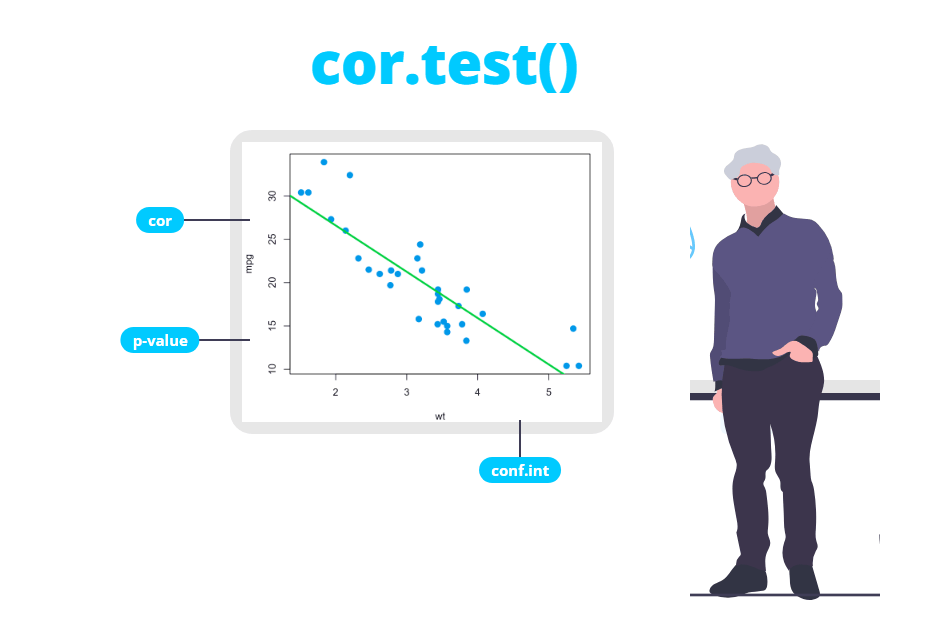
The cor.test function tests whether the correlation between two numeric variables is significantly different from zero. It computes the Pearson, Spearman or Kendall coefficient together with a p-value and, for Pearson, a confidence interval. In this tutorial you will learn how to run each of the three tests, how to read every line of the output, which method to choose, how to deal with the “Cannot compute exact p-value with ties” warning and how to test several pairs of variables at once.
Hypothesis of the correlation test
The cor function returns a correlation coefficient, but that number is computed from a sample. Even if two variables are completely unrelated in the population, the sample correlation will rarely be exactly 0. The correlation test answers the question: is the correlation of my sample large enough to conclude that it is not zero in the population? If you only need the coefficient itself, see the covariance and correlation tutorial.
The hypotheses of the two-sided test are:
- \(H_0\): the population correlation is zero, \(\rho = 0\) (there is no linear or monotonic relationship).
- \(H_1\): the population correlation is not zero, \(\rho \neq 0\).
The syntax of the function is the following:
cor.test(x, y,
         alternative = c("two.sided", "less", "greater"),
         method = c("pearson", "kendall", "spearman"),
         exact = NULL, conf.level = 0.95, continuity = FALSE, ...)

# With a formula:
cor.test(formula, data, subset, na.action, ...)
Being x and y two numeric vectors of the same length, alternative the alternative hypothesis, method the correlation coefficient to test, exact whether to compute an exact p-value (only for Spearman and Kendall) and conf.level the confidence level of the interval (only for Pearson).
Pearson correlation test
For this example we are going to use the mtcars data set, which contains information about 32 cars. The question is whether the weight of a car (wt, in 1000 lbs) is correlated with its fuel consumption (mpg, miles per gallon). By default, cor.test uses the Pearson method:
# Is the correlation between weight and miles per gallon zero?
cor.test(mtcars$wt, mtcars$mpg)
Pearson's product-moment correlation
data: mtcars$wt and mtcars$mpg
t = -9.559, df = 30, p-value = 1.294e-10
alternative hypothesis: true correlation is not equal to 0
95 percent confidence interval:
-0.9338264 -0.7440872
sample estimates:
cor
-0.8676594How to interpret the output
Each line of the output means the following:
- data: the two variables being tested.
- t: the test statistic. For the Pearson test it is computed as \(t = \frac{r\sqrt{n-2}}{\sqrt{1-r^2}}\). With \(r = -0.8677\) and \(n = 32\) you get \(t = -9.559\). The sign is the same as the sign of the correlation.
- df: the degrees of freedom, \(n - 2 = 30\). Under \(H_0\) the statistic follows a t distribution with these degrees of freedom.
- p-value: the probability of observing a correlation at least this strong (in absolute value) if the true correlation were 0. Here it is \(1.294 \cdot 10^{-10}\), so you can reject the null hypothesis: weight and fuel consumption are correlated.
- alternative hypothesis: reminds you which hypothesis was tested, two-sided in this case.
- 95 percent confidence interval: the plausible values of the population correlation, from -0.934 to -0.744. As it doesn’t contain 0, the conclusion is the same as with the p-value. The interval is also useful to see how precise the estimate is.
- sample estimates: the Pearson correlation coefficient, \(r = -0.868\), the same value that
cor(mtcars$wt, mtcars$mpg)returns.
So the conclusion is that there is a strong, negative and significant correlation between the weight and the miles per gallon: heavier cars travel fewer miles per gallon.
You can extract each element of the result with $, which is useful to use the values in your code or in a report. The available elements are statistic, parameter, p.value, estimate, null.value, alternative, method, data.name and conf.int:
res <- cor.test(mtcars$wt, mtcars$mpg)

res$estimate
res$p.value
res$conf.int
cor
-0.8676594
[1] 1.293959e-10
[1] -0.9338264 -0.7440872
attr(,"conf.level")
[1] 0.95If you need a different confidence level, use the conf.level argument, for instance conf.level = 0.99.
Assumptions of the Pearson test
The Pearson test measures the linear relationship between two variables and its p-value assumes that:
- The observations are independent (each row is a different car, person, plant…).
- The relationship is linear. If it is curved, Pearson underestimates its strength.
- Both variables are approximately normal (more precisely, bivariate normal). With large samples the test is fairly robust to this assumption.
- There are no strong outliers, as a single extreme point can create or hide a correlation.
The quickest way to check linearity and outliers is a scatter plot. Let’s compare the relationship of mpg with the weight and with the horsepower (hp):
par(mfrow = c(1, 2))

plot(mtcars$wt, mtcars$mpg, pch = 19, col = 4,
     xlab = "Weight (1000 lbs)", ylab = "Miles per gallon")
plot(mtcars$hp, mtcars$mpg, pch = 19, col = 4,
     xlab = "Horsepower", ylab = "Miles per gallon")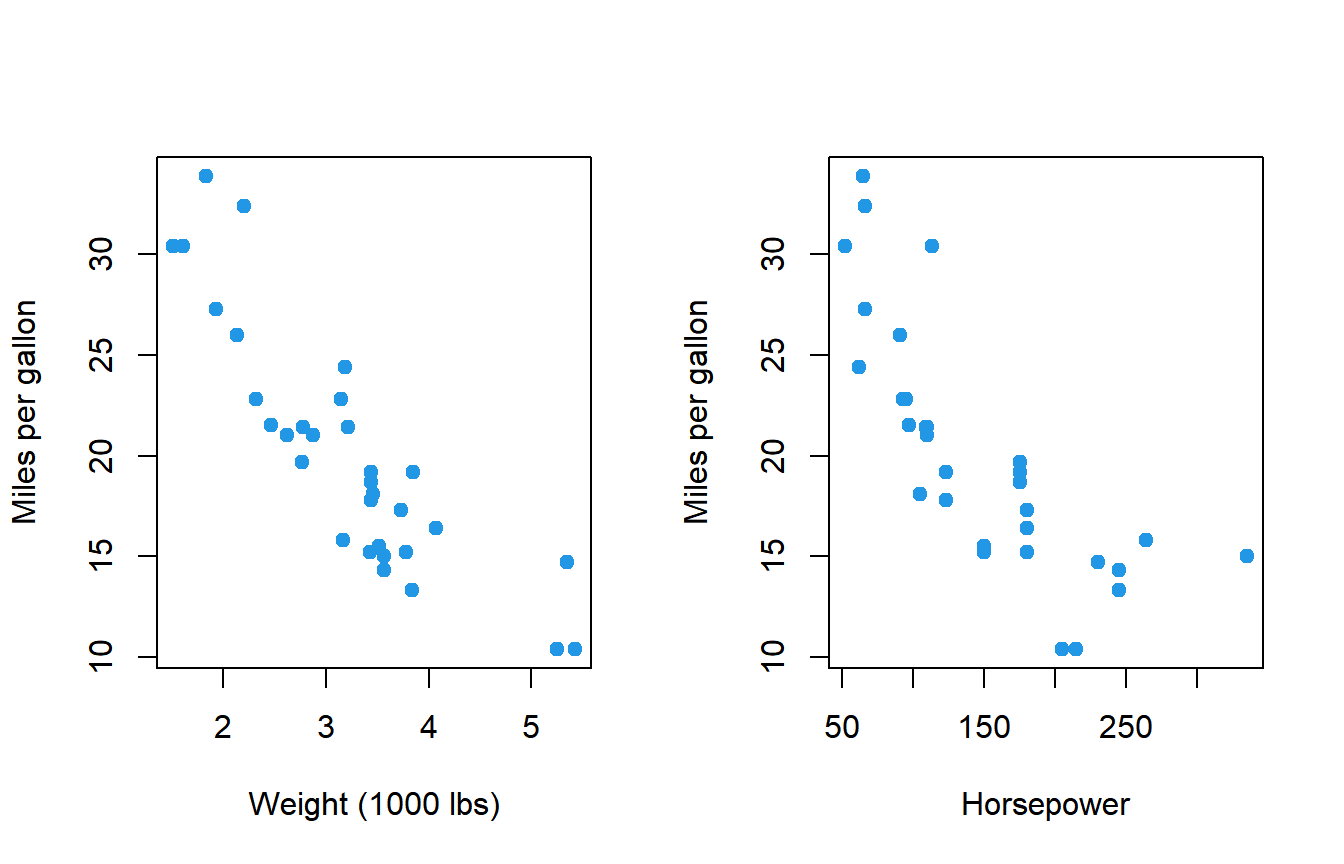
par(mfrow = c(1, 1))The relationship with the weight is roughly linear, but the relationship with the horsepower is curved: the miles per gallon fall quickly at first and then flatten. To check normality you can use the Shapiro-Wilk test on each variable:
shapiro.test(mtcars$wt)
shapiro.test(mtcars$hp)
Shapiro-Wilk normality test
data: mtcars$wt
W = 0.94326, p-value = 0.09265
Shapiro-Wilk normality test
data: mtcars$hp
W = 0.93342, p-value = 0.04881The weight is compatible with normality (p-value = 0.093), but the horsepower is not (p-value = 0.049), and in addition its relationship with mpg is not linear. For the pair hp and mpg a rank-based method is a better choice.
Spearman and Kendall correlation tests
Spearman’s \(\rho\) and Kendall’s \(\tau\) are computed from the ranks of the data instead of the values, so they don’t require normality, they are robust to outliers and they detect any monotonic relationship (always increasing or always decreasing), not only linear ones. To use them, set the method argument:
# Spearman correlation test
cor.test(mtcars$hp, mtcars$mpg, method = "spearman")
Spearman's rank correlation rho
data: mtcars$hp and mtcars$mpg
S = 10337, p-value = 5.086e-12
alternative hypothesis: true rho is not equal to 0
sample estimates:
rho
-0.8946646
Warning message:
In cor.test.default(mtcars$hp, mtcars$mpg, method = "spearman") :
Cannot compute exact p-value with tiesThe output is similar to the Pearson one, but there is no confidence interval and the statistic is now S, which is based on the sum of the squared differences between the ranks. The Spearman coefficient is -0.895, stronger than the Pearson coefficient for the same pair (-0.776), because Pearson is penalized by the curvature of the relationship.
The Kendall test works in the same way:
# Kendall correlation test
cor.test(mtcars$hp, mtcars$mpg, method = "kendall", exact = FALSE)
Kendall's rank correlation tau
data: mtcars$hp and mtcars$mpg
z = -5.871, p-value = 4.332e-09
alternative hypothesis: true tau is not equal to 0
sample estimates:
tau
-0.7428125Kendall’s \(\tau\) is the difference between the proportion of concordant and discordant pairs of observations, so its values are usually smaller in absolute value than Spearman’s (here -0.743 vs -0.895). That doesn’t mean the relationship is weaker: both coefficients are on different scales and you shouldn’t compare them directly. The z statistic is the normal approximation used to compute the p-value.
The warning “Cannot compute exact p-value with ties”
For small samples, cor.test tries to compute an exact p-value for Spearman (up to 1290 observations) and Kendall (fewer than 50 observations). The exact computation assumes that all the values are different. When there are ties (repeated values, very common with integer or rounded data such as hp), it can’t be done, so R falls back to an approximation and shows the warning.
The warning is not an error and the result is valid. To get rid of it, tell R to use the approximation from the beginning with exact = FALSE:
cor.test(mtcars$hp, mtcars$mpg, method = "spearman", exact = FALSE) Spearman's rank correlation rho
data: mtcars$hp and mtcars$mpg
S = 10337, p-value = 5.086e-12
alternative hypothesis: true rho is not equal to 0
sample estimates:
rho
-0.8946646The p-value is exactly the same as before, because it was already computed with the approximation. If you have many ties and a small sample, Kendall’s \(\tau\) handles them better than Spearman’s \(\rho\).
Which method to choose
| Method | Measures | Use it when | Argument |
|---|---|---|---|
| Pearson \(r\) | Linear relationship | Both variables are numeric, roughly normal, the relationship is linear and there are no strong outliers | method = "pearson" (default) |
| Spearman \(\rho\) | Monotonic relationship | Data is not normal, the relationship is curved but monotonic, there are outliers or the variables are ordinal | method = "spearman" |
| Kendall \(\tau\) | Monotonic relationship (concordant pairs) | Same cases as Spearman, but with small samples or many ties | method = "kendall" |
If Pearson and Spearman give very different values, look at the scatter plot: there is probably a curved relationship or an outlier driving the result.
Unlike cor, which returns NA when there are missing values, cor.test removes the incomplete pairs automatically. For instance, cor.test(airquality$Ozone, airquality$Temp) reports df = 114, because only 116 of the 153 rows have both values. Check the degrees of freedom to know how many observations were really used, and read the NA values tutorial if you need to handle them yourself.
One-sided correlation tests
If before looking at the data you expected the correlation to go in a specific direction, you can run a one-sided test with the alternative argument:
alternative = "greater": \(H_1: \rho > 0\) (positive correlation).alternative = "less": \(H_1: \rho < 0\) (negative correlation).
For instance, it is reasonable to expect that heavier cars travel fewer miles per gallon, so the alternative hypothesis is a negative correlation:
cor.test(mtcars$wt, mtcars$mpg, alternative = "less") Pearson's product-moment correlation
data: mtcars$wt and mtcars$mpg
t = -9.559, df = 30, p-value = 6.47e-11
alternative hypothesis: true correlation is less than 0
95 percent confidence interval:
-1.0000000 -0.7690872
sample estimates:
cor
-0.8676594The p-value is half of the two-sided one and the confidence interval is now one-sided: it goes from -1 to -0.769. Choose the direction before seeing the data. If you pick it after looking at the sign of the coefficient, the p-value is no longer valid.
Significance is not strength (and correlation is not causation)
The p-value only tells you whether the correlation is different from zero. It doesn’t tell you whether the correlation is strong, and it depends a lot on the sample size. In the following example the true correlation is very weak, but the sample has 5000 observations:
set.seed(1)
x <- rnorm(5000)
y <- 0.05 * x + rnorm(5000)

cor.test(x, y)
Pearson's product-moment correlation
data: x and y
t = 3.5217, df = 4998, p-value = 0.0004327
alternative hypothesis: true correlation is not equal to 0
95 percent confidence interval:
0.02206331 0.07736478
sample estimates:
cor
0.04975218The test is clearly significant (p-value = 0.0004), but \(r = 0.05\) and \(r^2 = 0.0025\): x explains only 0.25% of the variability of y. The relationship exists, but it is negligible in practice. The opposite also happens: with only 8 observations a coefficient of 0.51 is not significant.
set.seed(1)
x2 <- rnorm(8)
y2 <- 0.6 * x2 + rnorm(8)

cor.test(x2, y2)
Pearson's product-moment correlation
data: x2 and y2
t = 1.457, df = 6, p-value = 0.1954
alternative hypothesis: true correlation is not equal to 0
95 percent confidence interval:
-0.3023781 0.8938808
sample estimates:
cor
0.5112256The confidence interval, from -0.30 to 0.89, shows that the sample is too small to say anything: the correlation could be negative, null or very strong. That’s why you should always report the coefficient and its confidence interval, not only the p-value.
A significant correlation doesn’t imply causation. Heavier cars consume more fuel, but the correlation alone can’t tell you whether one variable causes the other, whether the relationship goes in the opposite direction or whether a third variable (for instance, the engine size) drives both. Proving causation requires a controlled experiment or a careful causal analysis.
Testing several pairs: correlation matrix with p-values
cor accepts a data frame and returns the whole correlation matrix, but cor.test only accepts two variables. If you want the p-value of every pair you can apply cor.test over all the combinations of columns. With nested calls to sapply you get a matrix of p-values with the same shape as the correlation matrix:
# Sample data
df <- mtcars[, c("mpg", "wt", "hp", "qsec")]

# Matrix of p-values
p <- sapply(df, function(x) sapply(df, function(y) cor.test(x, y)$p.value))
diag(p) <- NA

signif(p, 3)
mpg wt hp qsec
mpg NA 1.29e-10 1.79e-07 1.71e-02
wt 1.29e-10 NA 4.15e-05 3.39e-01
hp 1.79e-07 4.15e-05 NA 5.77e-06
qsec 1.71e-02 3.39e-01 5.77e-06 NAThe diagonal is set to NA because the correlation of a variable with itself is always 1 and testing it makes no sense. All the pairs are significant at the 5% level except wt and qsec (p-value = 0.339).
When you test many pairs, the chance of finding at least one false positive grows, as with multiple comparisons after an ANOVA. A tidier approach is to build a table with one row per pair and adjust the p-values with p.adjust:
# Sample data
df <- mtcars[, c("mpg", "wt", "hp", "qsec")]

# All pairs of variables
pairs <- combn(names(df), 2)

res <- data.frame(var1 = pairs[1, ], var2 = pairs[2, ])
tests <- lapply(seq_len(ncol(pairs)), function(k) {
  cor.test(df[[pairs[1, k]]], df[[pairs[2, k]]])
})
res$r <- sapply(tests, function(t) t$estimate)
res$p_value <- sapply(tests, function(t) t$p.value)
res$p_adj <- p.adjust(res$p_value, method = "holm")

res
var1 var2 r p_value p_adj
1 mpg wt -0.8676594 1.293959e-10 7.763752e-10
2 mpg hp -0.7761684 1.787835e-07 8.939176e-07
3 mpg qsec 0.4186840 1.708199e-02 3.416398e-02
4 wt hp 0.6587479 4.145827e-05 1.243748e-04
5 wt qsec -0.1747159 3.388683e-01 3.388683e-01
6 hp qsec -0.7082234 5.766253e-06 2.306501e-05combn creates the 6 possible pairs of the 4 variables, lapply runs one test per pair and the Holm adjustment increases each p-value to account for the 6 tests. After the adjustment, the pair mpg and qsec is still significant (0.034). If you want to visualize the matrix, check the correlation plot tutorial.
Formula interface
cor.test also accepts a formula. Unlike most tests, both variables go on the right-hand side of the formula, separated by +, and the left-hand side is empty:
cor.test(~ wt + mpg, data = mtcars) Pearson's product-moment correlation
data: wt and mpg
t = -9.559, df = 30, p-value = 1.294e-10
alternative hypothesis: true correlation is not equal to 0
95 percent confidence interval:
-0.9338264 -0.7440872
sample estimates:
cor
-0.8676594The result is the same as before. The advantage of the formula is the subset argument, which lets you run the test on a part of the data without creating a new data frame. For instance, only for cars with manual transmission (am == 1):
cor.test(~ wt + mpg, data = mtcars, subset = am == 1) Pearson's product-moment correlation
data: wt and mpg
t = -7.2294, df = 11, p-value = 1.688e-05
alternative hypothesis: true correlation is not equal to 0
95 percent confidence interval:
-0.9727488 -0.7170043
sample estimates:
cor
-0.9089148Writing cor.test(mpg ~ wt, data = mtcars) with a response on the left-hand side is a common mistake and returns the error 'formula' missing or invalid. Finally, remember that both variables must be numeric: if you pass a factor you will get the error 'x' must be a numeric vector.