Logistic regression in R with glm()
The logistic regression is used to model a binary response variable (yes/no, success/failure, 1/0) as a function of one or more explanatory variables. In R you can fit it with the glm function and family = binomial. In this tutorial you will learn how to fit the model, how to read every part of the summary output, how to compute and explain odds ratios, how to obtain predicted probabilities with predict, how to build a confusion matrix, how to compare models and what the warning “fitted probabilities numerically 0 or 1 occurred” means.
When to use logistic regression
Use a logistic regression when the variable you want to explain only has two possible values: whether a patient has a disease, whether a customer buys a product, whether an email is spam… The explanatory variables can be numeric, categorical or both.
A linear model is not appropriate for this kind of data, because it can predict “probabilities” lower than 0 or greater than 1, and the variance of a binary variable is not constant. The logistic regression solves both problems by modelling the probability of the event on a scale that is always between 0 and 1.
If you only want to know whether two categorical variables are associated, without a model, a chi-square test or a Fisher’s exact test on the contingency table is enough. The logistic regression is the tool when you want to quantify the effect of several variables at the same time or predict the probability for new observations.
The logistic model
Let \(p\) be the probability of the event (\(Y = 1\)). The odds are the ratio between the probability of the event and the probability of no event, \(p / (1 - p)\). For instance, a probability of 0.8 corresponds to odds of \(0.8 / 0.2 = 4\) (“4 to 1”). The logistic regression models the logarithm of the odds, called logit or log-odds, as a linear function of the explanatory variables:
\[\log\left(\frac{p}{1-p}\right) = \beta_0 + \beta_1 x_1 + \dots + \beta_k x_k\]
Solving for \(p\) you get the logistic function, which transforms any value of the linear predictor into a probability between 0 and 1:
\[p = \frac{1}{1 + e^{-(\beta_0 + \beta_1 x_1 + \dots + \beta_k x_k)}}\]
The key idea to interpret the output is that the coefficients are on the log-odds scale, not on the probability scale. You will need the exponential function to turn them into odds ratios.
Fitting a logistic regression with glm
For this example we are going to use the Pima.tr data set from the MASS package (included in every R installation), which contains 200 women of Pima Indian heritage. The response variable is type, a factor that indicates whether the woman has diabetes (Yes) or not (No). As explanatory variables we will use the plasma glucose concentration (glu), the body mass index (bmi) and the age in years (age).
library(MASS)

# Sample data
df <- Pima.tr
head(df, 3)
table(df$type)
npreg glu bp skin bmi ped age type
1 5 86 68 28 30.2 0.364 24 No
2 7 195 70 33 25.1 0.163 55 Yes
3 5 77 82 41 35.8 0.156 35 No
No Yes
132 68To fit the model, use glm with a formula (response on the left, explanatory variables on the right separated by +) and family = binomial:
library(MASS)
df <- Pima.tr

# Logistic regression
fit <- glm(type ~ glu + bmi + age, data = df, family = binomial)

summary(fit)
Call:
glm(formula = type ~ glu + bmi + age, family = binomial, data = df)
Coefficients:
Estimate Std. Error z value Pr(>|z|)
(Intercept) -9.405120 1.477177 -6.367 1.93e-10 ***
glu 0.030850 0.006448 4.784 1.72e-06 ***
bmi 0.091871 0.032242 2.849 0.00438 **
age 0.052569 0.016970 3.098 0.00195 **
---
Signif. codes: 0 '***' 0.001 '**' 0.01 '*' 0.05 '.' 0.1 ' ' 1
(Dispersion parameter for binomial family taken to be 1)
Null deviance: 256.41 on 199 degrees of freedom
Residual deviance: 188.39 on 196 degrees of freedom
AIC: 196.39
Number of Fisher Scoring iterations: 5The response can be a factor with two levels, a logical vector or a numeric vector of 0 and 1. With a factor, R models the probability of the second level, here Yes (the levels are sorted alphabetically by default). If you want to model the other level, change the reference with relevel.
If you forget family = binomial, glm fits an ordinary linear model (the default family is gaussian) and with a factor response you will get an error. And if the response is a character vector instead of a factor, glm fails with the error y values must be 0 <= y <= 1. Convert it first with factor() or create a 0/1 variable with ifelse.
How to interpret the summary output
Coefficients table
Each row of the Coefficients table corresponds to one term of the model:
- Estimate: the estimated coefficient, on the log-odds scale. The coefficient of
glu(0.030850) means that, for women with the same BMI and age, each additional unit of glucose increases the log-odds of diabetes by 0.031. All the coefficients are positive, so higher glucose, BMI and age are associated with a higher probability of diabetes. - (Intercept): the log-odds when all the explanatory variables are 0. Here it has no practical meaning, because nobody has a glucose, a BMI and an age of 0.
- Std. Error: the standard error of the estimate, its precision.
- z value: the Wald statistic, the estimate divided by its standard error (\(0.030850 / 0.006448 = 4.784\)). In a logistic regression it is compared with a standard normal distribution, so you will see
zinstead of thetof a linear model. - Pr(>|z|): the p-value of the test \(H_0: \beta_j = 0\), that is, the variable has no effect on the log-odds once the other variables are in the model. The three variables are significant at the 5% level.
Deviance and AIC
The bottom part of the output summarizes the fit of the model:
- Dispersion parameter: in a binomial model it is fixed to 1. You can ignore it.
- Null deviance: the deviance of a model with only the intercept (256.41 on \(n - 1 = 199\) degrees of freedom). It measures how badly you predict the response without using any variable.
- Residual deviance: the deviance of your model (188.39 on \(200 - 4 = 196\) degrees of freedom). The lower, the better. The decrease from 256.41 to 188.39 is what the three variables explain.
- AIC: the Akaike Information Criterion, residual deviance plus twice the number of parameters (\(188.39 + 2 \cdot 4 = 196.39\)). It is only useful to compare models fitted on the same data: the model with the lowest AIC is preferred.
- Number of Fisher Scoring iterations: the iterations needed by the fitting algorithm. A very high number (for instance, 25) is a sign of problems, as you will see in the last section.
The difference between both deviances follows a chi-square distribution with as many degrees of freedom as variables added (3). You can use it to test whether the model as a whole is better than a model without variables:
with(fit, pchisq(null.deviance - deviance, df.null - df.residual,
                 lower.tail = FALSE))
[1] 1.13209e-14The p-value is practically 0, so the model explains the response significantly better than the null model.
Odds ratios with exp(coef)
Log-odds are hard to explain. If you exponentiate a coefficient you obtain an odds ratio (OR): the factor by which the odds of the event are multiplied when the variable increases by one unit, holding the other variables constant. To get the odds ratios with their 95% confidence intervals, apply exp to coef and confint:
exp(cbind(OR = coef(fit), confint(fit)))Waiting for profiling to be done...
OR 2.5 % 97.5 %
(Intercept) 8.230159e-05 3.661449e-06 0.001234031
glu 1.031331e+00 1.018923e+00 1.045154319
bmi 1.096223e+00 1.030776e+00 1.170482427
age 1.053975e+00 1.020132e+00 1.090750279The interpretation of an odds ratio is the following:
- OR = 1: the variable doesn’t change the odds.
- OR > 1: the odds increase. An OR of 1.096 for
bmimeans that each additional unit of BMI multiplies the odds of diabetes by 1.096, that is, it increases them by 9.6%, for women with the same glucose and age. - OR < 1: the odds decrease. An OR of 0.80 would mean a 20% decrease of the odds per unit.
For age, each additional year increases the odds of diabetes by 5.4% (95% CI from 2.0% to 9.1%). If the confidence interval of an odds ratio doesn’t contain 1, the variable is significant at the 5% level.
When one unit is a very small change, it is more informative to report the odds ratio for a larger increase. The OR for \(c\) units is \(e^{c \beta}\), so for 10 units of glucose:
exp(10 * coef(fit)["glu"]) glu
1.361384Each increase of 10 units in the glucose concentration multiplies the odds of diabetes by 1.36 (a 36% increase).
An odds ratio is not a ratio of probabilities. “The odds increase by 9.6%” is correct; “the probability of diabetes increases by 9.6%” is not. The change in probability depends on the starting point, which is why it is better to show predicted probabilities, as in the next section. confint computes profile likelihood intervals, while confint.default computes the faster Wald intervals; with large samples both are very similar.
Predicted probabilities with predict
The predict function returns predictions for the observations used to fit the model or, with the newdata argument, for new observations. The most common mistake is to forget the type argument. By default (type = "link"), predict returns log-odds, not probabilities:
# New observations: two women with BMI 30 and 40 years old
new <- data.frame(glu = c(100, 150), bmi = c(30, 30), age = c(40, 40))

# Log-odds (default)
predict(fit, newdata = new)

# Probabilities
predict(fit, newdata = new, type = "response")
1 2
-1.46121960 0.08128981
1 2
0.1882809 0.5203113The first values can be negative and are not probabilities. With type = "response" you get the estimated probability of diabetes: 18.8% for a woman with a glucose of 100 and 52.0% for a woman with a glucose of 150, with the same BMI and age. Note that a 50-unit increase in glucose raises the probability by 33 percentage points here, but the same increase would produce a different change starting from another glucose level. If you already have the log-odds, plogis() transforms them into probabilities.
The following plot shows the S-shaped curve of the probability of diabetes for a model with the glucose only. The points are the observed values (0 = no, 1 = yes) and the dashed line marks a probability of 0.5:
library(MASS)
df <- Pima.tr
fit_glu <- glm(type ~ glu, data = df, family = binomial)

plot(df$glu, as.numeric(df$type == "Yes"), pch = 19, col = 4,
     xlab = "Plasma glucose", ylab = "Probability of diabetes")
curve(predict(fit_glu, newdata = data.frame(glu = x), type = "response"),
      add = TRUE, lwd = 2, col = 2)
abline(h = 0.5, lty = 2)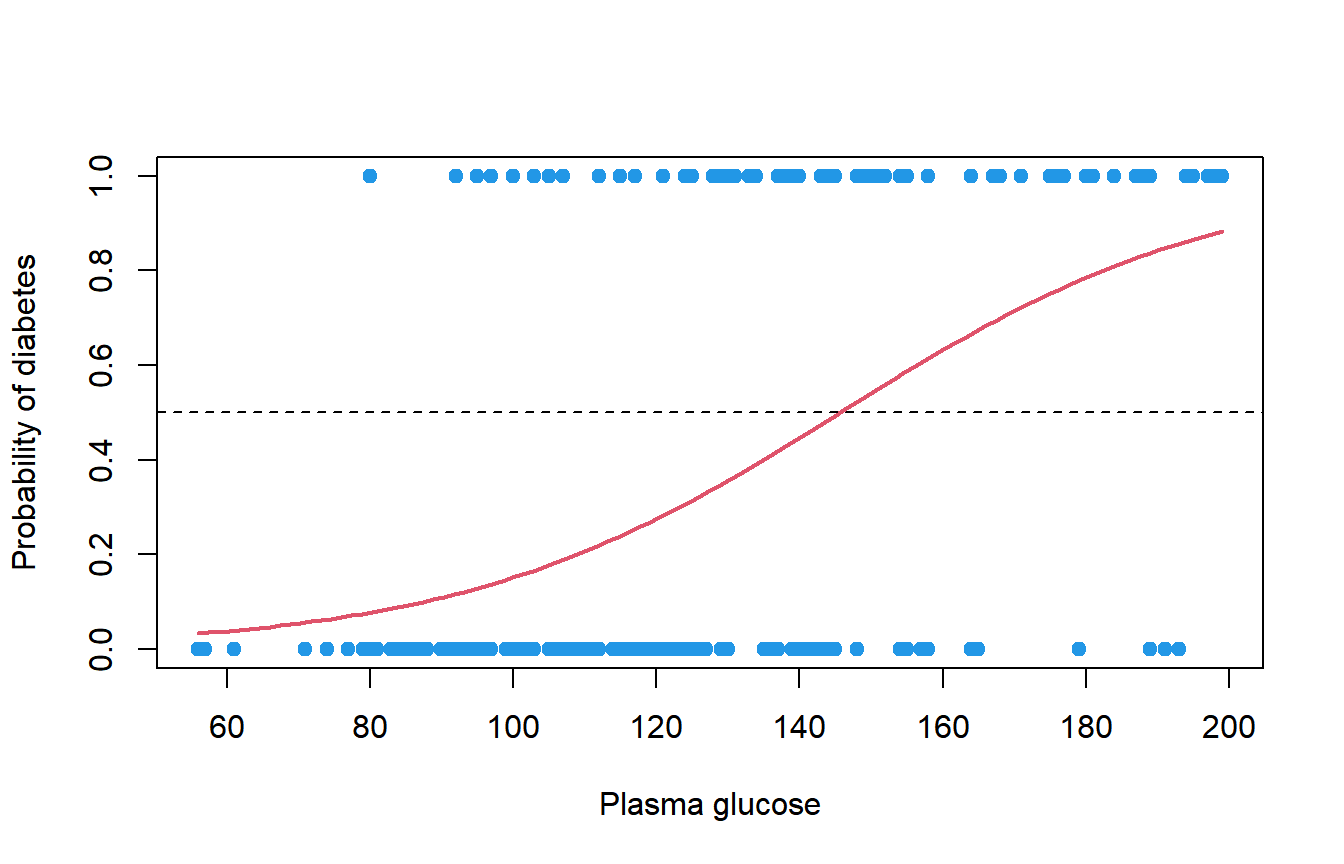
With this simple model, the predicted probability exceeds 0.5 for glucose values above 146.
Classification and confusion matrix
To turn the probabilities into a class, choose a threshold: the usual one is 0.5. Then compare the predicted and observed classes with table, which gives you a contingency table known as confusion matrix:
# Predicted probabilities and classes
prob <- predict(fit, type = "response")
pred <- ifelse(prob > 0.5, "Yes", "No")
table(Predicted = pred, Observed = df$type)

# Accuracy
mean(pred == df$type)
Observed
Predicted No Yes
No 113 29
Yes 19 39
[1] 0.76The diagonal contains the correct predictions: 113 women without diabetes and 39 with diabetes were correctly classified, so the accuracy is \((113 + 39) / 200 = 0.76\). The off-diagonal cells are the errors: 19 false positives and 29 false negatives.
The accuracy measured on the same data used to fit the model is optimistic. The MASS package also includes Pima.te, 332 different women with the same variables, which you can use as a test set:
prob_te <- predict(fit, newdata = Pima.te, type = "response")
pred_te <- ifelse(prob_te > 0.5, "Yes", "No")
table(Predicted = pred_te, Observed = Pima.te$type)
Observed
Predicted No Yes
No 199 46
Yes 24 63The accuracy on the test set is \((199 + 63) / 332 = 0.789\). However, the model only detects \(63 / 109 = 57.8\%\) of the women with diabetes (sensitivity), while it correctly classifies \(199 / 223 = 89.2\%\) of the women without it (specificity).
The 0.5 threshold is not mandatory. If missing a case of diabetes is worse than a false alarm, you can lower it. With a threshold of 0.3 on the same test set the confusion matrix is:
         Observed
Predicted  No Yes
      No  173  27
      Yes  50  82
The sensitivity grows to \(82 / 109 = 75.2\%\) at the cost of more false positives (the specificity drops to \(173 / 223 = 77.6\%\)). The best threshold depends on the cost of each type of error in your problem.
Comparing nested models with anova
To decide whether adding variables improves the model, compare two nested models (the smaller one contains a subset of the variables of the larger one) with anova and test = "Chisq". This is the likelihood ratio test, which compares the residual deviances:
fit_glu <- glm(type ~ glu, data = df, family = binomial)

anova(fit_glu, fit, test = "Chisq")
Analysis of Deviance Table
Model 1: type ~ glu
Model 2: type ~ glu + bmi + age
Resid. Df Resid. Dev Df Deviance Pr(>Chi)
1 198 207.37
2 196 188.39 2 18.98 7.561e-05 ***
---
Signif. codes: 0 '***' 0.001 '**' 0.01 '*' 0.05 '.' 0.1 ' ' 1Adding bmi and age reduces the deviance by 18.98 with 2 degrees of freedom, and the p-value (7.561e-05) indicates that the larger model is significantly better. Unlike the ANOVA of a linear model, here the test uses the chi-square distribution instead of the F distribution. In R versions older than 4.4.0, anova shows the deviances but no p-value unless you add test = "Chisq", so it is a good habit to always write it.
If the models are not nested, compare their AIC instead. Lower is better:
fit_full <- glm(type ~ glu + bmi + age + ped + npreg, data = df, family = binomial)

AIC(fit_glu, fit, fit_full)
df AIC
fit_glu 2 211.3727
fit 4 196.3929
fit_full 6 190.4705Adding the diabetes pedigree function (ped) and the number of pregnancies (npreg) lowers the AIC again, so it is worth including them too.
Warning: fitted probabilities numerically 0 or 1 occurred
This warning appears when the model predicts probabilities extremely close to 0 or 1 for some observations. The most common cause is separation: a variable (or a combination of variables) splits the two classes perfectly, so the maximum likelihood estimate doesn’t exist and the coefficients tend to infinity. Look at this small example, where every observation with x greater than 5 is a 1:
dd <- data.frame(x = 1:10, y = c(0, 0, 0, 0, 0, 1, 1, 1, 1, 1))

sep <- glm(y ~ x, data = dd, family = binomial)
summary(sep)
Warning messages:
1: glm.fit: algorithm did not converge
2: glm.fit: fitted probabilities numerically 0 or 1 occurred
Call:
glm(formula = y ~ x, family = binomial, data = dd)
Coefficients:
Estimate Std. Error z value Pr(>|z|)
(Intercept) -245.8 337834.2 -0.001 0.999
x 44.7 61172.1 0.001 0.999
(Dispersion parameter for binomial family taken to be 1)
Null deviance: 1.3863e+01 on 9 degrees of freedom
Residual deviance: 7.8648e-10 on 8 degrees of freedom
AIC: 4
Number of Fisher Scoring iterations: 25The symptoms of separation are easy to recognize: huge coefficients and standard errors, p-values close to 1, a residual deviance of almost 0 and many iterations. Although x predicts y perfectly, the p-value says it is not significant, so these results can’t be interpreted.
What to do depends on the cause:
- Check whether a variable is in fact another version of the response (for instance, a variable created from it). This is a data leak and the variable must be removed.
- Look at the cross table of the response with the categorical variables. A category with only 0s or only 1s produces separation; merging categories usually solves it.
- If the separation is real and you need the model, use a penalized logistic regression, such as Firth’s method (
logistfpackage).
The warning can also appear without separation when a few observations are very extreme. In that case the coefficients are reasonable and the model is valid, but it is worth checking those observations.