F distribution in R
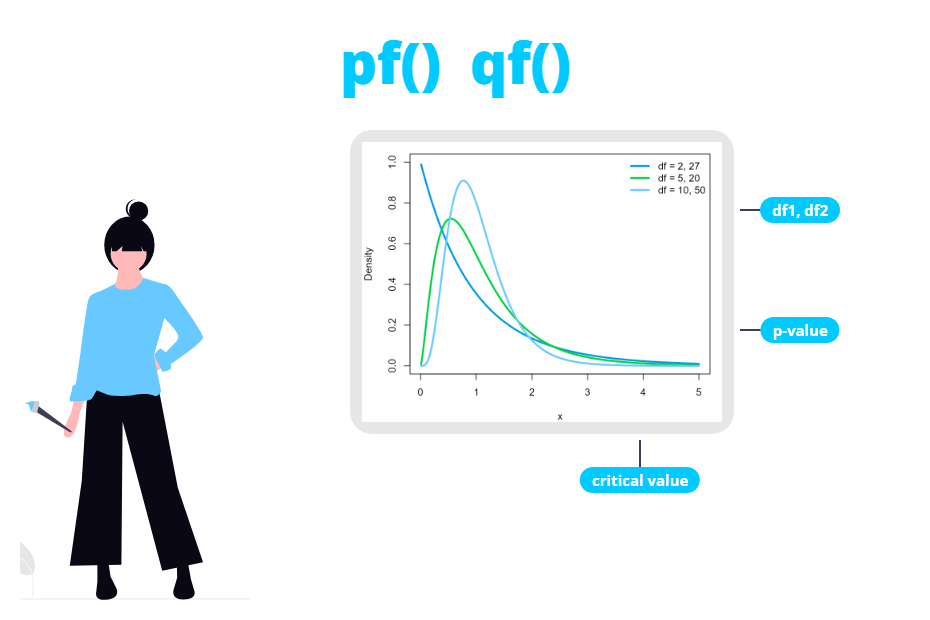
The F distribution is the distribution behind ANOVA, the F test to compare two variances and the global test of a regression model. In this tutorial you will learn how to use the df, pf, qf and rf functions in R, how to get a p-value from an F statistic, how to find F critical values and why the square of a t statistic follows an F distribution, checking every result against the output of aov and var.test.
The F distribution
If \(U\) and \(V\) are two independent chi-square random variables with \(d_1\) and \(d_2\) degrees of freedom, the ratio of both variables divided by their degrees of freedom
\[F = \frac{U / d_1}{V / d_2}\]
follows an F distribution (also called Fisher-Snedecor distribution) with \(d_1\) and \(d_2\) degrees of freedom, denoted as \(F \sim F_{d_1, d_2}\). Unlike the t or the chi-square distributions, the F distribution has two parameters: \(d_1\) are the degrees of freedom of the numerator and \(d_2\) the degrees of freedom of the denominator.
In practice, an F statistic is almost always a ratio of two variances. In ANOVA it is the variance between groups divided by the variance within groups, and in the F test it is the variance of one sample divided by the variance of the other. If both variances estimate the same quantity, the ratio should be close to 1.
Let \(X \sim F_{d_1, d_2}\):
- It only takes non-negative values, since it is a ratio of sums of squares.
- It is right skewed, and the skewness decreases as both degrees of freedom increase.
- The expected mean is \(E(X) = \frac{d_2}{d_2 - 2}\) (for \(d_2 > 2\)), which only depends on the denominator and is always greater than 1.
- The variance is \(Var(X) = \frac{2 d_2^2 (d_1 + d_2 - 2)}{d_1 (d_2 - 2)^2 (d_2 - 4)}\) (for \(d_2 > 4\)).
- If \(X \sim F_{d_1, d_2}\), then \(1/X \sim F_{d_2, d_1}\), and if \(T \sim t_{\nu}\), then \(T^2 \sim F_{1, \nu}\).
In R you have four functions for the F distribution, which follow the same naming as the normal distribution functions:
| Function | Description | Typical use |
|---|---|---|
| df |
F density (Probability Density Function) |
Plot the curve |
| pf |
F distribution (Cumulative Distribution Function) |
p-values |
| qf | Quantile function of the F distribution | Critical values |
| rf | F random number generation | Simulation |
The arguments are called df1 and df2 and neither has a default value. The order matters: df1 is always the numerator and df2 the denominator. For instance, qf(0.95, 2, 27) is 3.35, but qf(0.95, 27, 2) is 19.46.
The df function
The df function returns the density of the F distribution for a vector of values x. Its syntax is the following:
df(x,           # Vector of values (quantiles)
   df1,         # Degrees of freedom of the numerator
   df2,         # Degrees of freedom of the denominator
   ncp,         # Non-centrality parameter (optional)
   log = FALSE) # If TRUE, densities are given as log
For instance, the density of an F with 5 and 10 degrees of freedom at 0.5, 1 and 2 is:
df(c(0.5, 1, 2), df1 = 5, df2 = 10)[1] 0.6876070 0.4954798 0.1620057As with any continuous distribution, these values are not probabilities, but the height of the curve. You will need df mainly to plot the distribution.
Plot the F distribution in R
The following plot shows the F density for several combinations of degrees of freedom. You can create the grid of values for the X-axis with seq:
# Grid of X-axis values
x <- seq(0, 4, length = 400)

plot(x, df(x, df1 = 1, df2 = 10), type = "l", lwd = 2, col = "red",
     ylab = "Density", xlab = "x", ylim = c(0, 1.5))
lines(x, df(x, df1 = 5, df2 = 10), lwd = 2, col = "orange")
lines(x, df(x, df1 = 10, df2 = 30), lwd = 2, col = "blue")
lines(x, df(x, df1 = 50, df2 = 50), lwd = 2, col = "darkgreen")

legend("topright", legend = c("df1 = 1, df2 = 10", "df1 = 5, df2 = 10",
                              "df1 = 10, df2 = 30", "df1 = 50, df2 = 50"),
       col = c("red", "orange", "blue", "darkgreen"), lwd = 2, box.lty = 0)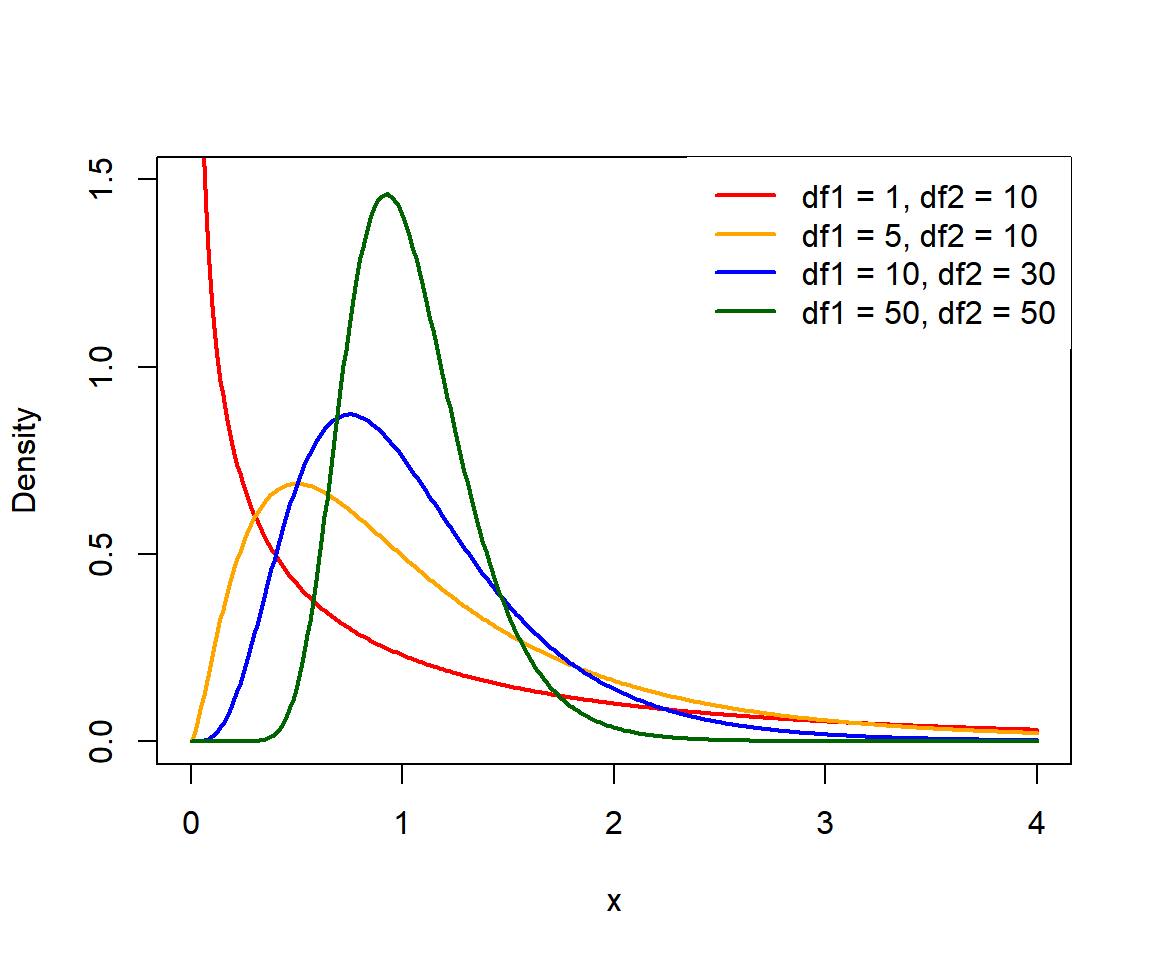
With \(d_1 = 1\) (and also with \(d_1 = 2\)) the density is decreasing, with its maximum at 0. With more degrees of freedom the curve has a peak below 1, and as both degrees of freedom grow it concentrates around 1: with large samples, the ratio of two estimates of the same variance is rarely far from 1.
df as a data frame name
Many tutorials (including some on this site, like the ANOVA in R one) store the data in an object called df. That doesn’t break the density function: when you call df(...), R looks for an object named df that is a function, skipping your data frame.
df <- PlantGrowth

class(df)
df(1, df1 = 2, df2 = 27) # Still the F density
[1] "data.frame"
[1] 0.3548163The problem appears in the opposite case. If you forget to create your data frame (or you start a new session) and run df$weight, R finds the function df and returns this confusing error:
Error in df$weight : object of type 'closure' is not subsettable“Closure” means “function”: you are trying to subset the df function. Create the data frame first or, better, give it a more descriptive name.
The pf function
The pf function gives the cumulative distribution function (CDF) of the F distribution, this is, the probability \(P(X \leq q)\). With lower.tail = FALSE it returns the upper tail \(P(X > q)\), which is the one you need for p-values.
pf(q,                 # Vector of quantiles
   df1,               # Degrees of freedom of the numerator
   df2,               # Degrees of freedom of the denominator
   ncp,               # Non-centrality parameter (optional)
   lower.tail = TRUE, # If TRUE, P(X <= q), or P(X > q) otherwise
   log.p = FALSE)     # If TRUE, probabilities are given as log
As an example, the probability that an F with 5 and 10 degrees of freedom takes a value lower than 2 and greater than 2 is:
pf(2, df1 = 5, df2 = 10)                     # P(X <= 2)
pf(2, df1 = 5, df2 = 10, lower.tail = FALSE) # P(X > 2)
1 - pf(2, df1 = 5, df2 = 10)                 # Equivalent
[1] 0.835805
[1] 0.164195
[1] 0.164195P-value from an F statistic
This is the most common reason to use pf. Consider the one-way ANOVA of the PlantGrowth data set, which compares the dried weight of plants among three groups (a control and two treatments, 10 plants each):
fit <- aov(weight ~ group, data = PlantGrowth)
summary(fit)
Df Sum Sq Mean Sq F value Pr(>F)
group 2 3.766 1.8832 4.846 0.0159 *
Residuals 27 10.492 0.3886
---
Signif. codes: 0 '***' 0.001 '**' 0.01 '*' 0.05 '.' 0.1 ' ' 1The F value is the ratio of both mean squares, \(1.8832 / 0.3886 = 4.846\), and the degrees of freedom are in the Df column: 2 for the numerator (number of groups minus 1) and 27 for the denominator (observations minus number of groups). The p-value in Pr(>F) is the probability of an F value greater than the observed one, so you can reproduce it with pf and lower.tail = FALSE:
# Exact F statistic from the ANOVA table
F_stat <- summary(fit)[[1]][1, "F value"]
F_stat

# p-value: upper tail
pf(F_stat, df1 = 2, df2 = 27, lower.tail = FALSE)
[1] 4.846088
[1] 0.01590996The result is the 0.0159 of the table. In ANOVA the p-value is always the upper tail: small F values (close to 0 or 1) mean that the group means are similar, so only large values are evidence against the null hypothesis. If you write pf(F_stat, 2, 27) without lower.tail = FALSE you will get 0.984, which is the complement of the p-value.
If you copy the rounded F value of the printed table (pf(4.846, 2, 27, lower.tail = FALSE)) you will get 0.01591099 instead of 0.01590996. The difference is irrelevant to make a decision, but if you want to match the output exactly extract the statistic from the object, as in the code above.
The same applies to the F statistic printed at the bottom of summary(lm(...)) and to the Levene test, which is also an ANOVA (on the absolute deviations from the median of each group).
P-value of the F test for two variances
The F test compares the variances of two samples with the statistic \(F = s_1^2 / s_2^2\), with \(n_1 - 1\) and \(n_2 - 1\) degrees of freedom. For instance, you can compare the variances of the two treatment groups of PlantGrowth:
x <- PlantGrowth$weight[PlantGrowth$group == "trt1"]
y <- PlantGrowth$weight[PlantGrowth$group == "trt2"]

var.test(x, y)
F test to compare two variances
data: x and y
F = 3.216, num df = 9, denom df = 9, p-value = 0.0968
alternative hypothesis: true ratio of variances is not equal to 1
95 percent confidence interval:
0.7988084 12.9475894
sample estimates:
ratio of variances
3.215998Here the test is two-sided by default, so you need both tails. As the F distribution is not symmetric you can’t use abs() as with the t distribution. The safest way is to double the smallest of the two tails:
F_stat <- var(x) / var(y)
F_stat

# Two-sided p-value
2 * min(pf(F_stat, 9, 9), pf(F_stat, 9, 9, lower.tail = FALSE))
[1] 3.215998
[1] 0.09680353The p-value matches the one of var.test (0.0968), so with a significance level of 0.05 there is not enough evidence to say that the variances are different, even if the variance of trt1 is more than three times the variance of trt2. With 10 observations per group the F test has little power.
Don’t use 2 * pf(F_stat, df1, df2, lower.tail = FALSE) without checking which tail is the smallest. It only works when the F statistic is greater than 1. If you swap the samples, var.test(y, x) gives F = 0.311 and the same p-value, 0.0968, but 2 * pf(0.311, 9, 9, lower.tail = FALSE) returns 1.903, which is not a valid probability.
The qf function
The qf function is the inverse of pf: given a probability \(p\), it returns the value \(q\) such that \(P(X \leq q) = p\). You will use it to obtain critical values.
qf(p,                 # Vector of probabilities
   df1,               # Degrees of freedom of the numerator
   df2,               # Degrees of freedom of the denominator
   ncp,               # Non-centrality parameter (optional)
   lower.tail = TRUE, # If TRUE, probabilities are P(X <= x), or P(X > x) otherwise
   log.p = FALSE)     # If TRUE, probabilities are given as log
F critical values
In ANOVA you reject the null hypothesis when the F statistic is greater than the critical value that leaves \(\alpha\) in the upper tail. For \(\alpha = 0.05\) and the degrees of freedom of the previous example (2 and 27):
qf(0.95, df1 = 2, df2 = 27)
qf(0.05, df1 = 2, df2 = 27, lower.tail = FALSE) # Equivalent
[1] 3.354131
[1] 3.354131As \(F = 4.846 > 3.354\), you reject \(H_0\), which agrees with the p-value of 0.0159. Note that ANOVA is one-tailed, so you use qf(0.95, ...) and not qf(0.975, ...), even though the alternative hypothesis (“at least one mean is different”) doesn’t have a direction.
For a two-sided F test of variances you need two critical values, one in each tail. With 9 and 9 degrees of freedom and \(\alpha = 0.05\):
qf(c(0.025, 0.975), df1 = 9, df2 = 9)[1] 0.2483859 4.0259942The statistic of the previous section (3.216) is between both values, so you don’t reject the equality of variances. The lower critical value is the inverse of the upper one with the degrees of freedom swapped: 1 / qf(0.975, 9, 9) also returns 0.2483859.
You can also create your own table of F critical values with sapply. The following code returns the critical values for \(\alpha = 0.05\) for several degrees of freedom of the numerator (columns) and the denominator (rows):
d1 <- c(1, 2, 3, 4, 5, 10)
d2 <- c(5, 10, 20, 30, 60, 120, Inf)

# Critical values for alpha = 0.05
crit <- sapply(d1, function(a) qf(0.95, df1 = a, df2 = d2))
dimnames(crit) <- list(df2 = d2, df1 = d1)
round(crit, 3)
df1
df2 1 2 3 4 5 10
5 6.608 5.786 5.409 5.192 5.050 4.735
10 4.965 4.103 3.708 3.478 3.326 2.978
20 4.351 3.493 3.098 2.866 2.711 2.348
30 4.171 3.316 2.922 2.690 2.534 2.165
60 4.001 3.150 2.758 2.525 2.368 1.993
120 3.920 3.072 2.680 2.447 2.290 1.910
Inf 3.841 2.996 2.605 2.372 2.214 1.831The critical values decrease when the degrees of freedom increase. The first column is especially interesting: with df2 = Inf you get 3.841, which is the square of 1.96, the critical value of the normal distribution. That is not a coincidence, as you will see in the next section.
Relationship between the t and the F distributions
If \(T\) follows a t distribution with \(\nu\) degrees of freedom, then \(T^2\) follows an F distribution with 1 and \(\nu\) degrees of freedom. As a consequence, the square of the two-sided t critical value is the F critical value:
qt(0.975, df = 27)^2
qf(0.95, df1 = 1, df2 = 27)
[1] 4.210008
[1] 4.210008And the two-sided p-value of a t statistic is the upper tail p-value of its square. For instance, for \(t = 2.1\) with 27 degrees of freedom:
t_stat <- 2.1

2 * pt(-abs(t_stat), df = 27)
pf(t_stat^2, df1 = 1, df2 = 27, lower.tail = FALSE)
[1] 0.04520873
[1] 0.04520873This explains why a t-test with equal variances and an ANOVA with two groups give exactly the same p-value. Using the ToothGrowth data set, which has two supplement types:
tt <- t.test(len ~ supp, data = ToothGrowth, var.equal = TRUE)
tt$statistic^2
tt$p.value

summary(aov(len ~ supp, data = ToothGrowth))
t
3.668253
[1] 0.06039337
Df Sum Sq Mean Sq F value Pr(>F)
supp 1 205 205.35 3.668 0.0604 .
Residuals 58 3247 55.98
---
Signif. codes: 0 '***' 0.001 '**' 0.01 '*' 0.05 '.' 0.1 ' ' 1The squared t statistic is the F value of the ANOVA (3.668) and both p-values are 0.0604. The only difference is that the t-test also allows one-sided alternatives, while the F test only looks at the size of the difference, not its sign.
The rf function
The rf function generates random values from an F distribution. As with any random generation function, set a seed to make the results reproducible:
rf(n,   # Number of observations to be generated
   df1, # Degrees of freedom of the numerator
   df2, # Degrees of freedom of the denominator
   ncp) # Non-centrality parameter (optional)
set.seed(1)
rf(5, df1 = 5, df2 = 10)[1] 0.3122938 1.5506509 1.7055359 1.4951191 0.6280872Simulation is a good way to check the definition of the distribution. You can generate F values directly with rf or build them as a ratio of chi-square variables divided by their degrees of freedom with rchisq. In both cases the mean should be close to \(10 / (10 - 2) = 1.25\) and the 95% quantile close to qf(0.95, 5, 10):
# Directly with rf
set.seed(1)
f1 <- rf(100000, df1 = 5, df2 = 10)

# As a ratio of chi-squares
set.seed(1)
f2 <- (rchisq(100000, df = 5) / 5) / (rchisq(100000, df = 10) / 10)

mean(f1)
mean(f2)
quantile(f1, 0.95)
quantile(f2, 0.95)
qf(0.95, df1 = 5, df2 = 10)
[1] 1.251399
[1] 1.248321
95%
3.31972
95%
3.31121
[1] 3.325835The simulated values agree with the theory. The following plot compares the histogram of 10000 simulated ratios with the density of the \(F_{5, 10}\):
set.seed(1)
f_sim <- (rchisq(10000, df = 5) / 5) / (rchisq(10000, df = 10) / 10)

hist(f_sim, breaks = 100, freq = FALSE, xlim = c(0, 6),
     main = "", xlab = "F", ylab = "Density", col = "lightgray", border = "white")
curve(df(x, df1 = 5, df2 = 10), from = 0, to = 6, n = 400,
      lwd = 2, col = "red", add = TRUE)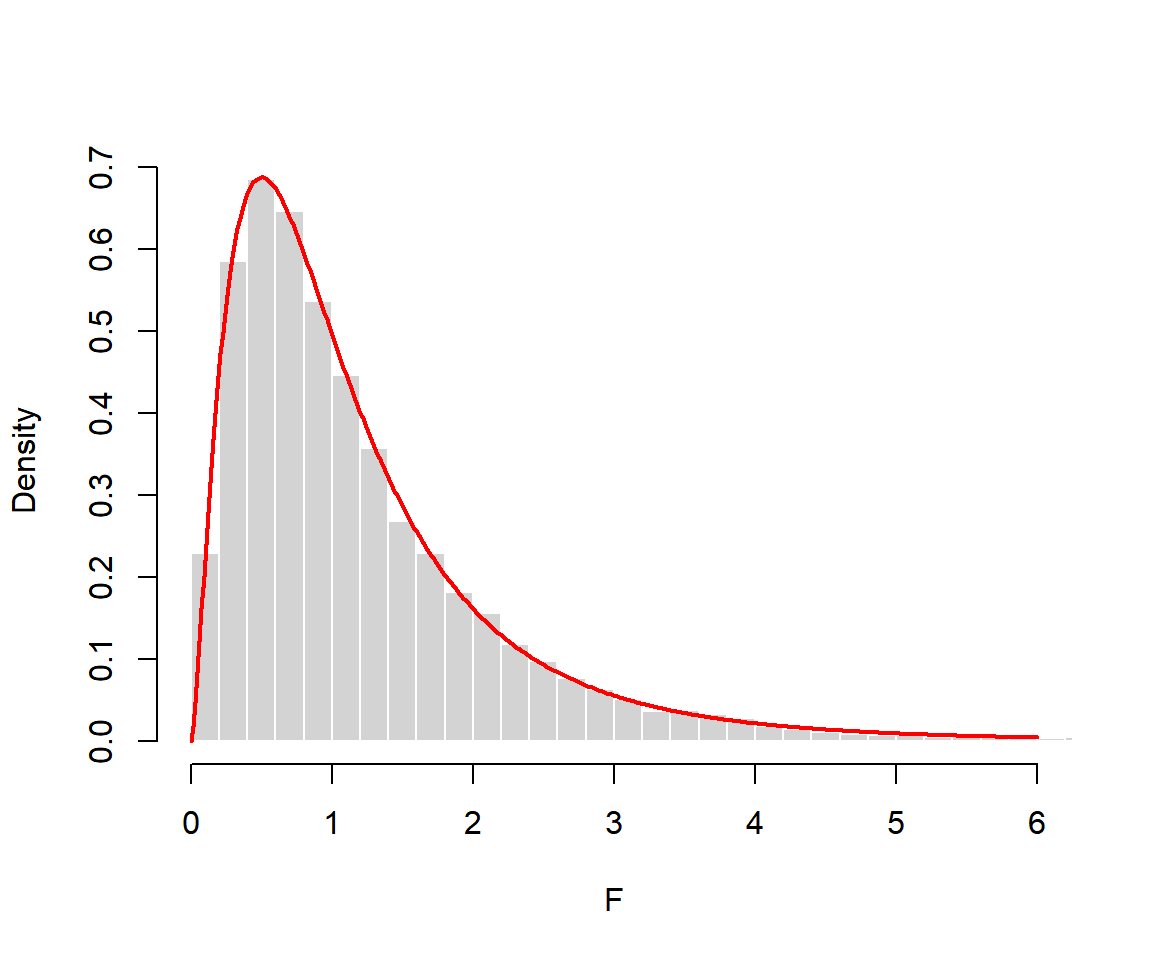
A typical use of rf and of these simulations is checking the type I error of a procedure: if you compute the proportion of simulated values above qf(0.95, 5, 10) you will get a value close to 0.05 (0.0496 with the previous 10000 values).