Student's t distribution in R
The Student’s t distribution is the distribution behind the t-test and the confidence interval for a mean. In this tutorial you will learn how to use the dt, pt, qt and rt functions in R, how to get a p-value from a t statistic, how to find t critical values and how to build a confidence interval by hand, checking every result against the output of t.test.
The Student’s t distribution
The t distribution appears when you standardize a sample mean using the sample standard deviation instead of the true (unknown) one. If \(\bar{x}\) is the mean of a sample of size \(n\) from a normal population with mean \(\mu\), then
\[t = \frac{\bar{x} - \mu}{s / \sqrt{n}}\]
follows a t distribution with \(n - 1\) degrees of freedom (df). The degrees of freedom are the only parameter of the distribution.
Let \(X \sim t_{\nu}\), namely a random variable following a t distribution with \(\nu\) degrees of freedom:
- It is symmetric around 0 and bell-shaped, like the standard normal.
- It has heavier tails than the normal: extreme values are more likely, because estimating the standard deviation adds uncertainty.
- The expected mean and variance are \(E(X) = 0\) (for \(\nu > 1\)) and \(Var(X) = \frac{\nu}{\nu - 2}\) (for \(\nu > 2\)).
- When \(\nu\) grows, the t distribution approaches the standard normal distribution.
In R you have four functions for the t distribution, which follow the same naming as the normal distribution functions:
| Function | Description | Typical use |
|---|---|---|
| dt |
t density (Probability Density Function) |
Plot the curve |
| pt |
t distribution (Cumulative Distribution Function) |
p-values |
| qt | Quantile function of the t distribution | Critical values and confidence intervals |
| rt | t random number generation | Simulation |
Unlike dnorm and friends, the df argument has no default value. If you forget it, R will throw the error argument “df” is missing, with no default.
The dt function
The dt function returns the density of the t distribution for a vector of values x. Its syntax is the following:
dt(x,          # Vector of values (quantiles)
   df,         # Degrees of freedom (> 0, can be non-integer)
   ncp,        # Non-centrality parameter (optional)
   log = FALSE) # If TRUE, densities are given as log
For instance, you can compare the density of a t with 5 degrees of freedom with the density of a standard normal at -2, 0 and 2:
dt(c(-2, 0, 2), df = 5)
dnorm(c(-2, 0, 2))
[1] 0.06509031 0.37960669 0.06509031
[1] 0.05399097 0.39894228 0.05399097The t density is lower at the center (0.380 vs 0.399) and higher at the tails (0.065 vs 0.054). That is exactly what “heavier tails” means.
Plot the t distribution in R
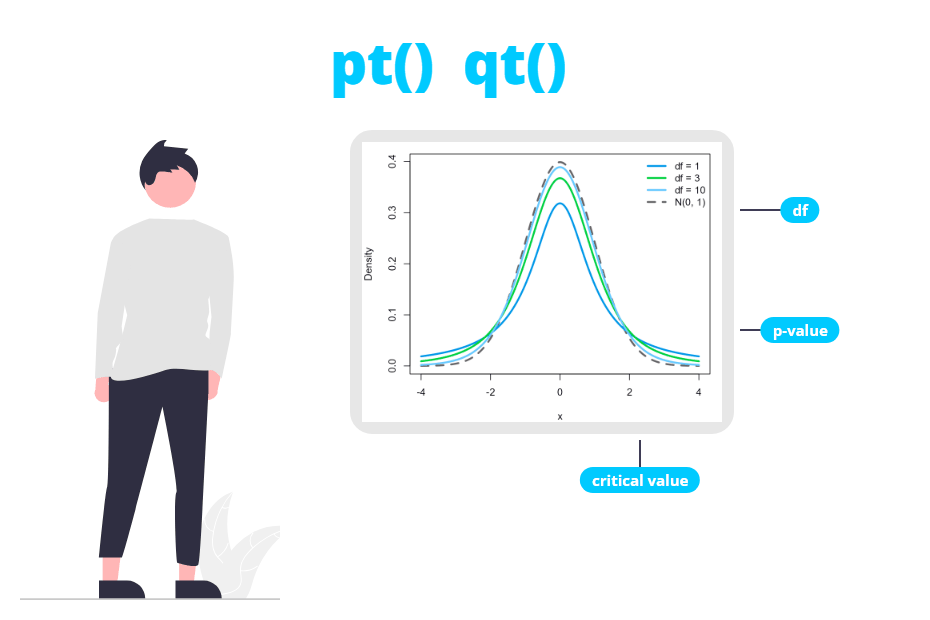
The following plot shows the t density for 1, 3 and 10 degrees of freedom along with the standard normal density (dashed line). You can see how the curve gets closer to the normal as the degrees of freedom increase:
# Grid of X-axis values
x <- seq(-4, 4, length = 200)

# Standard normal (dashed)
plot(x, dnorm(x), type = "l", lwd = 2, lty = 2, col = "black",
     ylab = "Density", xlab = "x", ylim = c(0, 0.4))

# t distributions
lines(x, dt(x, df = 1), lwd = 2, col = "red")
lines(x, dt(x, df = 3), lwd = 2, col = "orange")
lines(x, dt(x, df = 10), lwd = 2, col = "blue")

legend("topright", legend = c("df = 1", "df = 3", "df = 10", "N(0, 1)"),
       col = c("red", "orange", "blue", "black"), lty = c(1, 1, 1, 2),
       lwd = 2, box.lty = 0)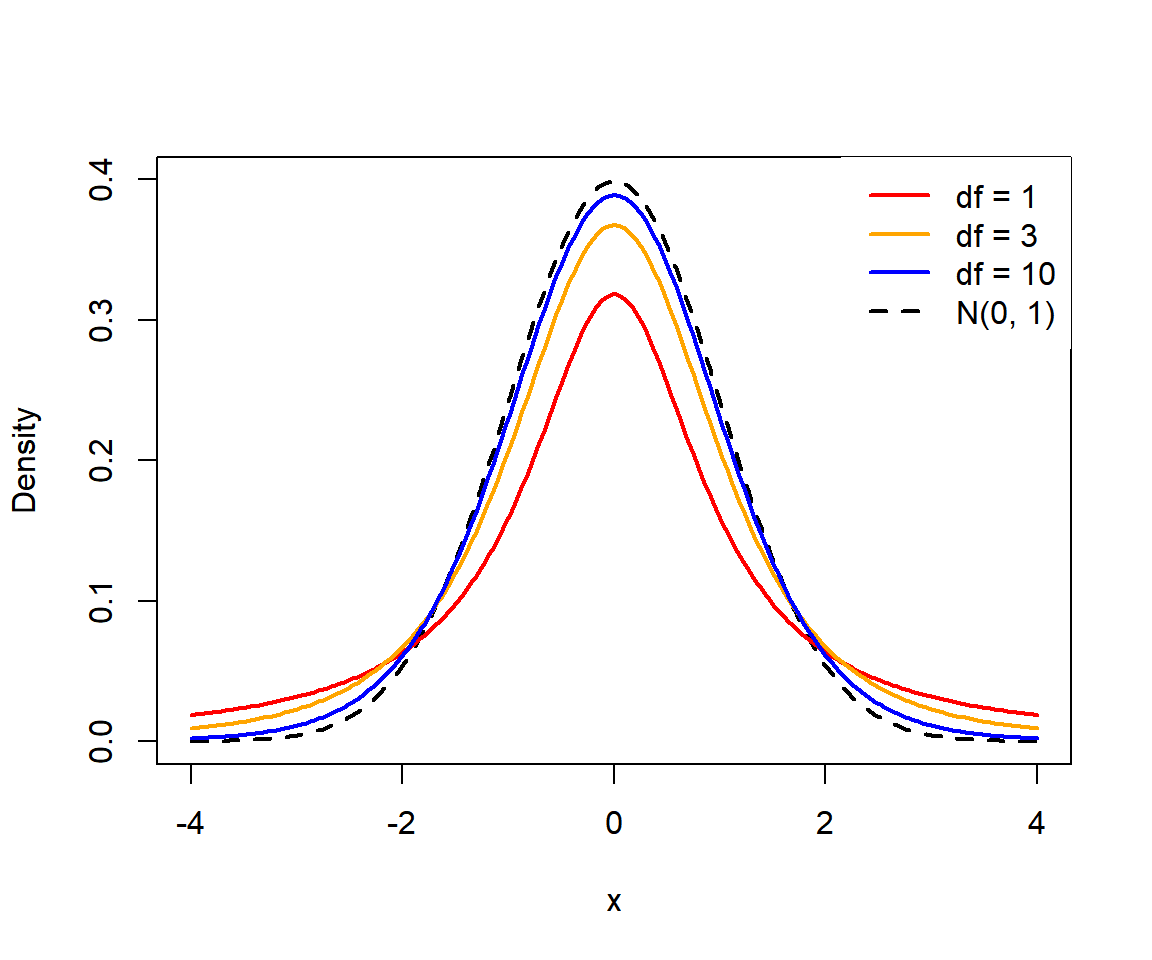
With 10 degrees of freedom the t curve is already very close to the normal one, but the difference in the tails is what matters when you compute p-values and critical values, as you will see in the next sections.
The pt function
The pt function gives the cumulative distribution function (CDF) of the t distribution, this is, the probability \(P(X \leq q)\). With lower.tail = FALSE it returns the upper tail \(P(X > q)\).
pt(q,                 # Vector of quantiles
   df,                # Degrees of freedom
   ncp,               # Non-centrality parameter (optional)
   lower.tail = TRUE, # If TRUE, P(X <= q), or P(X > q) otherwise
   log.p = FALSE)     # If TRUE, probabilities are given as log
As an example, the probability that a t with 10 degrees of freedom takes a value lower than 2 and greater than 2 is:
pt(2, df = 10)                     # P(X <= 2)
pt(2, df = 10, lower.tail = FALSE) # P(X > 2)
1 - pt(2, df = 10)                 # Equivalent
[1] 0.963306
[1] 0.03669402
[1] 0.03669402For the same value, pnorm(2, lower.tail = FALSE) returns 0.02275, so the probability of being above 2 is higher under the t distribution.
If you need the probability of an interval, subtract the two cumulative probabilities. For instance, \(P(-1 < X < 1)\) with 10 df:
pt(1, df = 10) - pt(-1, df = 10)[1] 0.6591069P-value from a t statistic
This is the most common reason to use pt. Suppose you want to test whether the mean fuel consumption of the cars in mtcars is equal to 18 miles per gallon. The t-test gives:
t.test(mtcars$mpg, mu = 18) One Sample t-test
data: mtcars$mpg
t = 1.9622, df = 31, p-value = 0.05876
alternative hypothesis: true mean is not equal to 18
95 percent confidence interval:
17.91768 22.26357
sample estimates:
mean of x
20.09062You can reproduce the statistic and the p-value by hand. First, compute the t statistic with the mean and the standard deviation of the sample:
x <- mtcars$mpg
n <- length(x)

# t statistic
t_stat <- (mean(x) - 18) / (sd(x) / sqrt(n))
t_stat
[1] 1.962247Now, the p-value depends on the alternative hypothesis. For a two-sided test you need the probability of both tails, so you double the probability of the tail beyond \(|t|\):
# Two-sided p-value (alternative = "two.sided")
2 * pt(-abs(t_stat), df = n - 1)

# Equivalent
2 * pt(abs(t_stat), df = n - 1, lower.tail = FALSE)
[1] 0.05876422
[1] 0.05876422The result matches the p-value returned by t.test. For one-sided tests you only need one tail:
# alternative = "greater": P(T > t)
pt(t_stat, df = n - 1, lower.tail = FALSE)

# alternative = "less": P(T < t)
pt(t_stat, df = n - 1)
[1] 0.02938211
[1] 0.9706179These are the same values you would obtain with t.test(x, mu = 18, alternative = "greater") and alternative = "less". Note that the two-sided test is not significant at the 5% level (0.0588), while the one-sided “greater” test is (0.0294). You have to choose the alternative hypothesis before looking at the data, not to get a lower p-value.
Two common mistakes: writing 2 * pt(t_stat, df) without abs(), which for a positive statistic returns a “p-value” greater than 1 (here, 1.941), and using pnorm instead of pt. With 2 * pnorm(-abs(t_stat)) you would get 0.0497 instead of 0.0588 and wrongly reject the null hypothesis at the 5% level.
The qt function
The qt function is the inverse of pt: given a probability \(p\), it returns the value \(q\) such that \(P(X \leq q) = p\). You will mainly use it to obtain critical values and confidence intervals.
qt(p,                 # Vector of probabilities
   df,                # Degrees of freedom
   ncp,               # Non-centrality parameter (optional)
   lower.tail = TRUE, # If TRUE, probabilities are P(X <= x), or P(X > x) otherwise
   log.p = FALSE)     # If TRUE, probabilities are given as log
t critical values
For a two-sided test at significance level \(\alpha\), the critical value leaves \(\alpha/2\) in each tail, so you need the quantile \(1 - \alpha/2\). For \(\alpha = 0.05\) and 31 degrees of freedom:
qt(0.975, df = 31) # Two-sided, alpha = 0.05
qt(0.025, df = 31) # Lower critical value (symmetric)
qt(0.95, df = 31)  # One-sided, alpha = 0.05
[1] 2.039513
[1] -2.039513
[1] 1.695519In the previous example \(|t| = 1.962 < 2.0395\), so you don’t reject \(H_0\) in the two-sided test, which agrees with the p-value of 0.0588. Note that the normal critical value would have been qnorm(0.975) = 1.96, which is lower than the t one.
The most frequent error with qt is using qt(0.95, df) for a two-sided test at the 5% level. For two-sided tests and 95% confidence intervals you need qt(0.975, df).
You can also create your own table of critical values with sapply. The following code returns the two-sided critical values for several degrees of freedom and significance levels. Setting df = Inf gives the normal quantiles:
dfs <- c(1, 2, 5, 10, 20, 30, 50, 100, Inf)
alpha <- c(0.10, 0.05, 0.01)

# Two-sided critical values
crit <- sapply(alpha, function(a) qt(1 - a / 2, df = dfs))
dimnames(crit) <- list(df = dfs, alpha = alpha)
round(crit, 3)
alpha
df 0.1 0.05 0.01
1 6.314 12.706 63.657
2 2.920 4.303 9.925
5 2.015 2.571 4.032
10 1.812 2.228 3.169
20 1.725 2.086 2.845
30 1.697 2.042 2.750
50 1.676 2.009 2.678
100 1.660 1.984 2.626
Inf 1.645 1.960 2.576With very few degrees of freedom the critical values are much larger than the normal ones (12.706 vs 1.96 with 1 df). From around 30 df the difference is small, but there is no reason to use the normal approximation in R: qt is just as easy to use.
Confidence interval for a mean by hand
The confidence interval for the mean with confidence level \(1 - \alpha\) is
\[\bar{x} \pm t_{1 - \alpha/2,\, n-1} \frac{s}{\sqrt{n}}\]
So you can compute the 95% interval of the mpg variable as follows:
x <- mtcars$mpg
n <- length(x)

se <- sd(x) / sqrt(n)              # Standard error
t_crit <- qt(0.975, df = n - 1)    # Critical value

c(mean(x) - t_crit * se, mean(x) + t_crit * se)

# Compare with t.test
t.test(x)$conf.int
[1] 17.91768 22.26357
[1] 17.91768 22.26357
attr(,"conf.level")
[1] 0.95Both intervals are identical. For a 99% interval just replace 0.975 by 0.995. Remember that the interval relies on the same assumptions as the t-test: independent observations and an approximately normal population (or a large enough sample).
The rt function
The rt function generates random values from a t distribution. As with any random generation function, set a seed to make the results reproducible:
rt(n,   # Number of observations to be generated
   df,  # Degrees of freedom
   ncp) # Non-centrality parameter (optional)
set.seed(1)
rt(5, df = 10)[1] -0.6329433 -0.6401328 0.4306047 -0.3110855 -0.2373372Simulation is a good way to check the theoretical properties. With 5 degrees of freedom the variance should be \(5 / (5 - 2) = 1.667\), larger than the variance of the standard normal:
set.seed(1)
y <- rt(100000, df = 5)

mean(y)
var(y)
[1] -0.005257564
[1] 1.657237You can use rt to generate data with outliers (heavy tails) when you want to test how robust a method is, for instance comparing the t-test with the Wilcoxon test.
Non-central t distribution
All the functions accept the ncp argument (non-centrality parameter). The non-central t distribution is the distribution of the t statistic when the null hypothesis is false, so it is used to compute the power of a t-test.
For example, the power of a two-sided one-sample t-test with \(n = 20\) and a true difference of half a standard deviation (\(\delta = 0.5\)) is the probability of exceeding the critical value under a t with \(ncp = \delta \sqrt{n}\):
n <- 20
d <- 0.5
t_crit <- qt(0.975, df = n - 1)

pt(t_crit, df = n - 1, ncp = d * sqrt(n), lower.tail = FALSE)
[1] 0.5644829This is the same value returned by power.t.test(n = 20, delta = 0.5, sd = 1, type = "one.sample"), so with 20 observations you would only detect that difference about 56% of the times.