ANOVA in R: one-way and two-way analysis of variance
The analysis of variance (ANOVA) is used to test whether the means of three or more independent groups are equal. In R you can fit it with the aov function and display the ANOVA table with summary. In this tutorial you will learn how to run a one-way and a two-way ANOVA, how to read every column of the output, how to check the assumptions, what to do when they are not met and how to find which groups differ with the Tukey post-hoc test.
When to use ANOVA
Use a one-way ANOVA when you have a numeric response variable and a categorical variable (factor) with three or more groups, and you want to know if the mean of the response differs between groups. If you only have two groups, the one-way ANOVA is equivalent to the t-test with equal variances.
Running several t-tests (one per pair of groups) instead of an ANOVA is a common mistake: with three groups you need three tests and the probability of finding at least one false positive grows well above 5%. ANOVA compares all the means with a single test.
The hypotheses of the one-way ANOVA are:
- \(H_0\): all the group means are equal, \(\mu_1 = \mu_2 = \dots = \mu_k\).
- \(H_1\): at least one group mean is different from the others.
The test assumes that the observations are independent, that the residuals are normally distributed and that the variance is the same in all groups (homoscedasticity). You will learn how to check the last two below.
One-way ANOVA in R with aov
For this example we are going to use the PlantGrowth data set, which contains the dried weight of 30 plants (weight) obtained under a control and two different treatments (group, with levels ctrl, trt1 and trt2), with 10 plants in each group.
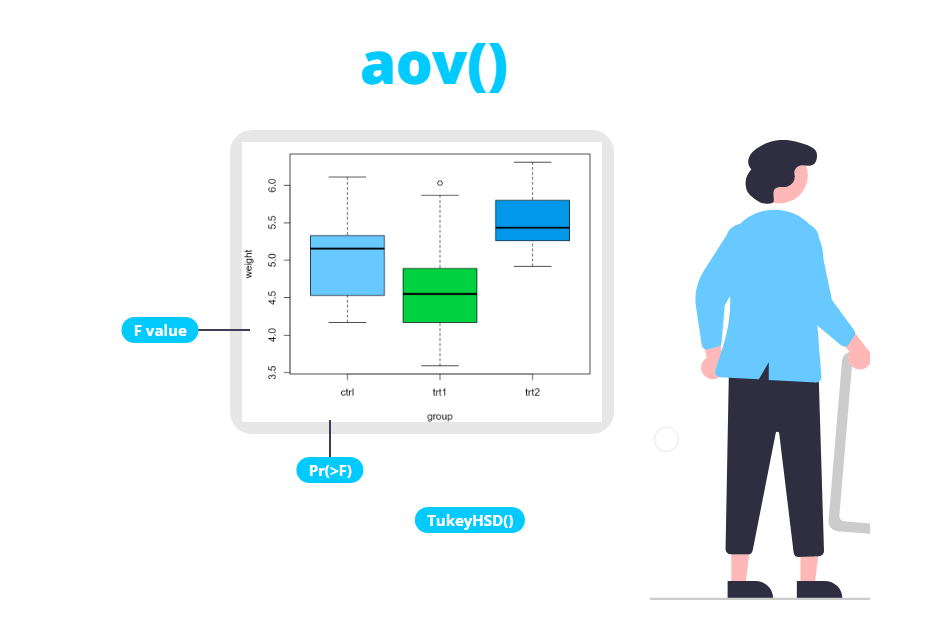
The first step is an exploratory analysis. A box plot by group gives you a first idea of the differences between groups and of their spread:
# Sample data
df <- PlantGrowth

# Box plot
boxplot(weight ~ group, data = df, col = 4, xlab = "Group", ylab = "Dried weight")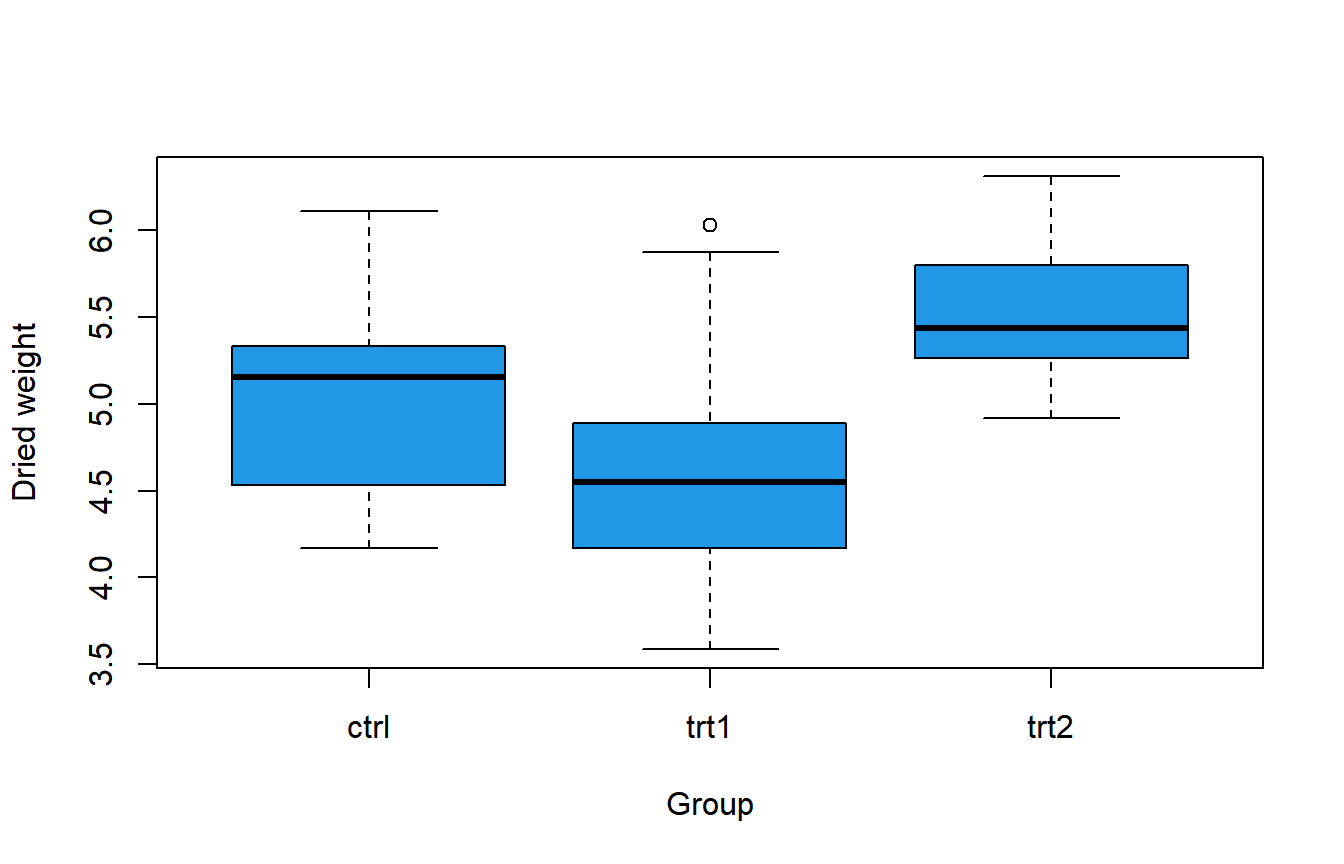
Treatment 2 seems to produce heavier plants and treatment 1 lighter ones than the control. You can also compute the mean and the standard deviation of each group with aggregate (or tapply):
# Sample data
df <- PlantGrowth

aggregate(weight ~ group, data = df,
          FUN = function(x) c(mean = mean(x), sd = sd(x)))
group weight.mean weight.sd
1 ctrl 5.0320000 0.5830914
2 trt1 4.6610000 0.7936757
3 trt2 5.5260000 0.4425733The question is whether these differences between means are larger than what you would expect by chance. To answer it, fit the model with aov using a formula (response on the left, factor on the right) and pass the result to summary:
# Sample data
df <- PlantGrowth

# One-way ANOVA
fit <- aov(weight ~ group, data = df)

summary(fit)
Df Sum Sq Mean Sq F value Pr(>F)
group 2 3.766 1.8832 4.846 0.0159 *
Residuals 27 10.492 0.3886
---
Signif. codes: 0 '***' 0.001 '**' 0.01 '*' 0.05 '.' 0.1 ' ' 1The grouping variable must be a factor or a character vector. If the groups are coded with numbers (for instance 1, 2 and 3), convert them with factor() first. Otherwise aov will treat the variable as numeric and fit a regression line with a single degree of freedom instead of comparing groups.
How to interpret the ANOVA table
The output of summary(aov) is the classic ANOVA table. The row group describes the variability between groups and the row Residuals the variability within groups. Each column means the following:
- Df (degrees of freedom): number of groups minus one for
group(\(3 - 1 = 2\)) and number of observations minus number of groups for the residuals (\(30 - 3 = 27\)). - Sum Sq (sum of squares): the variability explained by the groups (3.766) and the variability that remains inside the groups (10.492).
- Mean Sq (mean squares): each sum of squares divided by its degrees of freedom, \(3.766 / 2 = 1.8832\) and \(10.492 / 27 = 0.3886\). The residual mean square is the estimate of the common variance of the groups.
- F value: the ratio between both mean squares, \(F = 1.8832 / 0.3886 = 4.846\). If \(H_0\) is true, it should be close to 1. The larger the F, the larger the differences between groups compared with the noise inside the groups.
- Pr(>F): the p-value, the probability of observing an F statistic this large if all the means were equal. It is computed from an F distribution with 2 and 27 degrees of freedom, the same distribution used in the F test to compare two variances.
The p-value is 0.0159, lower than the usual significance level of 0.05, so there is statistical evidence that at least one of the group means is different. The asterisk next to the p-value is just a visual guide based on the significance codes shown below the table.
A significant ANOVA doesn’t tell you which groups differ, only that not all the means are equal. To identify the groups you need a post-hoc test, such as the Tukey test explained below.
Checking the assumptions
The assumptions of ANOVA are checked on the residuals of the model, that is, on the difference between each observation and the mean of its group.
Normality of the residuals
You can check normality visually with a Q-Q plot of the residuals. If they are normal, the points should lie close to the line.
df <- PlantGrowth
fit <- aov(weight ~ group, data = df)

qqnorm(residuals(fit), pch = 19, col = 4)
qqline(residuals(fit), lwd = 2)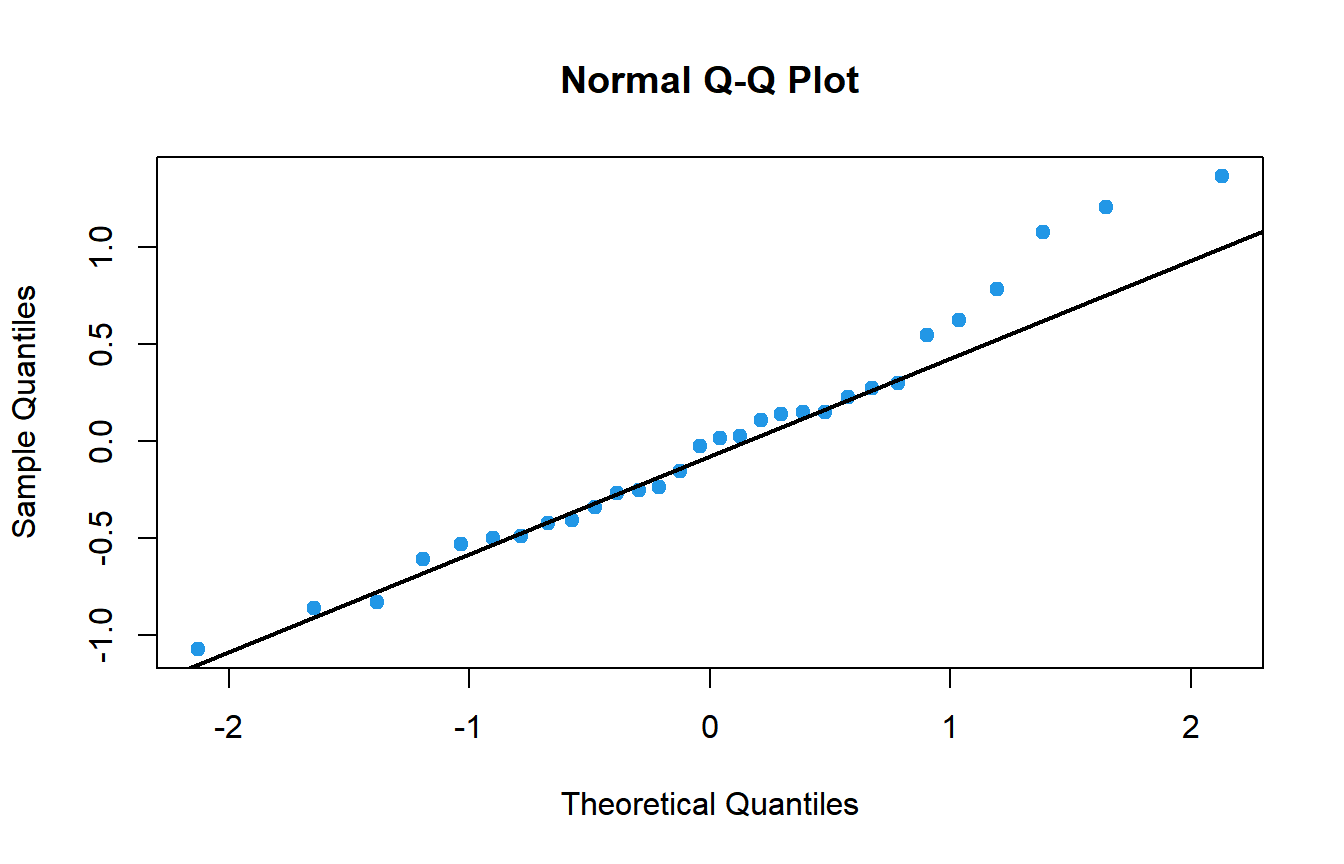
The points follow the line reasonably well. To confirm it formally, apply the Shapiro-Wilk test to the residuals:
shapiro.test(residuals(fit)) Shapiro-Wilk normality test
data: residuals(fit)
W = 0.96607, p-value = 0.4379The p-value (0.4379) is greater than 0.05, so there is no evidence against the normality of the residuals.
Homogeneity of variances
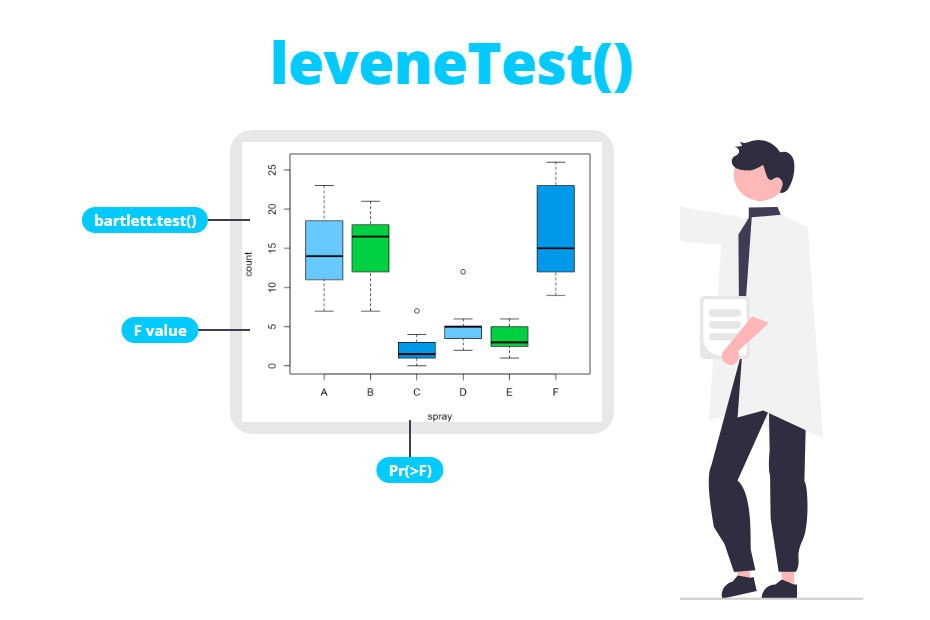
To check whether the variances are equal across groups you can use the Levene test (leveneTest from the car package), which is robust to departures from normality, or the Bartlett test (bartlett.test), which is more powerful when the data is normal. In both cases the null hypothesis is that all the variances are equal.
library(car)
leveneTest(weight ~ group, data = PlantGrowth)
Levene's Test for Homogeneity of Variance (center = median)
Df F value Pr(>F)
group 2 1.1192 0.3412
27bartlett.test(weight ~ group, data = PlantGrowth) Bartlett test of homogeneity of variances
data: weight by group
Bartlett's K-squared = 2.8786, df = 2, p-value = 0.2371Both p-values (0.3412 and 0.2371) are greater than 0.05, so the assumption of equal variances is reasonable and the result of the classic ANOVA is valid.
What to do if the assumptions are not met
The choice depends on which assumption fails:
| Situation | Alternative | Function |
|---|---|---|
| Normal residuals, different variances | Welch ANOVA | oneway.test(y ~ g, data) |
| Residuals far from normal or outliers | Kruskal-Wallis test | kruskal.test(y ~ g, data) |
| Both assumptions hold | Classic ANOVA | aov(y ~ g, data) |
The Welch ANOVA doesn’t assume equal variances. It is the default of oneway.test (var.equal = FALSE):
oneway.test(weight ~ group, data = PlantGrowth) One-way analysis of means (not assuming equal variances)
data: weight and group
F = 5.181, num df = 2.000, denom df = 17.128, p-value = 0.01739Note that the denominator degrees of freedom are not an integer: this is the correction for unequal variances. If you set var.equal = TRUE you will get exactly the same F and p-value as aov.
When the residuals are clearly not normal, use the non-parametric Kruskal-Wallis test, which compares the groups using ranks:
kruskal.test(weight ~ group, data = PlantGrowth) Kruskal-Wallis rank sum test
data: weight by group
Kruskal-Wallis chi-squared = 7.9882, df = 2, p-value = 0.01842In this example all three tests lead to the same conclusion, which is common when the assumptions are reasonably met. With small samples, skewed data or very different variances they can disagree, and then the alternative tests are the ones to trust.
Post-hoc comparisons with TukeyHSD
Once the ANOVA is significant, the Tukey HSD (Honestly Significant Difference) test compares all pairs of groups while controlling the family-wise error rate, so you don’t need to correct the p-values yourself. Pass the fitted aov object to TukeyHSD:
TukeyHSD(fit) Tukey multiple comparisons of means
95% family-wise confidence level
Fit: aov(formula = weight ~ group, data = df)
$group
diff lwr upr p adj
trt1-ctrl -0.371 -1.0622161 0.3202161 0.3908711
trt2-ctrl 0.494 -0.1972161 1.1852161 0.1979960
trt2-trt1 0.865 0.1737839 1.5562161 0.0120064Each row is a comparison between two groups:
diff: difference between the means of the two groups, in the order indicated by the name. For instance, plants with treatment 2 weigh on average 0.865 more than plants with treatment 1.lwrandupr: lower and upper limits of the 95% confidence interval for that difference. If the interval doesn’t contain 0, the difference is significant.p adj: p-value adjusted for multiple comparisons.
Only the comparison trt2-trt1 is significant (p-value = 0.012 and an interval from 0.17 to 1.56 that doesn’t include 0). Neither treatment differs significantly from the control. In other words, the ANOVA was significant because the two treatments are different from each other, not because any of them differs from the control.
Effect size: eta squared
The p-value tells you whether there is a difference, but not how large it is. The most common effect size for ANOVA is eta squared (\(\eta^2\)), the proportion of the total variability explained by the groups:
\[\eta^2 = \frac{SS_{between}}{SS_{total}} = \frac{SS_{between}}{SS_{between} + SS_{residuals}}\]
You can compute it directly from the ANOVA table. summary(fit) returns a list whose first element is the table, so you can extract the Sum Sq column:
tab <- summary(fit)[[1]]
ss <- tab[["Sum Sq"]]

# Eta squared
ss[1] / sum(ss)
[1] 0.2641483The treatment explains about 26% of the variability of the plant weight. As a rough guide, values around 0.01, 0.06 and 0.14 are usually considered small, medium and large effects, so this is a large effect.
Two-way ANOVA with interaction
A two-way ANOVA studies the effect of two factors at the same time and, optionally, their interaction: whether the effect of one factor depends on the level of the other.
For this example we are going to use the ToothGrowth data set, which contains the length of the teeth (len) of 60 guinea pigs that received vitamin C with two delivery methods (supp: orange juice OJ or ascorbic acid VC) at three doses (dose: 0.5, 1 and 2 mg/day), with 10 animals per combination.
The variable dose is numeric, so you have to convert it to a factor before fitting the model. Then, use supp * dose in the formula, which is a shortcut for supp + dose + supp:dose (both main effects plus the interaction).
# Sample data
df2 <- ToothGrowth
df2$dose <- factor(df2$dose)

# Two-way ANOVA with interaction
fit2 <- aov(len ~ supp * dose, data = df2)

summary(fit2)
Df Sum Sq Mean Sq F value Pr(>F)
supp 1 205.4 205.4 15.572 0.000231 ***
dose 2 2426.4 1213.2 92.000 < 2e-16 ***
supp:dose 2 108.3 54.2 4.107 0.021860 *
Residuals 54 712.1 13.2
---
Signif. codes: 0 '***' 0.001 '**' 0.01 '*' 0.05 '.' 0.1 ' ' 1Now the table has one row per term and each row has its own null hypothesis:
supp: the mean length is the same for both supplements. Rejected (p = 0.000231).dose: the mean length is the same for the three doses. Rejected (p < 2e-16).supp:dose: there is no interaction, that is, the effect of the supplement is the same at every dose. Rejected (p = 0.0219).
Always look at the interaction first. When it is significant, the main effects can’t be interpreted on their own, because the difference between supplements changes with the dose. An interaction plot shows it clearly:
df2 <- ToothGrowth
df2$dose <- factor(df2$dose)

interaction.plot(x.factor = df2$dose, trace.factor = df2$supp,
                 response = df2$len, col = c(2, 4), lwd = 2,
                 xlab = "Dose (mg/day)", ylab = "Mean tooth length",
                 trace.label = "Supplement")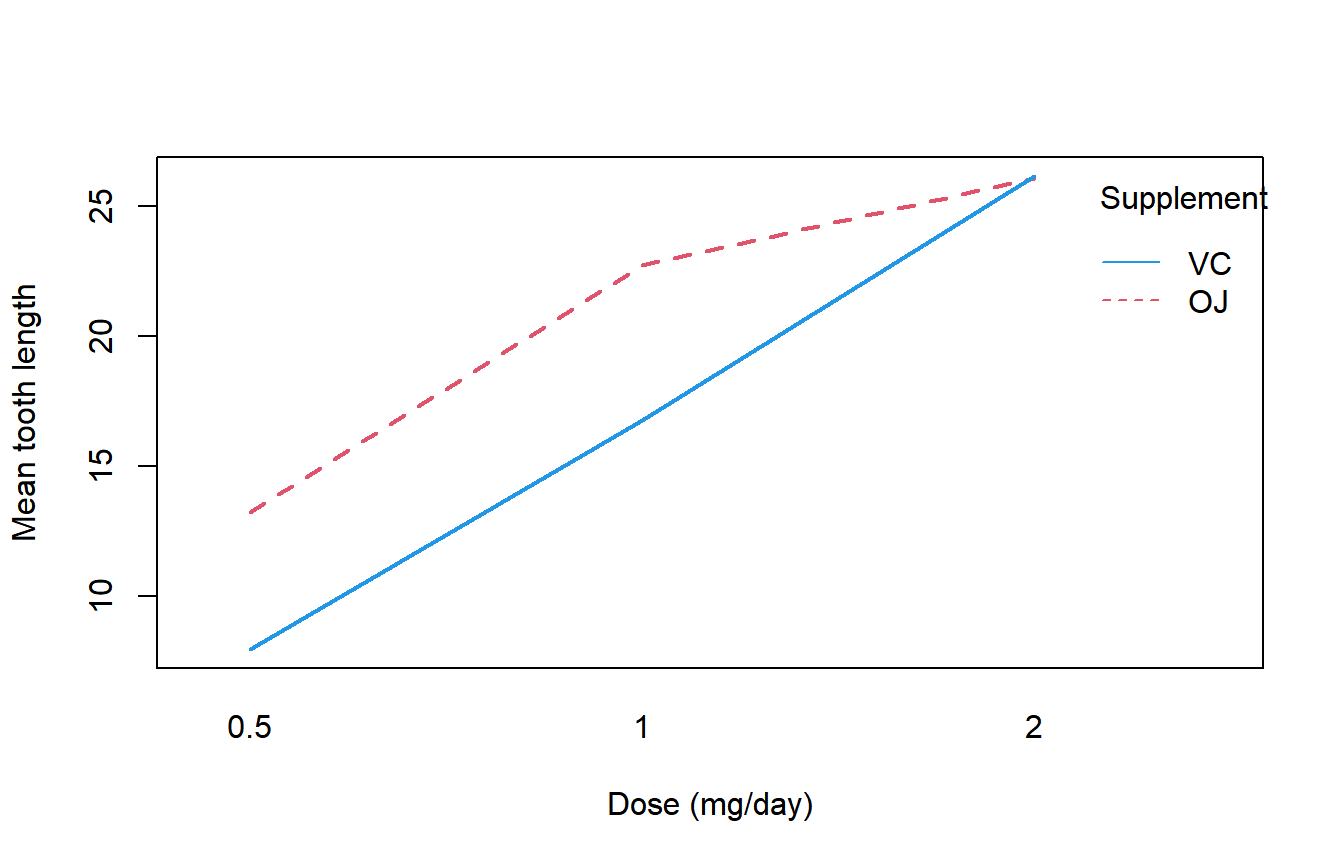
If there were no interaction, the lines would be roughly parallel. Here orange juice produces longer teeth at 0.5 and 1 mg/day, but at 2 mg/day both supplements give almost the same result. So the correct conclusion is not “orange juice is better”, but “orange juice is better at low and medium doses”.
The interaction term is significant, but how important is it? Computing eta squared for each term puts it in perspective:
ss2 <- summary(fit2)[[1]][["Sum Sq"]]
eta2 <- ss2 / sum(ss2)
names(eta2) <- c("supp", "dose", "supp:dose", "Residuals")

round(eta2, 3)
supp dose supp:dose Residuals
0.059 0.703 0.031 0.206The dose explains 70% of the variability of the tooth length, while the supplement and the interaction explain much less. To compare the levels of a factor, you can use TukeyHSD with the which argument:
TukeyHSD(fit2, which = "dose") Tukey multiple comparisons of means
95% family-wise confidence level
Fit: aov(formula = len ~ supp * dose, data = df2)
$dose
diff lwr upr p adj
1-0.5 9.130 6.362488 11.897512 0.0e+00
2-0.5 15.495 12.727488 18.262512 0.0e+00
2-1 6.365 3.597488 9.132512 2.7e-06All the doses differ from each other: each increase in the dose produces significantly longer teeth.
Common mistake: a numeric factor
If you forget to convert dose to a factor, aov treats it as a numeric variable. Look at the degrees of freedom of dose: there is only 1 instead of 2, because the model fits a straight line instead of comparing three groups.
summary(aov(len ~ supp * dose, data = ToothGrowth)) Df Sum Sq Mean Sq F value Pr(>F)
supp 1 205.4 205.4 12.317 0.000894 ***
dose 1 2224.3 2224.3 133.415 < 2e-16 ***
supp:dose 1 88.9 88.9 5.333 0.024631 *
Residuals 56 933.6 16.7
---
Signif. codes: 0 '***' 0.001 '**' 0.01 '*' 0.05 '.' 0.1 ' ' 1Always check the Df column: for a factor it must be the number of levels minus one.
Note also that aov computes sequential (type I) sums of squares, so with unbalanced data (different number of observations per combination of factors) the result depends on the order of the factors in the formula. ToothGrowth is balanced, so this is not a problem here. With unbalanced data, the Anova function of the car package with type = 2 or type = 3 is the usual choice.
aov vs lm and anova
ANOVA is a particular case of the linear model, and aov is just a wrapper around lm. You can obtain exactly the same table by fitting the model with lm and passing it to anova:
fit_lm <- lm(weight ~ group, data = PlantGrowth)
anova(fit_lm)
Analysis of Variance Table
Response: weight
Df Sum Sq Mean Sq F value Pr(>F)
group 2 3.7663 1.8832 4.8461 0.01591 *
Residuals 27 10.4921 0.3886
---
Signif. codes: 0 '***' 0.001 '**' 0.01 '*' 0.05 '.' 0.1 ' ' 1Use aov when your goal is to compare groups, because it works directly with TukeyHSD. Use lm when you also want the coefficients of the model: summary(fit_lm) shows the difference of each group with respect to the reference level (ctrl) and the \(R^2\), which is the same value as the eta squared computed above (0.2641).