Join data frames in R with dplyr: left_join, inner_join, anti_join and more
dplyr provides a family of *_join functions to combine two data frames using one or more key columns. Mutating joins (inner_join, left_join, right_join and full_join) add columns from one table to the other, while filtering joins (semi_join and anti_join) only keep or drop rows. In this tutorial you will learn which join to choose, how to join by columns with different names and how to deal with the most common problems: duplicated keys, the “many-to-many” warning, extra rows and NA values after a join.
Sample data
In this tutorial we will use two small data frames: a table of customers and a table of orders. Both share the id column, which identifies the customer. Note that not all keys match: David (id = 4) has no orders and order 105 belongs to a customer (id = 5) that is not in the customers table. Besides, Ana has two orders.
library(dplyr)

customers <- data.frame(id = c(1, 2, 3, 4),
                        name = c("Ana", "Ben", "Carla", "David"),
                        city = c("Madrid", "London", "Paris", "Rome"))

orders <- data.frame(order_id = c(101, 102, 103, 104, 105),
                     id = c(1, 1, 2, 3, 5),
                     amount = c(50, 20, 35, 80, 15))

customers
orders
id name city
1 1 Ana Madrid
2 2 Ben London
3 3 Carla Paris
4 4 David Rome
order_id id amount
1 101 1 50
2 102 1 20
3 103 2 35
4 104 3 80
5 105 5 15All the join functions share the same basic syntax: the first data frame (x), the second one (y) and the key columns passed to by. They also work with the pipe operator, so customers %>% left_join(orders, by = "id") is equivalent to left_join(customers, orders, by = "id").
left_join(x, y, by = NULL, suffix = c(".x", ".y"), ..., relationship = NULL)Always specify the by argument. If you omit it, dplyr joins by all the columns with the same name in both tables and prints a message like Joining with by = join_by(id). This is handy for exploring, but it can silently join by columns you didn’t expect.
Mutating joins
Mutating joins combine the columns of both data frames. The difference between them is which rows survive when a key has no match in the other table.
inner_join
inner_join keeps only the rows whose key exists in both tables. David (no orders) and order 105 (unknown customer) are dropped.
inner_join(customers, orders, by = "id") id name city order_id amount
1 1 Ana Madrid 101 50
2 1 Ana Madrid 102 20
3 2 Ben London 103 35
4 3 Carla Paris 104 80left_join
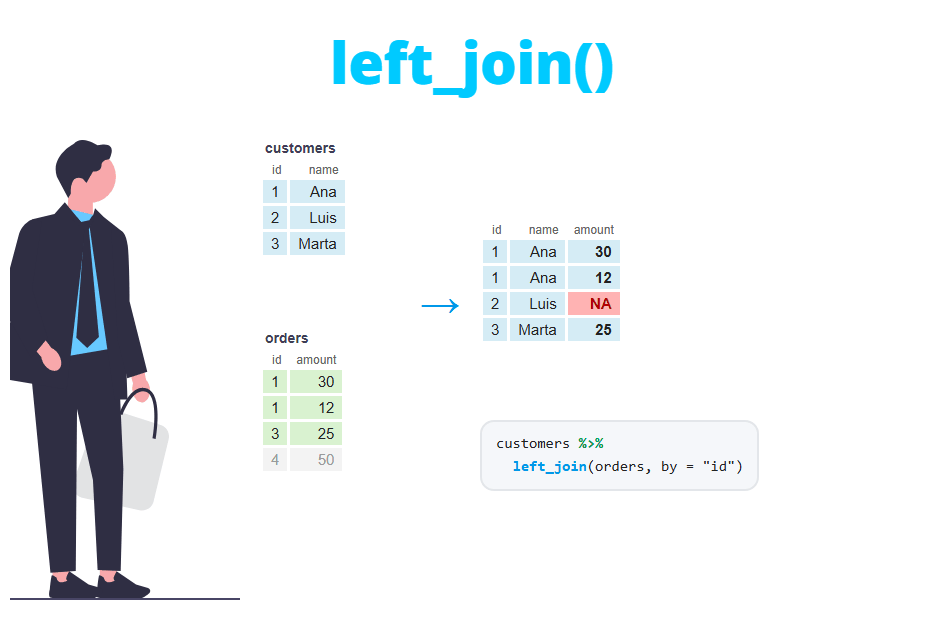
left_join is the most used join. It keeps all the rows of the first table (x) and adds the matching information from the second (y). When a row of x has no match, the new columns are filled with NA, as it happens with David.
left_join(customers, orders, by = "id") id name city order_id amount
1 1 Ana Madrid 101 50
2 1 Ana Madrid 102 20
3 2 Ben London 103 35
4 3 Carla Paris 104 80
5 4 David Rome NA NAright_join
right_join is the opposite: it keeps all the rows of the second table (y). Here order 105 is kept, but its name and city are NA because customer 5 doesn’t exist in customers.
right_join(customers, orders, by = "id") id name city order_id amount
1 1 Ana Madrid 101 50
2 1 Ana Madrid 102 20
3 2 Ben London 103 35
4 3 Carla Paris 104 80
5 5 <NA> <NA> 105 15In practice, right_join(x, y) returns the same rows as left_join(y, x), only with the columns in a different order. Most people stick to left_join and change the order of the tables.
full_join
full_join keeps all the rows of both tables. Rows without a match on either side get NA in the columns coming from the other table.
full_join(customers, orders, by = "id") id name city order_id amount
1 1 Ana Madrid 101 50
2 1 Ana Madrid 102 20
3 2 Ben London 103 35
4 3 Carla Paris 104 80
5 4 David Rome NA NA
6 5 <NA> <NA> 105 15Filtering joins
Filtering joins don’t add any column. They use the second table only to decide which rows of the first table to keep, like a filter based on another data frame. Besides, they never duplicate rows.
semi_join
semi_join keeps the rows of x that have a match in y. The following code returns the customers that placed at least one order. Note that Ana appears only once, even though she has two orders.
semi_join(customers, orders, by = "id") id name city
1 1 Ana Madrid
2 2 Ben London
3 3 Carla Parisanti_join
anti_join keeps the rows of x that don’t have a match in y. It is the easiest way to answer questions like “which customers have no orders?”.
# Customers without orders
anti_join(customers, orders, by = "id")
id name city
1 4 David RomeSwapping the tables is very useful to check the quality of a join before doing it. The following code finds the orders whose customer doesn’t exist, which are the rows that would get NA values in a right_join.
# Orders with an unknown customer
anti_join(orders, customers, by = "id")
order_id id amount
1 105 5 15Which join should you use?
The following table summarizes the rows returned by each join with the sample data (4 customers and 5 orders).
| Function | Rows kept | Adds columns of y |
Rows in the example |
|---|---|---|---|
inner_join(x, y) |
Rows with a match in both tables | Yes | 4 |
left_join(x, y) |
All rows of x |
Yes | 5 |
right_join(x, y) |
All rows of y |
Yes | 5 |
full_join(x, y) |
All rows of both tables | Yes | 6 |
semi_join(x, y) |
Rows of x with a match in y |
No | 3 |
anti_join(x, y) |
Rows of x without a match in y |
No | 1 |
As a rule of thumb, use left_join when you want to add information to a main table without losing rows, inner_join when you only care about complete cases, and anti_join to find what doesn’t match.
Join by multiple columns
Sometimes a single column doesn’t identify a row. In the following example, a sale is identified by the store and the year, so you need to pass both columns to by.
sales <- data.frame(store = c("A", "A", "B", "B"),
                    year = c(2023, 2024, 2023, 2024),
                    sales = c(100, 120, 90, 95))

targets <- data.frame(store = c("A", "A", "B"),
                      year = c(2023, 2024, 2024),
                      target = c(110, 115, 100))

left_join(sales, targets, by = c("store", "year"))
store year sales target
1 A 2023 100 110
2 A 2024 120 115
3 B 2023 90 NA
4 B 2024 95 100If you forget one of the key columns and join only by store, each sale is matched with all the targets of the same store. The result has 6 rows instead of 4, two year columns (year.x and year.y) and a warning:
left_join(sales, targets, by = "store") store year.x sales year.y target
1 A 2023 100 2023 110
2 A 2023 100 2024 115
3 A 2024 120 2023 110
4 A 2024 120 2024 115
5 B 2023 90 2024 100
6 B 2024 95 2024 100
Warning message:
In left_join(sales, targets, by = "store") :
Detected an unexpected many-to-many relationship between `x` and `y`.
ℹ Row 1 of `x` matches multiple rows in `y`.
ℹ Row 1 of `y` matches multiple rows in `x`.
ℹ If a many-to-many relationship is expected, set `relationship =
"many-to-many"` to silence this warning.Join by columns with different names
It is very common that the key has a different name in each table. Suppose that the column id of the orders table is called customer_id. You could rename the column before joining, but it is not necessary.
orders2 <- rename(orders, customer_id = id)
orders2
order_id customer_id amount
1 101 1 50
2 102 1 20
3 103 2 35
4 104 3 80
5 105 5 15You can pass a named vector to by, with the name of the column of x on the left and the name of the column of y on the right. Since dplyr 1.1.0 you can also use the join_by helper, which is more readable and uses == like a condition. Both lines below return the same output.
# Named vector
left_join(customers, orders2, by = c("id" = "customer_id"))

# join_by (dplyr >= 1.1.0)
left_join(customers, orders2, by = join_by(id == customer_id))
id name city order_id amount
1 1 Ana Madrid 101 50
2 1 Ana Madrid 102 20
3 2 Ben London 103 35
4 3 Carla Paris 104 80
5 4 David Rome NA NAThe output keeps only the key column of x (id). If you need several keys with different names, separate them with commas: join_by(id == customer_id, year == order_year).
Columns with the same name: the suffix argument
When both tables have a column with the same name that is not part of the key, dplyr keeps both and adds the suffixes .x and .y. In the following example both tables have a city column.
stores <- data.frame(id = c(1, 2, 3),
                     city = c("Madrid", "Berlin", "Paris"))

left_join(customers, stores, by = "id")
id name city.x city.y
1 1 Ana Madrid Madrid
2 2 Ben London Berlin
3 3 Carla Paris Paris
4 4 David Rome <NA>Use the suffix argument to give them meaningful names:
left_join(customers, stores,
          by = "id",
          suffix = c("_customer", "_store"))
id name city_customer city_store
1 1 Ana Madrid Madrid
2 2 Ben London Berlin
3 3 Carla Paris Paris
4 4 David Rome <NA>If the two columns really contain the same information, it is usually better to add the column to the key (by = c("id", "city")) or to drop it from one of the tables with select before joining.
Why does a left join return more rows?
A frequent surprise is that left_join returns more rows than the original table. Our customers table has 4 rows, but the result of the left join has 5:
nrow(customers)
nrow(left_join(customers, orders, by = "id"))
[1] 4
[1] 5left_join guarantees that no row of x is lost, but not that the number of rows stays the same. If a key of x matches several rows of y, the row of x is repeated once per match. Ana has two orders, so she appears twice. This is correct for a customers-orders relationship (one-to-many), but it is a bug when you expected one row per customer.
To find the keys that are repeated in the second table you can count them:
orders %>%
  count(id) %>%
  filter(n > 1)
id n
1 1 2If you want one row per customer, summarise the orders first (for instance, the total amount per customer with group_by and summarise) and then join the summarised table.
The “many-to-many relationship” warning
Since dplyr 1.1.0, joins warn you when a key is duplicated in both tables, because each duplicated row of x is combined with each duplicated row of y and the number of rows can grow very fast. Consider a stock table and a price table where the price of the pen was entered twice by mistake:
prices <- data.frame(product = c("pen", "pen", "book"),
                     price = c(1, 1.2, 10))

stock <- data.frame(product = c("pen", "pen", "book"),
                    shop = c("S1", "S2", "S1"))

left_join(stock, prices, by = "product")
product shop price
1 pen S1 1.0
2 pen S1 1.2
3 pen S2 1.0
4 pen S2 1.2
5 book S1 10.0
Warning message:
In left_join(stock, prices, by = "product") :
Detected an unexpected many-to-many relationship between `x` and `y`.
ℹ Row 1 of `x` matches multiple rows in `y`.
ℹ Row 1 of `y` matches multiple rows in `x`.
ℹ If a many-to-many relationship is expected, set `relationship =
"many-to-many"` to silence this warning.The warning tells you that row 1 of x matches several rows of y and vice versa. Each pen of the stock table was matched with the two prices, so the result has 5 rows instead of 3. There are two possible fixes, depending on whether the duplicates are an error or not:
- The duplicates are an error (the usual case). Remove them from the lookup table, for instance with
distinct(learn more in how to remove duplicates in R), or add the missing key column toby. - The many-to-many relationship is expected. Set
relationship = "many-to-many"to silence the warning.
# Keep the first price of each product
prices_clean <- prices %>%
  distinct(product, .keep_all = TRUE)

# Join with the clean table
left_join(stock, prices_clean, by = "product")
product shop price
1 pen S1 1
2 pen S2 1
3 book S1 10Don’t set relationship = "many-to-many" just to make the warning go away. In most cases the warning means that the key doesn’t uniquely identify the rows of the lookup table and the result contains duplicated rows that will distort any later sum or mean.
The relationship argument is also useful to validate your assumptions. If each product should have only one price, set relationship = "many-to-one" and dplyr will throw an error instead of returning duplicated rows:
left_join(stock, prices, by = "product", relationship = "many-to-one")Error in `left_join()`:
! Each row in `x` must match at most 1 row in `y`.
ℹ Row 1 of `x` matches multiple rows in `y`.The possible values are "one-to-one", "one-to-many", "many-to-one" and "many-to-many".
NA values after a join
Outer joins (left_join, right_join and full_join) fill with NA the columns of the rows that have no match. That’s why David has NA in order_id and amount after the left join. These NA don’t mean that the data is wrong, but you have to take them into account before computing statistics. If an unmatched customer means “zero amount”, you can replace the NA with coalesce inside mutate:
customers %>%
  left_join(orders, by = "id") %>%
  mutate(amount = coalesce(amount, 0))
id name city order_id amount
1 1 Ana Madrid 101 50
2 1 Ana Madrid 102 20
3 2 Ben London 103 35
4 3 Carla Paris 104 80
5 4 David Rome NA 0If you get many more NA than expected, the keys are probably not matching because of their format: a number stored as character in one table and as numeric in the other, extra white spaces or different capitalization. Check them with anti_join, as shown above. Learn more about missing values in our tutorial about NA values in R.
merge() vs dplyr joins
Base R can do the same joins with the merge function. The following table shows the equivalences:
| base R | dplyr |
|---|---|
merge(x, y, by = "id") |
inner_join(x, y, by = "id") |
merge(x, y, by = "id", all.x = TRUE) |
left_join(x, y, by = "id") |
merge(x, y, by = "id", all.y = TRUE) |
right_join(x, y, by = "id") |
merge(x, y, by = "id", all = TRUE) |
full_join(x, y, by = "id") |
merge(x, y, by.x = "id", by.y = "customer_id") |
inner_join(x, y, by = join_by(id == customer_id)) |
x[x$id %in% y$id, ] |
semi_join(x, y, by = "id") |
x[!x$id %in% y$id, ] |
anti_join(x, y, by = "id") |
The main practical differences are that merge sorts the output by the key by default, while dplyr joins keep the original order of the rows of x, and that merge doesn’t warn you about many-to-many relationships.