Select rows by position with slice() in dplyr
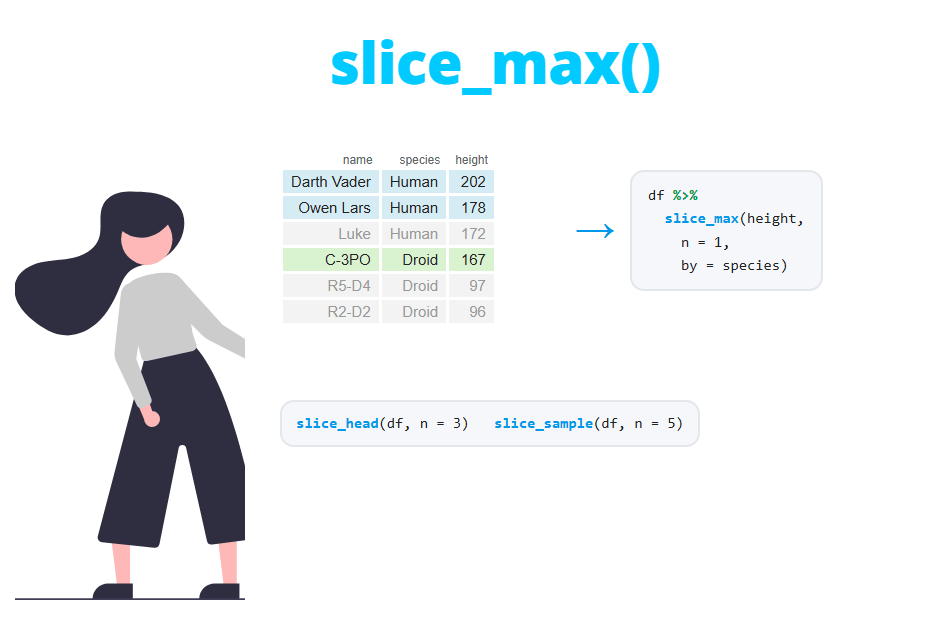
The slice family of functions from dplyr selects rows of a data frame by their position instead of by a condition. slice uses row numbers, slice_head and slice_tail return the first or last rows, slice_min and slice_max return the rows with the lowest or highest values of a variable and slice_sample draws a random sample. In this tutorial you will learn how to use each of them, how to get the top n rows by group, how ties and missing values are handled and which function to choose.
Sample data
In this tutorial we will use a subset of the starwars dataset from dplyr: the characters of three species (humans, droids and gungans) whose mass is known. The resulting data frame contains 26 rows and four columns. The code uses the pipe operator %>% to chain the steps.
library(dplyr)

df <- starwars %>%
  select(name, species, height, mass) %>%
  filter(species %in% c("Human", "Droid", "Gungan"), !is.na(mass))

df
# A tibble: 26 × 4
name species height mass
<chr> <chr> <int> <dbl>
1 Luke Skywalker Human 172 77
2 C-3PO Droid 167 75
3 R2-D2 Droid 96 32
4 Darth Vader Human 202 136
5 Leia Organa Human 150 49
6 Owen Lars Human 178 120
7 Beru Whitesun Lars Human 165 75
8 R5-D4 Droid 97 32
9 Biggs Darklighter Human 183 84
10 Obi-Wan Kenobi Human 182 77
# ℹ 16 more rowsSelect rows by position with slice
The slice function takes a vector of row numbers and returns those rows in the order you specify. It works like df[c(1, 3, 5), ] in base R, but it fits in a pipeline and always returns a tibble:
df %>%
  slice(c(1, 3, 5))
# A tibble: 3 × 4
name species height mass
<chr> <chr> <int> <dbl>
1 Luke Skywalker Human 172 77
2 R2-D2 Droid 96 32
3 Leia Organa Human 150 49You can use the function n(), which returns the number of rows, to refer to the last row without knowing the size of the data. For instance, slice(n()) returns the last row and slice((n() - 2):n()) the last three. If you repeat a position, the row is duplicated: slice(c(1, 1, 2)) returns Luke Skywalker twice.
Remove rows with negative indices
Negative positions remove rows instead of selecting them. This is the easiest way to remove the first row of a data frame, for example when the first line of a file contains a second header or units:
# Remove the first row
df %>%
  slice(-1)
# A tibble: 25 × 4
name species height mass
<chr> <chr> <int> <dbl>
1 C-3PO Droid 167 75
2 R2-D2 Droid 96 32
3 Darth Vader Human 202 136
4 Leia Organa Human 150 49
5 Owen Lars Human 178 120
6 Beru Whitesun Lars Human 165 75
7 R5-D4 Droid 97 32
8 Biggs Darklighter Human 183 84
9 Obi-Wan Kenobi Human 182 77
10 Anakin Skywalker Human 188 84
# ℹ 15 more rowsTo remove several rows use a negative vector, such as slice(-(1:3)) to remove the first three rows or slice(-n()) to remove the last one. Remember the parentheses: -1:3 is the sequence -1, 0, 1, 2, 3, not -1, -2, -3.
Positions out of range and mixed signs
Two behaviors of slice surprise many users. First, positions greater than the number of rows are silently ignored. The data has 26 rows, so asking for rows 25 to 30 returns only two rows, without any warning:
df %>%
  slice(25:30)
# A tibble: 2 × 4
name species height mass
<chr> <chr> <int> <dbl>
1 Jango Fett Human 183 79
2 Raymus Antilles Human 188 79Second, you can’t mix positive and negative positions in the same call:
df %>%
slice(-1, 2)Error in `slice()`:
! Can't compute indices.
Caused by error:
! Can't subset elements with `-1`.
✖ Negative and positive locations can't be mixed.
ℹ Subscript `-1` has a positive value at location 2.If you want to select rows based on their values rather than their position, use the filter function instead.
First and last rows: slice_head and slice_tail
slice_head returns the first rows and slice_tail the last rows of the data. The number of rows is set with the argument n. Note that you have to name it: slice_head(3) throws an error, while slice_head(n = 3) works.
df %>%
slice_head(n = 3)
df %>%
slice_tail(n = 2)# A tibble: 3 × 4
name species height mass
<chr> <chr> <int> <dbl>
1 Luke Skywalker Human 172 77
2 C-3PO Droid 167 75
3 R2-D2 Droid 96 32
# A tibble: 2 × 4
  name            species height  mass
  <chr>           <chr>    <int> <dbl>
1 Jango Fett      Human      183    79
2 Raymus Antilles Human 188 79Instead of a number of rows, you can pass a proportion with the prop argument. The result is rounded down: 10% of 26 rows is 2.6, so you get two rows.
df %>%
  slice_head(prop = 0.1)
# A tibble: 2 × 4
name species height mass
<chr> <chr> <int> <dbl>
1 Luke Skywalker Human 172 77
2 C-3PO Droid 167 75slice_head and slice_tail are equivalent to the head and tail functions of base R, with the advantage that they also work by group, as you will see later. Both use the current order of the rows, so if you want the first rows according to a variable, sort the data first with arrange or use slice_min and slice_max.
Rows with the lowest or highest values: slice_min and slice_max
slice_min and slice_max return the rows with the lowest or highest values of a variable, sorted by that variable. The following code returns the three tallest characters:
df %>%
  slice_max(height, n = 3)
# A tibble: 3 × 4
name species height mass
<chr> <chr> <int> <dbl>
1 Roos Tarpals Gungan 224 82
2 Darth Vader Human 202 136
3 IG-88 Droid 200 140The result is the same as df %>% arrange(desc(height)) %>% slice_head(n = 3), but shorter and easier to read. slice_max also accepts prop, so slice_max(mass, prop = 0.1) returns the 10% heaviest characters.
Ties: the with_ties argument
By default, slice_min and slice_max keep all the tied rows, so the output can have more rows than n. R2-D2 and R5-D4 both weigh 32 kg, so asking for the lightest character returns two rows:
df %>%
  slice_min(mass, n = 1)
# A tibble: 2 × 4
name species height mass
<chr> <chr> <int> <dbl>
1 R2-D2 Droid 96 32
2 R5-D4 Droid 97 32If you need exactly n rows, set with_ties = FALSE. In this case the first tied row in the data is kept:
df %>%
  slice_min(mass, n = 1, with_ties = FALSE)
# A tibble: 1 × 4
name species height mass
<chr> <chr> <int> <dbl>
1 R2-D2 Droid 96 32Which one should you choose? Keep the ties when the result is a ranking that you are going to read or report (it would be unfair to drop R5-D4). Use with_ties = FALSE when the next step requires a fixed number of rows, for instance to join exactly one row per group to another table.
If the tie has to be broken by a second variable, sort the data first and then use slice_head. For example, df %>% arrange(mass, desc(height)) %>% slice_head(n = 1) returns the lightest character and, in case of a tie, the tallest one (R5-D4).
Missing values
slice_min and slice_max place the NA values at the end, but they don’t remove them. If n is larger than the number of non-missing values, the output includes rows with NA, and as all the NA are considered tied, you can get even more rows than expected:
d <- tibble(id = 1:5, value = c(3, NA, 1, 5, NA))

d %>% slice_max(value, n = 4)
d %>% slice_max(value, n = 4, na_rm = TRUE)
# A tibble: 5 × 2
id value
<int> <dbl>
1 4 5
2 1 3
3 3 1
4 2 NA
5 5 NA
# A tibble: 3 × 2
id value
<int> <dbl>
1 4 5
2 1 3
3 3 1With na_rm = TRUE the missing values are removed before selecting the rows.
Top n rows by group
All the slice_* functions work by group. You can group the data with group_by or, since dplyr 1.1.0, use the by argument, which groups only for that operation and returns an ungrouped data frame. Note that in the slice_* functions the argument is called by and not .by as in mutate or summarise. The following code returns the tallest character of each species:
df %>%
  slice_max(height, n = 1, by = species)
# A tibble: 3 × 4
name species height mass
<chr> <chr> <int> <dbl>
1 Darth Vader Human 202 136
2 IG-88 Droid 200 140
3 Roos Tarpals Gungan 224 82Ties also apply within each group. The lightest character per species returns four rows, because the two lightest droids are tied:
df %>%
  slice_min(mass, n = 1, by = species)
# A tibble: 4 × 4
name species height mass
<chr> <chr> <int> <dbl>
1 Padmé Amidala Human 185 45
2 R2-D2 Droid 96 32
3 R5-D4 Droid 97 32
4 Jar Jar Binks Gungan 196 66With by the groups appear in the order in which they first appear in the data. With group_by they are sorted alphabetically and the result stays grouped, so remember to call ungroup afterwards.
First and last row of each group
To select the first row of each group, use slice_head(n = 1) by group, and slice_tail(n = 1) for the last one. This is especially useful when the data is sorted by date or by another variable and you need the first or the most recent record of each subject:
df %>%
  slice_head(n = 1, by = species)

df %>%
  slice_tail(n = 1, by = species)
# A tibble: 3 × 4
name species height mass
<chr> <chr> <int> <dbl>
1 Luke Skywalker Human 172 77
2 C-3PO Droid 167 75
3 Jar Jar Binks Gungan 196 66
# A tibble: 3 × 4
name species height mass
<chr> <chr> <int> <dbl>
1 Raymus Antilles Human 188 79
2 IG-88 Droid 200 140
3 Roos Tarpals Gungan 224 82With grouped data you can also use slice with positions, which are then relative to each group. group_by(species) %>% slice(1) returns the first row of each species and slice(n()) the last one.
Random rows with slice_sample
slice_sample selects random rows. As with the other functions, you can specify a number of rows with n or a proportion with prop. Call set.seed before sampling if you want to get the same rows every time you run the code:
set.seed(123)

df %>%
  slice_sample(n = 3)
# A tibble: 3 × 4
name species height mass
<chr> <chr> <int> <dbl>
1 Boba Fett Human 183 78.2
2 Qui-Gon Jinn Human 193 89
3 Palpatine Human 170 75By default the sample is without replacement, so each row can appear only once. If n is larger than the number of rows, you won’t get an error: slice_sample(n = 30) simply returns the 26 rows in random order. Set replace = TRUE to sample with replacement, as in a bootstrap. Now the same row can appear several times:
set.seed(2)

df %>%
  slice_sample(n = 5, replace = TRUE)
# A tibble: 5 × 4
name species height mass
<chr> <chr> <int> <dbl>
1 Jar Jar Binks Gungan 196 66
2 Boba Fett Human 183 78.2
3 Owen Lars Human 178 120
4 Owen Lars Human 178 120
5 R5-D4 Droid 97 32The weight_by argument gives each row a probability of being selected proportional to a variable. With weight_by = mass the heavier characters are more likely to appear in the sample:
set.seed(1)

df %>%
  slice_sample(n = 3, weight_by = mass)
# A tibble: 3 × 4
name species height mass
<chr> <chr> <int> <dbl>
1 Anakin Skywalker Human 188 84
2 Roos Tarpals Gungan 224 82
3 Lando Calrissian Human 177 79Finally, with by you get a stratified sample, that is, a random sample of each group. slice_sample(n = 1, by = species) returns one random character of each species. For sampling vectors instead of rows, use the base R sample function.
With by, n is the number of rows per group, not in total. If a group has fewer rows than n, all its rows are returned without any warning, so small groups end up with fewer rows than the others. For instance, slice_sample(n = 3, by = species) returns 8 rows instead of 9, because there are only two gungans. Check the size of each group with count() before sampling.
What about top_n?
In older code you will find top_n to get the rows with the highest values. This function is superseded by slice_min and slice_max and it is no longer recommended. Apart from its less intuitive syntax (a negative n returns the lowest values), it doesn’t sort the result:
df %>%
  top_n(2, mass)
# A tibble: 2 × 4
name species height mass
<chr> <chr> <int> <dbl>
1 Darth Vader Human 202 136
2 IG-88 Droid 200 140Darth Vader appears first because he appears first in the data, although IG-88 is heavier. The equivalent modern code is slice_max(mass, n = 2), which returns IG-88 first. The same applies to top_frac, which is replaced by the prop argument.
Base R equivalents
You can also select rows by position without dplyr. The first and last rows are obtained with head and tail, and the rows with the highest values by sorting the data with the order function and keeping the first n rows:
# First three rows
head(df, 3)

# Three heaviest characters
df[order(df$mass, decreasing = TRUE), ][1:3, ]
# A tibble: 3 × 4
name species height mass
<chr> <chr> <int> <dbl>
1 Luke Skywalker Human 172 77
2 C-3PO Droid 167 75
3 R2-D2 Droid 96 32
# A tibble: 3 × 4
name species height mass
<chr> <chr> <int> <dbl>
1 IG-88 Droid 200 140
2 Darth Vader Human 202 136
3 Owen Lars Human 178 120Note that the base R approach doesn’t handle ties: it always returns exactly three rows. To get the first row of each group in base R you can use df[!duplicated(df$species), ], as explained in the tutorial about unique and duplicated.
Which slice function should you use?
The following table summarizes the functions of the slice family and their base R equivalents:
| Function | Selects | Key arguments | Base R equivalent |
|---|---|---|---|
slice() |
Rows by position | Positive or negative positions | df[c(1, 3), ], df[-1, ] |
slice_head() |
First rows | n, prop, by |
head() |
slice_tail() |
Last rows | n, prop, by |
tail() |
slice_min() |
Rows with the lowest values | order_by, n, prop, with_ties, na_rm, by |
df[order(x), ][1:n, ] |
slice_max() |
Rows with the highest values | order_by, n, prop, with_ties, na_rm, by |
df[order(-x), ][1:n, ] |
slice_sample() |
Random rows | n, prop, replace, weight_by, by |
df[sample(nrow(df), n), ] |
In short: use slice when you know the row numbers, slice_head and slice_tail when the order of the data is meaningful, slice_min and slice_max for rankings and top n by group, and slice_sample for random samples.