Remove duplicates in R with unique(), duplicated() and distinct()
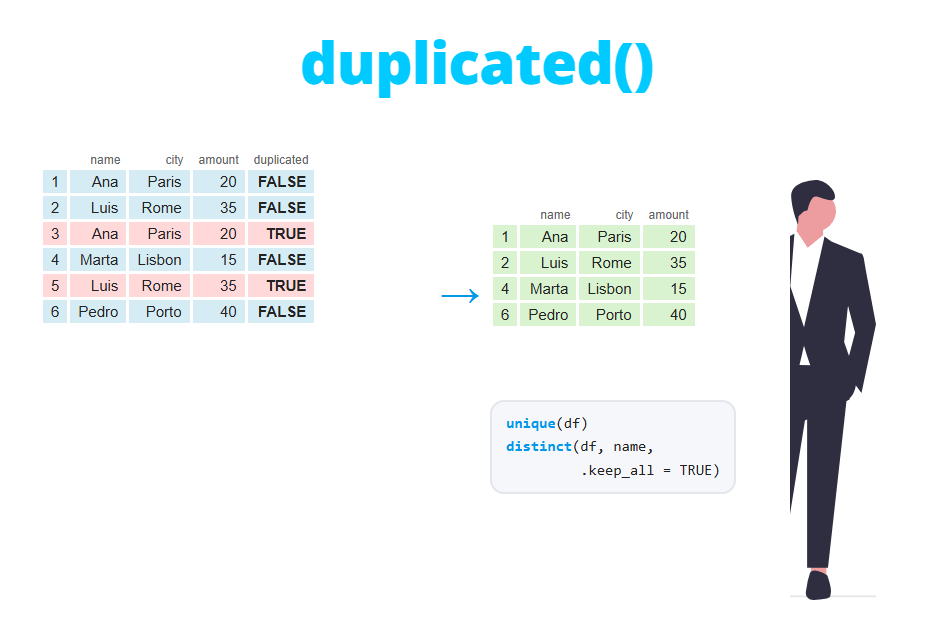
Duplicated values and rows are one of the most common problems when cleaning data. In this tutorial you will learn how to remove duplicates in R with unique and duplicated, how to find and show the duplicated rows, how to remove duplicates based on one or several columns keeping the first or the last occurrence, how to use the distinct function from dplyr and how to count unique values.
Unique values of a vector
The unique function returns the elements of a vector without repetitions, in the order in which they appear for the first time:
x <- c(3, 1, 3, 2, 1, 3)

unique(x)
[1] 3 1 2Note that the output is not sorted. If you want the unique values in ascending order use sort(unique(x)) (see how to sort data in R).
How the duplicated function works
While unique returns the values, duplicated returns a logical vector that tells you, for each element, whether it has appeared before. This is the key to understand it: the first occurrence of each value is FALSE and only the following repetitions are TRUE.
x <- c(3, 1, 3, 2, 1, 3)

duplicated(x)
[1] FALSE FALSE TRUE FALSE TRUE TRUEThe first 3 and the first 1 are FALSE, while the third, fifth and sixth elements are TRUE because their values were already seen. As a consequence:
x[!duplicated(x)]keeps the first occurrence of each value (the same asunique(x)).x[duplicated(x)]returns the repeated elements, as many times as they are repeated.sum(duplicated(x))counts how many elements you would remove.
x[!duplicated(x)]
x[duplicated(x)]
unique(x[duplicated(x)]) # which values are repeated
sum(duplicated(x))
[1] 3 1 2
[1] 3 1 3
[1] 3 1
[1] 3If you only want to know whether there is any duplicate you can use any(duplicated(x)) or anyDuplicated(x), which returns the index of the first duplicated element (3 in this case) or 0 if there are none.
Keep the last occurrence with fromLast
By default the elements are checked from left to right. With fromLast = TRUE the vector is checked from right to left, so the last occurrence of each value is the one considered “original”:
duplicated(x, fromLast = TRUE)[1] TRUE TRUE TRUE FALSE FALSE FALSENow the last 3 (position 6), the last 1 (position 5) and the only 2 are FALSE. This is useful when the data is sorted by date and you want to keep the most recent record.
Remove duplicated rows of a data frame
Consider the following data frame with purchases of several customers. Rows 2 and 3 are identical, row 7 is a copy of row 1 and customer 4 appears twice but with different city and amount:
df <- data.frame(
  id     = c(1, 2, 2, 3, 4, 4, 1),
  name   = c("Ana", "Luis", "Luis", "Marta", "Pedro", "Pedro", "Ana"),
  city   = c("Madrid", "Paris", "Paris", "Rome", "Lisbon", "Porto", "Madrid"),
  amount = c(120, 80, 80, 200, 50, 75, 120)
)

df
id name city amount
1 1 Ana Madrid 120
2 2 Luis Paris 80
3 2 Luis Paris 80
4 3 Marta Rome 200
5 4 Pedro Lisbon 50
6 4 Pedro Porto 75
7 1 Ana Madrid 120Applied to a data frame, duplicated compares entire rows: a row is duplicated only if all its columns match a previous row.
duplicated(df)

# Duplicated rows (the ones that would be removed)
df[duplicated(df), ]
[1] FALSE FALSE TRUE FALSE FALSE FALSE TRUE
id name city amount
3 2 Luis Paris 80
7 1 Ana Madrid 120To remove them, use unique or subset with !duplicated. Both options give the same result:
unique(df)

# Equivalent
df[!duplicated(df), ]
id name city amount
1 1 Ana Madrid 120
2 2 Luis Paris 80
4 3 Marta Rome 200
5 4 Pedro Lisbon 50
6 4 Pedro Porto 75The data frame goes from 7 to 5 rows. The two rows of Pedro are kept because they are not exact duplicates: they differ in city and amount.
To keep the last occurrence instead of the first one, add fromLast = TRUE. Note that now row 7 is kept instead of row 1:
df[!duplicated(df, fromLast = TRUE), ] id name city amount
3 2 Luis Paris 80
4 3 Marta Rome 200
5 4 Pedro Lisbon 50
6 4 Pedro Porto 75
7 1 Ana Madrid 120Remove duplicates based on one or several columns
In practice it is common to consider that two rows are duplicated if they share a key, such as the customer id, even if the rest of the columns differ. In this case pass only that column to duplicated:
# One row per id (first occurrence)
df[!duplicated(df$id), ]
id name city amount
1 1 Ana Madrid 120
2 2 Luis Paris 80
4 3 Marta Rome 200
5 4 Pedro Lisbon 50Now only one row of Pedro remains, the first one (Lisbon). For several columns, select the columns that form the key:
df[!duplicated(df[, c("id", "name")]), ] id name city amount
1 1 Ana Madrid 120
2 2 Luis Paris 80
4 3 Marta Rome 200
5 4 Pedro Lisbon 50When you remove duplicates by a key and the other columns differ, you are choosing which information to discard. Here keeping the first row of Pedro loses the purchase in Porto. Check those rows before removing them, as shown in the next section.
Find and show all the duplicated rows
As duplicated marks the first occurrence as FALSE, df[duplicated(df), ] doesn’t show all the copies, only the repetitions. To see every row that has a duplicate, including the first one, combine the search from the start and from the end with the OR operator |:
dup_all <- duplicated(df) | duplicated(df, fromLast = TRUE)

df[dup_all, ]
id name city amount
1 1 Ana Madrid 120
2 2 Luis Paris 80
3 2 Luis Paris 80
7 1 Ana Madrid 120The same trick works with a key column. This is the most useful way to review conflicting records before deciding what to do with them:
dup_id <- duplicated(df$id) | duplicated(df$id, fromLast = TRUE)

df[dup_id, ]
id name city amount
1 1 Ana Madrid 120
2 2 Luis Paris 80
3 2 Luis Paris 80
5 4 Pedro Lisbon 50
6 4 Pedro Porto 75
7 1 Ana Madrid 120With dplyr you can get the same rows grouping by the key and keeping the groups with more than one row, or count how many times each key appears:
library(dplyr)

df %>%
  count(id, name) %>%
  filter(n > 1)
id name n
1 1 Ana 2
2 2 Luis 2
3 4 Pedro 2Remove duplicates with distinct() from dplyr
The distinct function from dplyr is the equivalent of unique for data frames. Without arguments it removes the rows that are duplicated in all the columns:
library(dplyr)

df %>%
  distinct()
id name city amount
1 1 Ana Madrid 120
2 2 Luis Paris 80
3 3 Marta Rome 200
4 4 Pedro Lisbon 50
5 4 Pedro Porto 75Unlike unique, the row names are renumbered. If you specify columns, distinct uses them to detect the duplicates, but it only returns those columns:
df %>%
  distinct(id, name)
id name
1 1 Ana
2 2 Luis
3 3 Marta
4 4 PedroTo keep the rest of the columns, add .keep_all = TRUE. In that case, for each combination of the key the first row is kept:
df %>%
  distinct(id, .keep_all = TRUE)
id name city amount
1 1 Ana Madrid 120
2 2 Luis Paris 80
3 3 Marta Rome 200
4 4 Pedro Lisbon 50Choose which row to keep
distinct has no fromLast argument, but as it always keeps the first row you can control which one is kept by sorting the data with arrange beforehand. For instance, to keep the purchase with the highest amount of each customer:
df %>%
  arrange(desc(amount)) %>%
  distinct(id, .keep_all = TRUE)
id name city amount
1 3 Marta Rome 200
2 1 Ana Madrid 120
3 2 Luis Paris 80
4 4 Pedro Porto 75Now Pedro’s row is the one from Porto (75) instead of Lisbon (50). If you want the last occurrence in the original order, you can use group_by and slice_tail(n = 1).
Count unique values
To know how many different values a vector has you can use length(unique(x)) in base R or n_distinct from dplyr:
length(unique(df$city))
n_distinct(df$city)
[1] 5
[1] 5n_distinct is more convenient inside summarise and it also accepts several vectors, counting the unique combinations:
df %>%
  summarise(n_ids = n_distinct(id),
            n_cities = n_distinct(city))

# Unique combinations of name and city
n_distinct(df$name, df$city)
n_ids n_cities
1 4 5
[1] 5If you need the number of unique values of every column at once, use sapply(df, n_distinct) (or sapply(df, function(x) length(unique(x))) in base R):
sapply(df, n_distinct) id name city amount
4 4 5 5NA counts as one more value: length(unique(c(1, NA, 2, NA))) and n_distinct(c(1, NA, 2, NA)) both return 3. Use n_distinct(x, na.rm = TRUE) if you don’t want to count the missing values (see how to handle NA in R).
How many times each value is repeated
The number of unique values doesn’t tell you which ones are repeated. For that, use table or count from dplyr, which returns the frequency of each value:
table(df$id)

# Only the repeated values
table(df$id)[table(df$id) > 1]
1 2 3 4
2 2 1 2
1 2 4
2 2 2df %>%
count(city, sort = TRUE) city n
1 Madrid 2
2 Paris 2
3 Lisbon 1
4 Porto 1
5 Rome 1Duplicates that R doesn’t detect
unique and duplicated look for exact matches. In text columns, differences in upper and lower case or extra spaces make R consider them different values:
cities <- c("Madrid", "madrid", "Madrid ", "Paris")

unique(cities)
unique(tolower(trimws(cities)))
[1] "Madrid" "madrid" "Madrid " "Paris"
[1] "madrid" "paris"Before removing duplicates in real data, normalize the text with tolower and trimws, or you will keep “duplicates” that are not removed.
Base R vs dplyr
The following table summarizes the equivalences between base R and dplyr:
| Goal | Base R | dplyr |
|---|---|---|
| Remove duplicated rows | unique(df) or df[!duplicated(df), ] |
distinct(df) |
| Remove duplicates by columns, keeping all columns | df[!duplicated(df[, c("a", "b")]), ] |
distinct(df, a, b, .keep_all = TRUE) |
| Keep the last occurrence | df[!duplicated(df$a, fromLast = TRUE), ] |
group_by(a) %>% slice_tail(n = 1) |
| Show all the duplicated rows | duplicated(df) combined with duplicated(df, fromLast = TRUE) |
group_by(a) %>% filter(n() > 1) |
| Check if there are duplicates | anyDuplicated(df) > 0 |
|
| Count unique values | length(unique(x)) |
n_distinct(x) |
| Frequency of each value | table(x) |
count(df, x) |
As a summary, use unique or distinct when the rows are exact copies, duplicated when you need to inspect the duplicates or keep the last occurrence, and distinct(..., .keep_all = TRUE) combined with arrange when you need to decide which row to keep for each key.