case_when() and if_else() in dplyr: conditional values in R
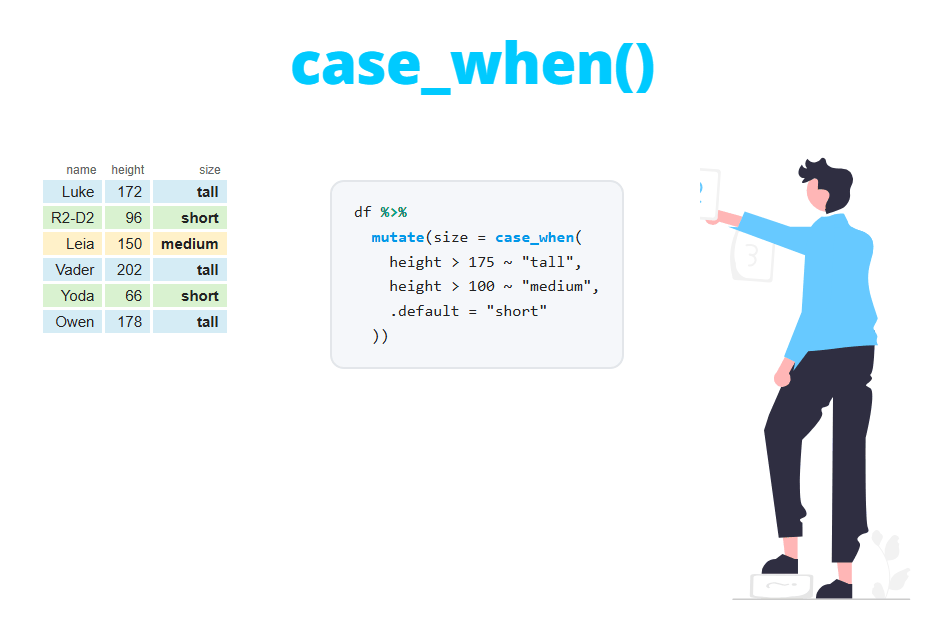
The case_when function from dplyr assigns a value to each element of a vector depending on several conditions, so it is the vectorized alternative to writing many nested ifelse calls. In this tutorial you will learn its syntax, why the order of the conditions matters, how to set a default value, how it handles NA and how to fix the most common type errors. You will also learn the differences between if_else and base R ifelse and when to use case_match instead.
Syntax of case_when
Each argument of case_when is a two-sided formula: on the left of the ~ goes a logical condition and on the right the value to return when that condition is TRUE. The basic syntax is the following:
case_when(
  condition_1 ~ value_1,
  condition_2 ~ value_2,
  ...,
  .default = default_value
)
The conditions are evaluated in order for each element, and the element takes the value of the first condition that is TRUE. Elements that don’t match any condition get the .default value or NA if you don’t specify it.
library(dplyr)

x <- c(5, 12, 18, 25)

case_when(
  x < 10 ~ "low",
  x < 20 ~ "medium",
  .default = "high"
)

# Without a default value
case_when(
  x < 10 ~ "low",
  x < 20 ~ "medium"
)
[1] "low" "medium" "medium" "high"
[1] "low" "medium" "medium" NAIn the second call the value 25 doesn’t meet any condition, so the output is NA.
Create categories inside mutate
In practice, case_when is almost always used inside the mutate function to create a new categorical column. In this tutorial we will use the following data frame with the age and the exam score of eight people. Note that there is a missing value in each numeric column.
library(dplyr)

df <- tibble(
  name = c("Ana", "Luis", "Marta", "Pedro", "Sara", "Juan", "Elena", "Pablo"),
  age = c(15, 34, 67, 22, NA, 45, 71, 17),
  score = c(85, 42, 91, 67, 55, NA, 73, 38)
)

df
# A tibble: 8 × 3
name age score
<chr> <dbl> <dbl>
1 Ana 15 85
2 Luis 34 42
3 Marta 67 91
4 Pedro 22 67
5 Sara NA 55
6 Juan 45 NA
7 Elena 71 73
8 Pablo 17 38The following code creates an age_group column with three categories using the pipe operator %>%. Inside mutate you can refer to the columns directly by their name:
df %>%
  mutate(age_group = case_when(
    age < 18 ~ "Minor",
    age < 65 ~ "Adult",
    .default = "Senior"
  ))
# A tibble: 8 × 4
name age score age_group
<chr> <dbl> <dbl> <chr>
1 Ana 15 85 Minor
2 Luis 34 42 Adult
3 Marta 67 91 Senior
4 Pedro 22 67 Adult
5 Sara NA 55 Senior
6 Juan 45 NA Adult
7 Elena 71 73 Senior
8 Pablo 17 38 MinorNotice that you don’t need to write age >= 18 & age < 65 in the second condition. As Ana and Pablo already matched the first condition, they are never assigned to a later one. Look also at Sara: her age is unknown, but she has been classified as "Senior". You will see why and how to fix it in the NA section.
Order of the conditions: the first match wins
The most common bug with case_when is writing a broad condition before a more specific one. As each element takes the value of the first condition that is TRUE, the specific condition never gets a chance to be applied. In the example below the conditions of the previous section have been swapped:
df %>%
  mutate(age_group = case_when(
    age < 65 ~ "Adult",
    age < 18 ~ "Minor",
    .default = "Senior"
  ))
# A tibble: 8 × 4
name age score age_group
<chr> <dbl> <dbl> <chr>
1 Ana 15 85 Adult
2 Luis 34 42 Adult
3 Marta 67 91 Senior
4 Pedro 22 67 Adult
5 Sara NA 55 Senior
6 Juan 45 NA Adult
7 Elena 71 73 Senior
8 Pablo 17 38 AdultAna (15) and Pablo (17) are now "Adult", because 15 and 17 are also lower than 65. R doesn’t throw any error or warning, so this bug is easy to miss. The rule is simple: write the conditions from the most specific to the most general and leave the catch-all value for the end.
A quick way to check a new categorical column is to count its values with count(df, age_group) or to cross it with the original variable. If a category that should exist has zero rows, a broader condition above it is probably capturing those elements.
Default value: .default vs TRUE ~
Since dplyr 1.1.0, the value for the elements that don’t meet any condition is set with the .default argument. In older code you will find the equivalent TRUE ~ value as the last condition. As TRUE is always true, it catches every element that reached that point:
df %>%
  mutate(age_group = case_when(
    age < 18 ~ "Minor",
    age < 65 ~ "Adult",
    TRUE ~ "Senior"
  ))
# A tibble: 8 × 4
name age score age_group
<chr> <dbl> <dbl> <chr>
1 Ana 15 85 Minor
2 Luis 34 42 Adult
3 Marta 67 91 Senior
4 Pedro 22 67 Adult
5 Sara NA 55 Senior
6 Juan 45 NA Adult
7 Elena 71 73 Senior
8 Pablo 17 38 MinorThe output is the same. Use .default if your dplyr version is 1.1.0 or newer (check it with packageVersion("dplyr")), because it makes the intention clearer and, unlike TRUE ~, it can’t be placed by mistake before other conditions. Keep TRUE ~ only if your code has to run on older versions.
The default value can also be a column. This is useful when you only want to modify some values and keep the rest unchanged. In the following example missing scores are replaced by 0, scores greater than 90 are capped at 90 and the other values stay as they are:
df %>%
  mutate(score2 = case_when(
    is.na(score) ~ 0,
    score > 90 ~ 90,
    .default = score
  ))
# A tibble: 8 × 4
name age score score2
<chr> <dbl> <dbl> <dbl>
1 Ana 15 85 85
2 Luis 34 42 42
3 Marta 67 91 90
4 Pedro 22 67 67
5 Sara NA 55 55
6 Juan 45 NA 0
7 Elena 71 73 73
8 Pablo 17 38 38Multiple conditions with & and |
Each condition can combine several variables with the logical operators & (and) and | (or). The next example classifies the students according to their score and age. Note how the most restrictive condition (high score and under 18) is placed first:
df %>%
  mutate(result = case_when(
    score >= 70 & age < 18 ~ "Young talent",
    score >= 70 ~ "Pass with merit",
    score >= 50 ~ "Pass",
    score < 50 | is.na(score) ~ "Fail or missing"
  ))
# A tibble: 8 × 4
name age score result
<chr> <dbl> <dbl> <chr>
1 Ana 15 85 Young talent
2 Luis 34 42 Fail or missing
3 Marta 67 91 Pass with merit
4 Pedro 22 67 Pass
5 Sara NA 55 Pass
6 Juan 45 NA Fail or missing
7 Elena 71 73 Pass with merit
8 Pablo 17 38 Fail or missingUse && and || only in if statements, where the condition is a single value. Inside case_when you need the vectorized versions & and |, because each condition is evaluated for the whole column at once.
How case_when handles NA values
When a condition evaluates to NA, case_when treats it as FALSE and moves on to the next condition. That’s why Sara, whose age is NA, didn’t match age < 18 or age < 65 and ended up in the .default category, "Senior". This is a silent error: the output has no NA that warns you about the problem.
The solution is to handle missing values explicitly with is.na in the first condition:
df %>%
  mutate(age_group = case_when(
    is.na(age) ~ "Unknown",
    age < 18 ~ "Minor",
    age < 65 ~ "Adult",
    .default = "Senior"
  ))
# A tibble: 8 × 4
name age score age_group
<chr> <dbl> <dbl> <chr>
1 Ana 15 85 Minor
2 Luis 34 42 Adult
3 Marta 67 91 Senior
4 Pedro 22 67 Adult
5 Sara NA 55 Unknown
6 Juan 45 NA Adult
7 Elena 71 73 Senior
8 Pablo 17 38 MinorIf you prefer to keep the missing values as NA, use is.na(age) ~ NA as the first condition or write the last category explicitly (age >= 65 ~ "Senior") instead of using .default. Read the tutorial about NA values in R for other ways to deal with them.
A .default value (or TRUE ~) catches everything that didn’t match before, including the rows with NA in the variables used in the conditions. Whenever your data can contain missing values, add an is.na() condition before the default one.
Common errors: incompatible types
All the values on the right-hand side of the formulas, and the .default value, must be of compatible types. If you mix a character string and a number you will get the following error:
df %>%
  mutate(age_group = case_when(
    age < 18 ~ "Minor",
    .default = 0
  ))
Error in `mutate()`:
ℹ In argument: `age_group = case_when(age < 18 ~ "Minor", .default =
0)`.
Caused by error in `case_when()`:
! Can't combine `..1 (right)` <character> and `.default` <double>.The message tells you which values can’t be combined: ..1 (right) is the right-hand side of the first condition (a character string) and .default is a number. To fix it, use the same type everywhere, for example .default = "0" or .default = "Adult". Numeric types that can be combined, such as integers and doubles, don’t produce an error: case_when(x < 10 ~ 1L, .default = 2.5) returns a double vector.
NA and NA_character_
In dplyr versions prior to 1.1.0, writing TRUE ~ NA in a case_when that returned text produced an error saying that the value must be a character vector, not a logical vector. The workaround was to use the typed missing values NA_character_, NA_real_ or NA_integer_. You will still see them in a lot of code online. Since dplyr 1.1.0 a plain NA works, as it is converted to the type of the other values:
x <- c(5, 12, 18, 25)

case_when(
  x < 10 ~ "low",
  x < 20 ~ "medium",
  .default = NA
)
[1] "low" "medium" "medium" NACan’t recycle error
The values on the right-hand side must have length 1 or the same length as the conditions. If you pass a vector of another length you will get this error:
case_when(x < 10 ~ c("a", "b"), .default = "c")Error in `case_when()`:
! Can't recycle `..1 (left)` (size 4) to match `..1 (right)` (size 2).Inside mutate this usually happens when you use a value computed from another data frame or a summary instead of a column of the same data.
case_when vs cut for numeric intervals
When all the conditions are intervals of the same numeric variable, the cut function is a compact alternative. The following code creates the same three age groups with both functions. With right = FALSE the intervals are closed on the left, so 18 is an adult and 65 is a senior, as with case_when:
ages <- c(15, 34, 67, 22, 45, 71, 17, 18, 65)

cut(ages, breaks = c(-Inf, 18, 65, Inf),
    labels = c("Minor", "Adult", "Senior"), right = FALSE)

case_when(ages < 18 ~ "Minor",
          ages < 65 ~ "Adult",
          .default = "Senior")
[1] Minor Adult Senior Adult Adult Senior Minor Adult Senior
Levels: Minor Adult Senior
[1] "Minor" "Adult" "Senior" "Adult" "Adult" "Senior" "Minor" "Adult"
[9] "Senior"The difference is in the output: cut returns a factor with the levels in the order of the intervals, which is very convenient for tables and plots, while case_when returns a character vector. Use cut for many intervals of a single variable and case_when when the categories depend on several variables or on conditions that are not intervals. If you need a factor from case_when, wrap it with factor(..., levels = c("Minor", "Adult", "Senior")).
if_else vs ifelse
When there are only two outcomes you can use if_else, the dplyr version of the base R ifelse function. Its syntax is if_else(condition, true, false, missing = NULL) and in simple cases it returns the same result:
x <- c(5, NA, 25)

ifelse(x > 10, "high", "low")
if_else(x > 10, "high", "low")
[1] "low" NA "high"
[1] "low" NA "high"However, there are three important differences.
Type strictness
ifelse silently converts the values to a common type, while if_else throws an error if true and false are not compatible:
ifelse(x > 10, "high", 0)
if_else(x > 10, "high", 0)
[1] "0" NA "high"
Error in `if_else()`:
! Can't combine `true` <character> and `false` <double>.With ifelse the number 0 became the string "0" without any warning. The error of if_else may seem annoying, but it stops the problem where it starts instead of several steps later.
The missing argument
if_else has a missing argument to set the value returned when the condition is NA. With ifelse you would need to nest another call with is.na:
if_else(x > 10, "high", "low", missing = "unknown")[1] "low" "unknown" "high"It preserves classes like dates
This is the difference that causes more trouble in practice. ifelse drops the attributes of the values, so a date becomes the number of days since January 1, 1970. if_else keeps the class of the input:
dates <- as.Date(c("2024-01-15", "2024-06-30", "2024-12-31"))

ifelse(dates > as.Date("2024-06-01"), dates, NA)
if_else(dates > as.Date("2024-06-01"), dates, NA)
[1] NA 19904 20088
[1] NA "2024-06-30" "2024-12-31"The same happens with factors: ifelse(f == "a", f, "z") returns the internal integer codes of the factor instead of its labels. For these reasons, inside dplyr pipelines use if_else, and case_when as soon as you need more than two outcomes.
Recode values with case_match
When the conditions only compare a variable with specific values (x == "a", x %in% c("b", "c")), dplyr 1.1.0 offers case_match, a shorter alternative inspired by SQL’s CASE WHEN. You pass the variable once and, on the left of each ~, the value or values to match:
species <- c("Human", "Droid", "Wookiee", "Human", "Gungan", "Ewok")

case_match(species,
           "Human" ~ "Humanoid",
           "Droid" ~ "Robot",
           c("Wookiee", "Ewok") ~ "Furry",
           .default = "Other")
[1] "Humanoid" "Robot" "Furry" "Humanoid" "Other" "Furry"The equivalent case_when call would be case_when(species == "Human" ~ "Humanoid", species == "Droid" ~ "Robot", species %in% c("Wookiee", "Ewok") ~ "Furry", .default = "Other"), which repeats the variable in every condition. In base R you can do something similar for a single value with the switch function, although switch is not vectorized.
Which function should you use?
The following table summarizes the alternatives covered in this tutorial:
| Function | Package | Use it when | Output |
|---|---|---|---|
if_else() |
dplyr | Two outcomes, strict types | Same type as true/false |
ifelse() |
base | Two outcomes, without dplyr | Common type (drops classes) |
case_when() |
dplyr | Several conditions, one or more variables | Common type of the values |
case_match() |
dplyr | Recoding specific values of one variable | Common type of the values |
cut() |
base | Numeric intervals of one variable | Factor |
switch() |
base | A single value (not vectorized) | Any object |
As a rule of thumb, start with case_when: it covers almost every situation and the code is easy to read. Remember to place the specific conditions first, to handle NA explicitly and to keep the same type in all the values.