seq() and rep() in R: create sequences and repeat vectors
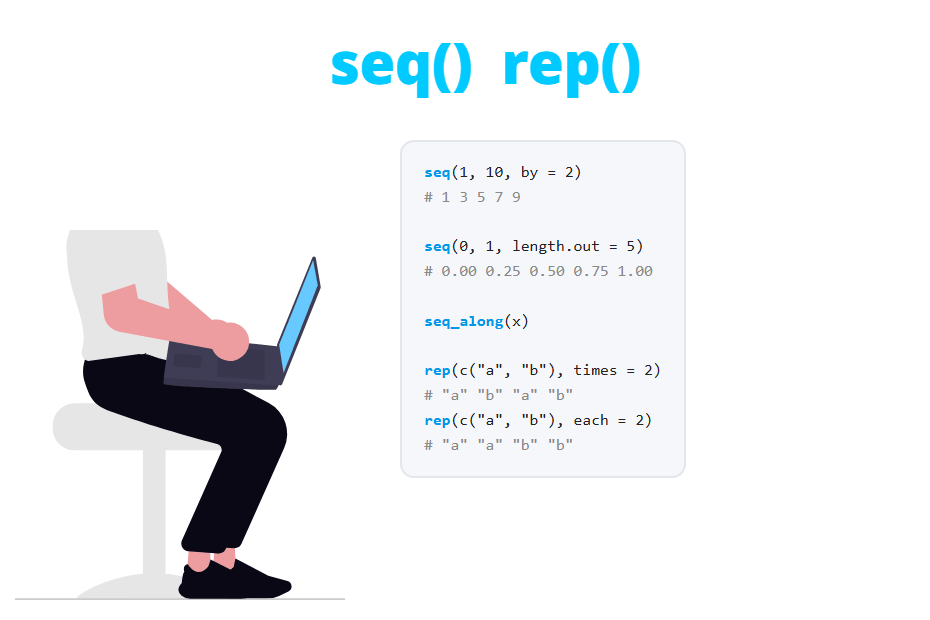
Creating sequences of numbers and repeating values are two of the most common tasks in R. In this tutorial you will learn how to use the : operator, the seq function and its fast versions seq_len and seq_along, and the rep function with its times, each and length.out arguments. You will also see the mistakes that cause most bugs: the precedence of :, the floating point surprise of seq with decimals and the 1:length(x) loop over an empty vector.
The : operator
The quickest way to create a sequence of numbers in R is the : operator, which returns all the values from the first number to the second in steps of 1:
1:10
5:1    # Decreasing sequence
-2:2
1.5:4  # Steps of 1, it stops before exceeding 4
[1] 1 2 3 4 5 6 7 8 9 10
[1] 5 4 3 2 1
[1] -2 -1 0 1 2
[1] 1.5 2.5 3.5Note that if the first value is greater than the second, : counts down instead of returning an empty vector. This is useful sometimes, but it is also the origin of the loop bug you will see later. When both values are whole numbers the result is an integer vector.
Precedence of the : operator
The : operator has higher precedence than the arithmetic operators +, -, * and /, but lower than ^ and the unary minus. This means that 1:n-1 is not “from 1 to n - 1”, but “the sequence from 1 to n, minus 1”:
n <- 5

1:n-1    # (1:n) - 1
1:(n-1)  # What you probably wanted
[1] 0 1 2 3 4
[1] 1 2 3 4The same happens with other operations. Check the following examples:
2*1:3    # 2 * (1:3)
-1:3     # (-1):3, the minus applies to 1 first
-(1:3)
1:n^2    # 1:(n^2), the power goes first
[1] 2 4 6
[1] -1 0 1 2 3
[1] -1 -2 -3
[1] 1 2 3 4 5 6 7 8 9 10 11 12 13 14 15 16 17 18 19 20 21 22 23 24 25When the limits of a sequence are expressions, always use parentheses: 1:(n - 1), (i + 1):n. They cost nothing and avoid the most common error with :. You can see the full precedence table in the R operators tutorial.
The seq function
When you need steps different from 1 or a fixed number of values, use the seq function. Its syntax is the following:
seq(from = 1,        # Starting value
    to = 1,          # End value
    by,              # Increment of the sequence
    length.out,      # Desired length of the sequence
    along.with)      # Take the length from this object
You will usually specify from, to and one of by or length.out. If you specify all of them R will return an error, because the sequence would be over-determined.
Sequences with a given step: by
The by argument sets the increment between consecutive values. The sequence starts at from and stops at the last value that doesn’t exceed to:
seq(1, 10, by = 2)
seq(0, 100, by = 25)
seq(1, 10, by = 4)   # 10 is not reached
[1] 1 3 5 7 9
[1] 0 25 50 75 100
[1] 1 5 9For a decreasing sequence the step must be negative. If you write a positive by when from is greater than to, R throws an error:
seq(10, 1, by = -3)
seq(10, 1, by = 3)
[1] 10 7 4 1
Error in seq.default(10, 1, by = 3) : wrong sign in 'by' argumentWithout by, seq(10, 1) works like 10:1 and counts down in steps of 1.
Sequences with a given length: length.out
Sometimes you don’t care about the step, but about the number of values. In that case use length.out (you can abbreviate it to length) and R will calculate the step for you:
seq(0, 1, length.out = 5)
seq(2, 20, length.out = 4)
seq(1, 2, length.out = 4)
[1] 0.00 0.25 0.50 0.75 1.00
[1] 2 8 14 20
[1] 1.000000 1.333333 1.666667 2.000000With length.out both limits are always included, which is not guaranteed with by. This is the option you want when you create a grid of values for a plot.
Sequences with decimals and the floating point surprise
You can create sequences with decimal steps, but be careful when you compare the result with other numbers. The following sequence looks perfect, but none of its elements is equal to 0.3:
x <- seq(0, 1, by = 0.1)
x

x[4]
x[4] == 0.3
which(x == 0.3)
[1] 0.0 0.1 0.2 0.3 0.4 0.5 0.6 0.7 0.8 0.9 1.0
[1] 0.3
[1] FALSE
integer(0)The reason is that numbers like 0.1 can’t be represented exactly in binary, so seq accumulates small errors. R prints the value rounded, but if you ask for more digits you can see the real value:
print(x[4], digits = 17)[1] 0.30000000000000004To compare decimal numbers use a tolerance, round the values first or use all.equal:
which(abs(x - 0.3) < 1e-8)       # Tolerance
which(round(x, 10) == 0.3)       # Rounding
isTRUE(all.equal(x[4], 0.3))     # all.equal
[1] 4
[1] 4
[1] TRUEseq with a single argument has a confusing behavior. seq(10) returns 1:10, but if you pass a vector of length greater than 1 it returns its indices: seq(c(2, 7)) returns 1 2, not the numbers from 2 to 7. If x can have one or several elements, seq(x) will behave differently depending on its length. Use seq_len or seq_along instead.
The seq_len and seq_along functions
seq_len(n) creates the integer sequence from 1 to n, and seq_along(x) creates the sequence from 1 to the length of x. They are faster than seq and, more importantly, they handle the length 0 case correctly:
seq_len(5)
seq_len(0)

x <- c(10, 20, 30)
seq_along(x)
[1] 1 2 3 4 5
integer(0)
[1] 1 2 3Note that seq_len(0) returns an empty vector, while 1:0 returns 1 0. That difference is the reason to prefer these functions.
The 1:length(x) bug in for loops
Many people write for loops with for (i in 1:length(x)). It works while x has at least one element, but if x is empty the loop runs twice, with i = 1 and i = 0:
x <- numeric(0) # Empty vector

length(x)
for (i in 1:length(x)) {
  print(paste("Iteration", i, "- value:", x[i]))
}
[1] 0
[1] "Iteration 1 - value: NA"
[1] "Iteration 0 - value: "In a real script the loop body would work with an NA and an empty element, and the error (or the wrong result) would appear far from its cause. With seq_along the loop simply doesn’t run when the vector is empty, and runs normally otherwise:
x <- numeric(0)
for (i in seq_along(x)) {
  print(paste("Iteration", i, "- value:", x[i]))
}

x <- c(4, 7, 1)
for (i in seq_along(x)) {
  print(paste("Iteration", i, "- value:", x[i]))
}
[1] "Iteration 1 - value: 4"
[1] "Iteration 2 - value: 7"
[1] "Iteration 3 - value: 1"The same applies to the rows of a data frame. Filtering can return zero rows without you noticing. For example, no day in airquality has a temperature above 100 ºF:
hot <- subset(airquality, Temp > 100)
nrow(hot)

1:nrow(hot)        # Wrong: iterates over rows 1 and 0
seq_len(nrow(hot)) # Right: no iterations
[1] 0
[1] 1 0
integer(0)Rule of thumb: use seq_along(x) to iterate over the elements of a vector or list, and seq_len(nrow(df)) or seq_len(n) when you have a number.
The rep function
The rep function repeats the elements of a vector or a list. Its syntax is the following:
rep(x,          # Vector or list to be repeated
    times,      # Number of times to repeat the whole vector (or each element)
    each,       # Number of times to repeat each element
    length.out) # Desired length of the output
The difference between times and each is the order of the output: times repeats the whole vector, while each repeats each element before moving on to the next one.
rep(1:3, times = 2)
rep(1:3, each = 2)
[1] 1 2 3 1 2 3
[1] 1 1 2 2 3 3Since times is the second argument, rep(1:3, 2) is the same as rep(1:3, times = 2). Write the argument name anyway: when you come back to the code it is much clearer.
Different number of repetitions for each element
If times is a vector with the same length as x, each element is repeated the corresponding number of times. This is very useful to create groups of different sizes:
rep(1:3, times = c(3, 1, 2))
rep(c("A", "B"), times = c(3, 2))
[1] 1 1 1 2 3 3
[1] "A" "A" "A" "B" "B"Combine each, times and length.out
You can combine each and times. In that case R first applies each and then repeats the result times times. With length.out the output is cut (or recycled) to the desired length:
rep(1:3, each = 2, times = 2)
rep(1:3, length.out = 7)
[1] 1 1 2 2 3 3 1 1 2 2 3 3
[1] 1 2 3 1 2 3 1length.out is handy when the length of the output doesn’t depend on the number of repetitions, for example, to create an alternating pattern for a vector of 7 elements. If you specify length.out, the times argument is ignored.
Repeat characters and factors to create group labels
rep works with any type of vector, not just numbers. A typical use case is creating the group column of a data set, like in an experimental design with 3 groups and 2 replicates:
data.frame(group = rep(c("ctrl", "trt1", "trt2"), each = 2),
           replicate = rep(1:2, times = 3))
group replicate
1 ctrl 1
2 ctrl 2
3 trt1 1
4 trt1 2
5 trt2 1
6 trt2 2Note how each and times work together here: the group changes every 2 rows and the replicate number goes 1, 2, 1, 2… If you repeat a factor, the result keeps the levels:
f <- factor(c("low", "high", "low"), levels = c("low", "high"))
rep(f, times = 2)
[1] low high low low high low
Levels: low highTo create a factor of groups directly you also have the gl function (generate levels), which is equivalent to factor(rep(..., each = ...)):
gl(3, 2, labels = c("ctrl", "trt1", "trt2"))[1] ctrl ctrl trt1 trt1 trt2 trt2
Levels: ctrl trt1 trt2Reverse a sequence with rev
To reverse the order of a sequence (or of any vector) use rev. It is the simplest option when you already have the sequence and you don’t want to rewrite the call to seq:
rev(1:5)
rev(seq(0, 1, by = 0.25))
[1] 5 4 3 2 1
[1] 1.00 0.75 0.50 0.25 0.00Keep in mind that rev only reverses the order of the elements. If you want to sort them from the largest to the smallest value, use sort with decreasing = TRUE.
Common use cases
Create sample data
Combining seq_len, rep and a random generator you can create a small data set to test your code in a few lines. Remember to set a seed if you want the same values every time:
set.seed(1)
data <- data.frame(id = seq_len(6),
                   group = rep(c("A", "B"), each = 3),
                   value = round(rnorm(6, mean = 10, sd = 2), 1))
data
id group value
1 1 A 8.7
2 2 A 10.4
3 3 A 8.3
4 4 B 13.2
5 5 B 10.7
6 6 B 8.4You can also build identifiers combining a sequence with paste0, for instance paste0("ID_", seq_len(5)), which returns "ID_1" "ID_2" "ID_3" "ID_4" "ID_5".
Grid of values to plot a curve
To plot a mathematical function or a density, like the ones of the normal or the F distribution, you need a grid of values for the X-axis. Use seq with length.out, because the number of points determines how smooth the curve looks:
x_coarse <- seq(-3, 3, length.out = 7)
x_fine <- seq(-3, 3, length.out = 200)

plot(x_fine, dnorm(x_fine), type = "l", lwd = 2, col = "blue",
     xlab = "x", ylab = "Density")
lines(x_coarse, dnorm(x_coarse), type = "b", lwd = 2, col = "red", pch = 19)
legend("topright", legend = c("length.out = 200", "length.out = 7"),
       col = c("blue", "red"), lwd = 2, box.lty = 0)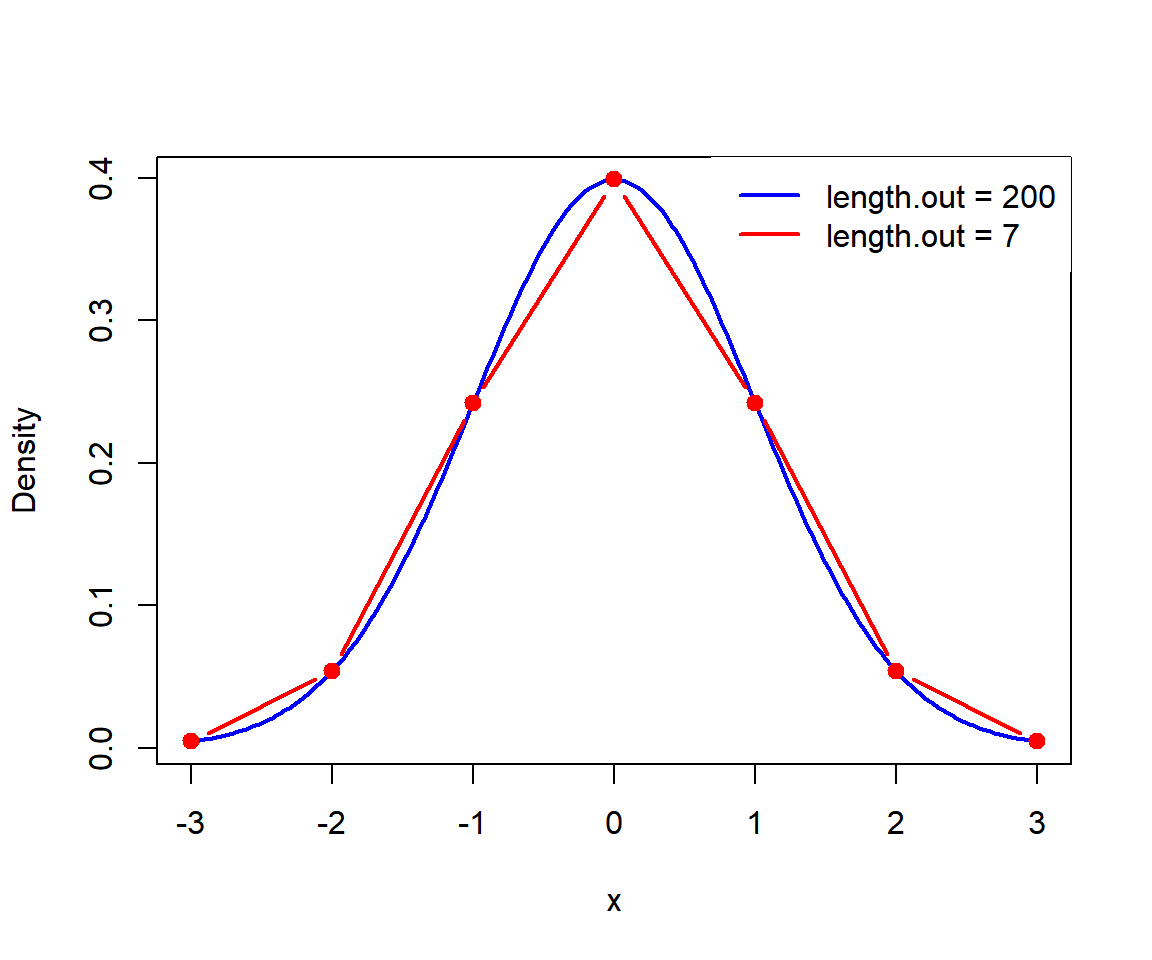
With 7 points the curve is a polygon. Between 100 and 500 points are enough for most plots.
seq also works with dates. For instance, seq(as.Date("2026-01-01"), by = "month", length.out = 4) returns the first day of the first four months of 2026. You can learn more in the dates in R tutorial.
Which function should you use?
The following table summarizes the options to create sequences and repetitions in R:
| Code | Output | When to use it |
|---|---|---|
1:5 |
1 2 3 4 5 | Quick integer sequences with fixed limits |
seq(1, 10, by = 3) |
1 4 7 10 | A given step, including decimals or negative steps |
seq(0, 1, length.out = 5) |
0 0.25 0.5 0.75 1 | A given number of values, like grids for plots |
seq_len(n) |
1 … n (empty if 0) | Loops and indices when you have a number |
seq_along(x) |
1 … length(x) | Loops over the elements of a vector or list |
rep(x, times = 2) |
1 2 3 1 2 3 | Repeat the whole vector |
rep(x, each = 2) |
1 1 2 2 3 3 | Repeat each element (group labels) |
rep(x, length.out = 7) |
1 2 3 1 2 3 1 | Recycle a pattern to a fixed length |
rev(x) |
3 2 1 | Reverse the order of an existing vector |
In the table, x is 1:3. As a general rule, use : only with constant limits, seq_len and seq_along in loops and functions, and seq when you need a step or a length different from the default.