Working with dates in R
R stores dates in a special class called Date, which allows you to sort them, subtract them or create sequences of dates. In this tutorial you will learn how to convert character strings and numbers to dates with as.Date, which format codes to use, why you get NA when converting, how to extract the year or the month with format, how to compute the difference between dates with difftime and how to do the same tasks with the lubridate package.
The Date class
When you read a file, the dates usually arrive as character strings ("2024-03-15"). They look like dates, but for R they are just text: you can’t subtract them and they would be sorted alphabetically. The as.Date function converts them to the Date class:
x <- as.Date("2024-03-15")

x
class(x)
[1] "2024-03-15"
[1] "Date"Internally, a Date is the number of days since January 1, 1970. That is why you can add or subtract days to a date and why converting it to numeric returns an integer:
as.numeric(x)[1] 19797If what you need is the current date or time, use the Sys.Date and Sys.time functions explained in the tutorial about the system date and time in R. Both return objects of the classes covered in this tutorial.
Convert a string to date with as.Date
By default, as.Date only understands the ISO format "year-month-day" ("2024-03-15") and "year/month/day" ("2024/03/15"). For any other format you have to describe the format of your strings with the format argument, using the codes of the next section:
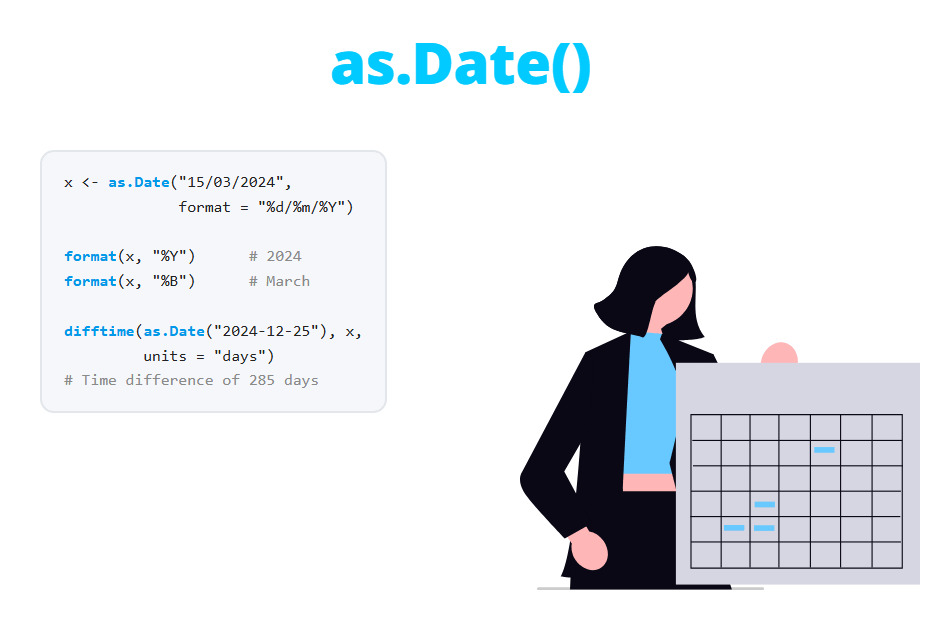
as.Date("15/03/2024", format = "%d/%m/%Y")
as.Date("03-15-2024", format = "%m-%d-%Y")
as.Date("15.03.24", format = "%d.%m.%y")
as.Date("15-Mar-2024", format = "%d-%b-%Y")
as.Date("March 15, 2024", format = "%B %d, %Y")
[1] "2024-03-15"
[1] "2024-03-15"
[1] "2024-03-15"
[1] "2024-03-15"
[1] "2024-03-15"The format string must reproduce the whole string, including the separators (/, -, ., spaces or commas). The output is always shown in ISO format, regardless of the input format.
Date format codes
The following table shows the most used format codes and the value they represent for the date 2024-03-15. These codes are used both to read dates with as.Date and to write them with format.
| Code | Meaning | Example |
|---|---|---|
%d |
Day of the month (01-31) | 15 |
%m |
Month as a number (01-12) | 03 |
%y |
Year without century (00-99) | 24 |
%Y |
Year with century | 2024 |
%b |
Abbreviated month name | Mar |
%B |
Full month name | March |
%a |
Abbreviated weekday name | Fri |
%A |
Full weekday name | Friday |
%j |
Day of the year (001-366) | 075 |
%u |
Weekday as a number, Monday = 1 (1-7) | 5 |
%w |
Weekday as a number, Sunday = 0 (0-6) | 5 |
%U |
Week of the year, starting on Sunday (00-53) | 10 |
%V |
ISO 8601 week of the year (01-53) | 11 |
Be careful with %y: years 00 to 68 are interpreted as 2000-2068 and years 69 to 99 as 1969-1999. A birth date like "01/05/68" becomes "2068-05-01", so use four-digit years whenever you can.
Why does as.Date return NA?
This is the most common problem when working with dates. If the string doesn’t match the format, as.Date returns NA without any warning. In the following example the date is in ISO format, but the format says day-month-year:
as.Date("2024-03-15", format = "%d-%m-%Y")[1] NAYou will also get NA for dates that don’t exist, such as February 30, and when the month name doesn’t match the language of your system (see the locale section).
Without a format, the behavior is different and even more dangerous. If the first value doesn’t look like a date at all, you get an error:
as.Date("hello")Error in charToDate(x) :
character string is not in a standard unambiguous formatBut if it starts with numbers, R may silently return a wrong date. Here "15/03/2024" is read as year 15, month 3, day 20:
as.Date("15/03/2024")[1] "0015-03-20"Always specify the format argument unless your dates are in ISO format, and after converting a column count the missing values with sum(is.na(x)). If the number of NA is larger than before the conversion, some strings didn’t match the format.
Columns with several date formats
Sometimes the same column contains dates written in different ways. The tryFormats argument doesn’t solve this: it chooses the first format that works for the first non-missing value and applies it to the whole vector:
dates <- c("2024-03-15", "15/03/2024", "2024-04-01")

as.Date(dates, tryFormats = c("%Y-%m-%d", "%d/%m/%Y"))
[1] "2024-03-15" NA "2024-04-01"Instead, convert the vector with each format and fill the missing values of the first attempt with the second one:
d1 <- as.Date(dates, format = "%Y-%m-%d")
d2 <- as.Date(dates, format = "%d/%m/%Y")

d1[is.na(d1)] <- d2[is.na(d1)]
d1
[1] "2024-03-15" "2024-03-15" "2024-04-01"You might think of using the ifelse function for this, but ifelse drops the Date class and returns the number of days:
ifelse(is.na(d1), d2, d1)[1] 19797 19797 19814If you use dplyr, if_else and coalesce(d1, d2) keep the class.
Convert numbers to dates
Dates can also arrive as numbers, especially from Excel. Excel stores dates as the number of days since December 30, 1899, so when a date column is imported as numbers (for instance 45366) you need to set that origin:
as.Date(c(45366, 45383), origin = "1899-12-30")[1] "2024-03-15" "2024-04-01"The origin is December 30 and not January 1 because Excel counts 1900 as a leap year, which it wasn’t. Files created with the old 1904 date system of Excel for Mac need origin = "1904-01-01" instead. Packages to read Excel files usually convert these columns automatically, so you will mostly need this when the column contains some text and is imported as character or numeric.
If the number is a count of days since 1970 (the R origin), you don’t need the origin argument in R 4.3.0 or newer. In older versions you need origin = "1970-01-01":
as.Date(19797)[1] "2024-03-15"A common mistake is to pass numbers like 20240315 directly. R interprets them as days since 1970 and the result is absurd. Convert them to character first and specify the format:
as.Date(20240315)
as.Date(as.character(20240315), format = "%Y%m%d")
[1] "57386-02-06"
[1] "2024-03-15"Format dates and extract the year, month or day
The format function does the opposite of as.Date: it converts a date into a character string using the codes of the table above. You can use it to display the date in any format:
x <- as.Date("2024-03-15")

format(x, "%d/%m/%Y")
format(x, "%B %d, %Y")
[1] "15/03/2024"
[1] "March 15, 2024"format is also the base R way to extract the year, month or day from a date. Note that the result is always a character string, so use as.numeric if you need to do calculations with it:
format(x, "%Y")
as.numeric(format(x, "%Y"))
as.numeric(format(x, "%m"))
format(x, "%A")
[1] "2024"
[1] 2024
[1] 3
[1] "Friday"The weekdays and months functions return the name of the weekday and the month, equivalent to format(x, "%A") and format(x, "%B").
Month and weekday names depend on the locale
The names returned by %B, %b, %A, %a, weekdays and months depend on the language of your system (the locale). The outputs of this tutorial were obtained with an English locale: on a computer configured in Spanish, format(x, "%B") returns "marzo" instead of "March".
This also affects reading. as.Date("15-Mar-2024", format = "%d-%b-%Y") returns NA if the locale is not English. You can check the locale with Sys.getlocale("LC_TIME") and change it for the current session:
Sys.setlocale("LC_TIME", "C") # English month and weekday namesIf you share code, avoid relying on month names: numeric formats such as %Y-%m-%d work the same in every locale.
Difference between dates
As dates are numbers of days, you can subtract them directly. The result is an object of class difftime:
start <- as.Date("2024-01-15")
end <- as.Date("2024-03-15")

end - start
Time difference of 60 daysTo choose the units, use the difftime function. The available units are "secs", "mins", "hours", "days" and "weeks":
difftime(end, start, units = "weeks")Time difference of 8.571429 weeksA difftime object prints the units next to the value, which is convenient to read but can cause problems in calculations or when saving the result in a data frame. Use as.numeric to keep only the number. You can also pass the units to as.numeric:
as.numeric(end - start)
as.numeric(difftime(end, start, units = "weeks"))
[1] 60
[1] 8.571429There are no "months" or "years" units, because months and years don’t have a fixed length:
difftime(end, start, units = "months")Error in match.arg(units) :
'arg' should be one of "auto", "secs", "mins", "hours", "days", "weeks"An approximate number of years can be obtained dividing the days by 365.25. For instance, to calculate the age of a person:
birth <- as.Date("1990-07-20")
today <- as.Date("2024-03-15")

floor(as.numeric(difftime(today, birth, units = "days")) / 365.25)
[1] 33For exact ages in years or months, the lubridate approach shown at the end of this tutorial is more reliable.
You can also add or subtract a number of days to a date, compare dates and compute the differences between consecutive dates with diff:
start + 30
start > end
diff(as.Date(c("2024-01-01", "2024-01-15", "2024-03-01")))
[1] "2024-02-14"
[1] FALSE
Time differences in days
[1] 14 46Sequences of dates
The seq function works with dates. The by argument accepts "day", "week", "month", "quarter" and "year", optionally preceded by a number ("2 weeks"). See the seq and rep tutorial for the rest of its arguments.
seq(as.Date("2024-01-01"), as.Date("2024-01-10"), by = "day")
seq(as.Date("2024-01-01"), by = "week", length.out = 5)
seq(as.Date("2024-01-01"), by = "month", length.out = 6)
[1] "2024-01-01" "2024-01-02" "2024-01-03" "2024-01-04" "2024-01-05"
[6] "2024-01-06" "2024-01-07" "2024-01-08" "2024-01-09" "2024-01-10"
[1] "2024-01-01" "2024-01-08" "2024-01-15" "2024-01-22" "2024-01-29"
[1] "2024-01-01" "2024-02-01" "2024-03-01" "2024-04-01" "2024-05-01"
[6] "2024-06-01"Monthly sequences that start at the end of a month give unexpected results. February 31 doesn’t exist, so R moves to March 2:
seq(as.Date("2024-01-31"), by = "month", length.out = 4)[1] "2024-01-31" "2024-03-02" "2024-03-31" "2024-05-01"If you need the last day of each month, create the sequence with the first days and subtract one day: seq(as.Date("2024-02-01"), by = "month", length.out = 4) - 1.
Group dates by month with cut
The cut function also has a method for dates. With breaks = "month" (or "week", "quarter", "year") it assigns each date to its period, which is very useful to aggregate data by month:
sales <- data.frame(
  date = as.Date(c("2024-01-05", "2024-01-20", "2024-02-03", "2024-02-28", "2024-03-10")),
  amount = c(100, 150, 80, 120, 200)
)

sales$month <- cut(sales$date, breaks = "month")
sales
date amount month
1 2024-01-05 100 2024-01-01
2 2024-01-20 150 2024-01-01
3 2024-02-03 80 2024-02-01
4 2024-02-28 120 2024-02-01
5 2024-03-10 200 2024-03-01The new column is a factor whose levels are the first day of each month. Now you can sum the amounts by month with aggregate:
aggregate(amount ~ month, data = sales, FUN = sum) month amount
1 2024-01-01 250
2 2024-02-01 200
3 2024-03-01 200An alternative is to group by format(date, "%Y-%m"). The difference is that cut also creates the levels of the months without data in the range, so empty months appear with a count of zero in tables.
Dates with time: POSIXct
The Date class only stores days. If you also need the time, use the POSIXct class, which stores the number of seconds since 1970-01-01 00:00:00 UTC. It is created with as.POSIXct, which accepts the same format codes plus %H (hours), %M (minutes) and %S (seconds):
t1 <- as.POSIXct("2024-03-15 14:30:00", tz = "UTC")
t2 <- as.POSIXct("15/03/2024 18:45", format = "%d/%m/%Y %H:%M", tz = "UTC")

t1
t2 - t1
difftime(t2, t1, units = "mins")
[1] "2024-03-15 14:30:00 UTC"
Time difference of 4.25 hours
Time difference of 255 minsNote that when you subtract date-times, R chooses the units automatically (hours in this case). Specify them with difftime if you need a fixed unit.
The main source of problems with POSIXct are time zones. If you don’t set tz, R uses the time zone of your computer, so the same code can give different results on different machines. Moreover, converting a date-time to Date can change the day. In R 4.3.2, as.Date uses UTC by default, so 23:30 in New York (03:30 of the next day in UTC) becomes the next day:
t3 <- as.POSIXct("2024-03-15 23:30:00", tz = "America/New_York")

as.Date(t3)
as.Date(t3, tz = "America/New_York")
[1] "2024-03-16"
[1] "2024-03-15"If your data only contains days, use the Date class: it is simpler and doesn’t have time zone problems.
Dates with lubridate
The lubridate package (part of the tidyverse) simplifies most of the previous tasks. Instead of writing format codes, you choose a function whose name gives the order of the components: ymd for year-month-day, dmy for day-month-year, mdy for month-day-year, etc. The separators don’t matter:
library(lubridate)

ymd("2024-03-15")
dmy(c("15/03/2024", "15-03-2024", "15.03.2024"))
mdy("March 15, 2024")
[1] "2024-03-15"
[1] "2024-03-15" "2024-03-15" "2024-03-15"
[1] "2024-03-15"Unlike as.Date, lubridate warns you when a value can’t be parsed:
ymd("2024-02-30")[1] NA
Warning message:
1 failed to parse.To extract components, lubridate returns numbers directly:
x <- ymd("2024-03-15")

year(x)
month(x)
day(x)
wday(x, week_start = 1)  # 1 = Monday
[1] 2024
[1] 3
[1] 15
[1] 5floor_date rounds a date down to the start of its period (an alternative to cut that returns a Date), and the %m+% operator adds months without overflowing to the next month. Compare it with adding months(1) to January 31:
floor_date(x, "month")
ymd("2024-01-31") + months(1)
ymd("2024-01-31") %m+% months(1:3)
[1] "2024-03-01"
[1] NA
[1] "2024-02-29" "2024-03-31" "2024-04-30"The exact age in completed years can be computed with an interval divided by years:
interval(ymd("1990-07-20"), ymd("2024-03-15")) %/% years(1)[1] 33The following table summarizes the equivalences between base R and lubridate:
| Task | Base R | lubridate |
|---|---|---|
| Convert day/month/year text | as.Date(x, format = "%d/%m/%Y") |
dmy(x) |
| Convert year-month-day text | as.Date(x) |
ymd(x) |
| Extract the year | as.numeric(format(x, "%Y")) |
year(x) |
| Extract the month | as.numeric(format(x, "%m")) |
month(x) |
| Weekday name | weekdays(x) |
wday(x, label = TRUE) |
| First day of the month | as.Date(cut(x, "month")) |
floor_date(x, "month") |
| Add months | seq(x, by = "month", length.out = 2)[2] |
x %m+% months(1) |
| Difference in days | as.numeric(difftime(y, x, units = "days")) |
as.numeric(y - x) |
| Date and time | as.POSIXct(x, tz = "UTC") |
ymd_hms(x) |
Which one should you use? Base R is enough to convert dates in a known format, compute differences in days and format the output, and it doesn’t need any package. If you work with dates frequently, have dates in several formats or need to add months and compute ages, lubridate saves a lot of code and avoids the most common mistakes. Inside a dplyr pipeline both can be used in mutate, for example mutate(year = year(date)).