Reshape data in R with pivot_longer() and pivot_wider() from tidyr
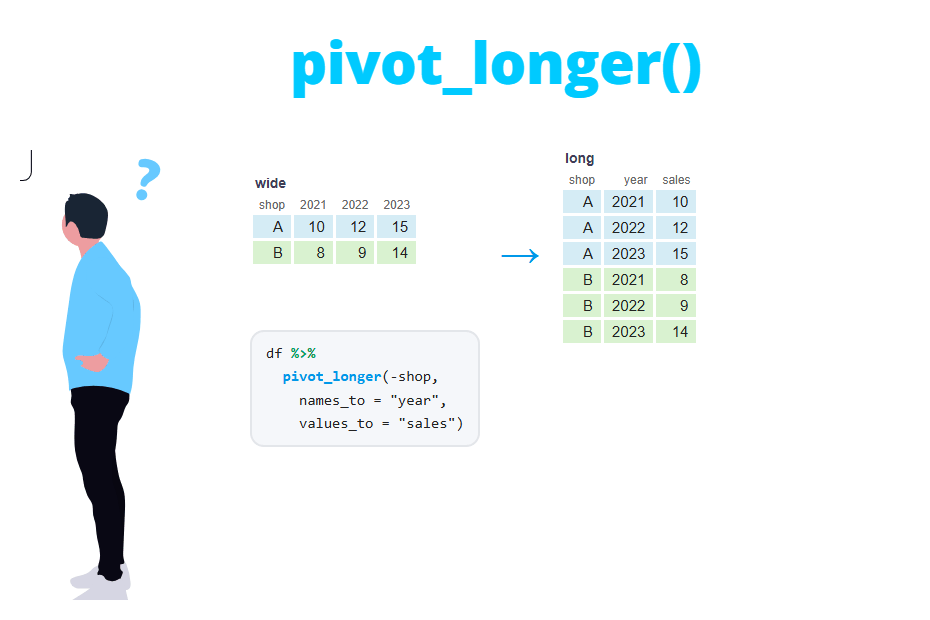
The pivot_longer and pivot_wider functions from the tidyr package are used to reshape data frames. pivot_longer converts data from wide to long format (columns into rows) and pivot_wider does the opposite, from long to wide format (rows into columns). In this tutorial you will learn when to use each format, how to handle column names that contain several pieces of information, and how to fix the "Values are not uniquely identified" warning.
Wide vs long format
The same data can be stored in two shapes. In wide format each subject has a single row and the repeated measurements are spread across several columns. The following data frame contains the sales of three stores in three years, with one column per year:
library(tidyr)
library(dplyr)

sales <- tibble(
  store = c("A", "B", "C"),
  `2022` = c(120, 95, 130),
  `2023` = c(135, 110, NA),
  `2024` = c(150, 105, 140)
)

sales
# A tibble: 3 × 4
store `2022` `2023` `2024`
<chr> <dbl> <dbl> <dbl>
1 A 120 135 150
2 B 95 110 105
3 C 130 NA 140In long format each row is a single observation: one store in one year. The year is no longer part of the column names, but a variable with its own column:
# A tibble: 9 × 3
  store year  sales
  <chr> <chr> <dbl>
1 A     2022    120
2 A     2023    135
3 A     2024    150
4 B     2022     95
5 B     2023    110
6 B     2024    105
7 C     2022    130
8 C     2023     NA
9 C     2024    140
Which one is better? Wide format is easier to read for people and is the usual layout of spreadsheets. However, most R tools expect long format: with long data you can group by year and summarise the sales, filter a range of years or map the year to the x axis of a ggplot2 chart. With wide data each of those operations would require writing one column name per year.
The rule of thumb is: if a piece of information you need to work with (a year, a treatment, a measurement type) is stored in the column names, you need pivot_longer. If you need a table to present results or a column per category to compute differences between them, you need pivot_wider.
pivot_longer: from wide to long
The basic syntax of pivot_longer has three key arguments:
pivot_longer(data, cols, names_to = "name", values_to = "value", ...)Being:
cols: the columns to pivot into rows.names_to: name of the new column that will store the old column names.values_to: name of the new column that will store the cell values.
The following code transforms the sales data frame into long format. The year columns have non-syntactic names (they start with a number), so you need to write them between backticks. The example uses the pipe operator %>%:
sales %>%
  pivot_longer(cols = c(`2022`, `2023`, `2024`),
               names_to = "year",
               values_to = "sales")
# A tibble: 9 × 3
store year sales
<chr> <chr> <dbl>
1 A 2022 120
2 A 2023 135
3 A 2024 150
4 B 2022 95
5 B 2023 110
6 B 2024 105
7 C 2022 130
8 C 2023 NA
9 C 2024 140The 3 rows × 3 year columns become 9 rows. The columns you don’t pivot (store) are repeated for each year, and they are the ones that identify each row.
Selecting the columns to pivot
The cols argument uses the same syntax as the select function, so you don’t need to type every column. These calls are equivalent to the previous one:
sales %>% pivot_longer(cols = -store, names_to = "year", values_to = "sales")
sales %>% pivot_longer(cols = `2022`:`2024`, names_to = "year", values_to = "sales")
sales %>% pivot_longer(cols = where(is.numeric), names_to = "year", values_to = "sales")
Selecting the columns to exclude (-store) is usually the most robust option, as it keeps working if a new year is added to the data. Other helpers such as starts_with("sales_"), ends_with(), contains() or matches() are useful when the columns share a pattern.
Converting the names column
Note that the new year column is of type character (<chr>), because it comes from column names. If you need it as a number, use names_transform instead of converting it afterwards:
sales %>%
  pivot_longer(cols = -store, names_to = "year", values_to = "sales",
               names_transform = list(year = as.integer))
# A tibble: 9 × 3
store year sales
<chr> <int> <dbl>
1 A 2022 120
2 A 2023 135
3 A 2024 150
4 B 2022 95
5 B 2023 110
6 B 2024 105
7 C 2022 130
8 C 2023 NA
9 C 2024 140Dropping missing values
In wide format, a missing combination has to be stored as an NA cell. In long format it can simply not exist. Set values_drop_na = TRUE to remove the rows whose value is NA. Now store C has only two rows:
sales %>%
  pivot_longer(cols = -store, names_to = "year", values_to = "sales",
               values_drop_na = TRUE)
# A tibble: 8 × 3
store year sales
<chr> <chr> <dbl>
1 A 2022 120
2 A 2023 135
3 A 2024 150
4 B 2022 95
5 B 2023 110
6 B 2024 105
7 C 2022 130
8 C 2024 140This is equivalent to applying drop_na(sales) after pivoting. Check the tutorial about NA values in R for other ways of handling missing data.
Removing a prefix with names_prefix
Column names are often like sales_2023 instead of just 2023. If you only want to keep the year, names_prefix removes the specified text from the beginning of the names:
sales2 <- tibble(store = c("A", "B"),
                 sales_2023 = c(135, 110),
                 sales_2024 = c(150, 105))

sales2 %>%
  pivot_longer(cols = starts_with("sales_"), names_to = "year",
               names_prefix = "sales_", values_to = "sales")
# A tibble: 4 × 3
store year sales
<chr> <chr> <dbl>
1 A 2023 135
2 A 2024 150
3 B 2023 110
4 B 2024 105Column names with several variables: names_sep and names_pattern
Sometimes the column names store two variables at once. In the data frame below each name contains a metric (sales or costs) and a year separated by an underscore:
sales3 <- tibble(store = c("A", "B"),
                 sales_2023 = c(135, 110), sales_2024 = c(150, 105),
                 costs_2023 = c(80, 70), costs_2024 = c(90, 72))

sales3
# A tibble: 2 × 5
store sales_2023 sales_2024 costs_2023 costs_2024
<chr> <dbl> <dbl> <dbl> <dbl>
1 A 135 150 80 90
2 B 110 105 70 72Pass a vector of two names to names_to and the separator to names_sep. tidyr will split each column name into the two new columns:
sales3 %>%
  pivot_longer(cols = -store, names_to = c("metric", "year"),
               names_sep = "_", values_to = "value")
# A tibble: 8 × 4
store metric year value
<chr> <chr> <chr> <dbl>
1 A sales 2023 135
2 A sales 2024 150
3 A costs 2023 80
4 A costs 2024 90
5 B sales 2023 110
6 B sales 2024 105
7 B costs 2023 70
8 B costs 2024 72If the names have no separator (for instance sales2023), use names_pattern with a regular expression. Each group between parentheses becomes one of the new columns. If you are not familiar with regular expressions, see the grepl and grep tutorial.
sales4 <- tibble(store = c("A", "B"),
                 sales2023 = c(135, 110), sales2024 = c(150, 105),
                 costs2023 = c(80, 70), costs2024 = c(90, 72))

sales4 %>%
  pivot_longer(cols = -store, names_to = c("metric", "year"),
               names_pattern = "([a-z]+)([0-9]+)", values_to = "value")
The output is the same as the previous one. The first group, ([a-z]+), captures the letters (the metric) and the second one, ([0-9]+), captures the digits (the year).
Sales and costs are two different variables, so in many cases you will prefer to keep them in separate columns. The special name ".value" tells pivot_longer that this part of the name must be used as a column name instead of being stored as a value:
sales3 %>%
  pivot_longer(cols = -store, names_to = c(".value", "year"), names_sep = "_")
# A tibble: 4 × 4
store year sales costs
<chr> <chr> <dbl> <dbl>
1 A 2023 135 80
2 A 2024 150 90
3 B 2023 110 70
4 B 2024 105 72Now each row is a store in a year, and you can compute the profit with a simple mutate(profit = sales - costs).
All the pivoted columns end up in the same value column, so they must have compatible types. If you mix numeric and character columns you will get the error Can’t combine . Pivot only the columns of the same type or convert them with x <double> and y <character>values_transform = as.character.
pivot_wider: from long to wide
pivot_wider is the inverse operation. Its main arguments are:
pivot_wider(data, names_from = name, values_from = value, values_fill = NULL, ...)Being:
names_from: the column whose values will become the new column names.values_from: the column whose values will fill the new columns.values_fill: the value used when a combination doesn’t exist in the data.
Consider the long data frame created in the first section, saved as long. You can go back to one column per year as follows:
long <- sales %>%
  pivot_longer(cols = -store, names_to = "year", values_to = "sales")

long %>%
  pivot_wider(names_from = year, values_from = sales)
# A tibble: 3 × 4
store `2022` `2023` `2024`
<chr> <dbl> <dbl> <dbl>
1 A 120 135 150
2 B 95 110 105
3 C 130 NA 140Every column not used in names_from or values_from identifies the rows of the output. Here only store is left, so you get one row per store. If you use store in names_from you get one row per year and one column per store instead:
long %>%
  pivot_wider(names_from = store, values_from = sales)
# A tibble: 3 × 4
year A B C
<chr> <dbl> <dbl> <dbl>
1 2022 120 95 130
2 2023 135 110 NA
3 2024 150 105 140Valid column names with names_prefix
Column names like 2022 are not syntactic and force you to use backticks (df$`2022`). Use names_prefix to add a prefix to the new columns:
long %>%
  pivot_wider(names_from = year, values_from = sales,
              names_prefix = "y_")
# A tibble: 3 × 4
store y_2022 y_2023 y_2024
<chr> <dbl> <dbl> <dbl>
1 A 120 135 150
2 B 95 110 105
3 C 130 NA 140Filling missing combinations with values_fill
values_fill replaces the missing values of the output, for example with 0 when no sales means zero sales. However, there is a detail that confuses many people: values_fill only fills combinations that don’t exist in the data, not explicit NA values. With the long data frame, which contains a row for store C in 2023 with an NA, nothing changes:
long %>%
  pivot_wider(names_from = year, values_from = sales,
              values_fill = 0)
# A tibble: 3 × 4
store `2022` `2023` `2024`
<chr> <dbl> <dbl> <dbl>
1 A 120 135 150
2 B 95 110 105
3 C 130 NA 140If the row doesn’t exist (here it is removed first with values_drop_na = TRUE) the gap is filled with 0:
sales %>%
  pivot_longer(cols = -store, names_to = "year", values_to = "sales",
               values_drop_na = TRUE) %>%
  pivot_wider(names_from = year, values_from = sales,
              values_fill = 0)
# A tibble: 3 × 4
store `2022` `2023` `2024`
<chr> <dbl> <dbl> <dbl>
1 A 120 135 150
2 B 95 110 105
3 C 130 0 140To replace explicit NA values use replace_na from tidyr after pivoting.
Several value columns
If you have more than one variable to spread, pass all of them to values_from. The names of the new columns combine the variable and the value of names_from, separated by names_sep ("_" by default):
long3 <- sales3 %>%
  pivot_longer(cols = -store, names_to = c(".value", "year"), names_sep = "_")

long3 %>%
  pivot_wider(names_from = year, values_from = c(sales, costs))
# A tibble: 2 × 5
store sales_2023 sales_2024 costs_2023 costs_2024
<chr> <dbl> <dbl> <dbl> <dbl>
1 A 135 150 80 90
2 B 110 105 70 72“Values are not uniquely identified; output will contain list-cols”
This is the most common problem with pivot_wider. Consider the following data, where each row is an order and some stores have more than one order in the same year:
orders <- tibble(
  store = c("A", "A", "A", "B", "B", "B"),
  year  = c(2023, 2023, 2024, 2023, 2024, 2024),
  sales = c(60, 75, 150, 110, 50, 55)
)

orders %>%
  pivot_wider(names_from = year, values_from = sales)
# A tibble: 2 × 3
store `2023` `2024`
<chr> <list> <list>
1 A <dbl [2]> <dbl [1]>
2 B <dbl [1]> <dbl [2]>
Warning message:
Values from `sales` are not uniquely identified; output will contain list-cols.
• Use `values_fn = list` to suppress this warning.
• Use `values_fn = {summary_fun}` to summarise duplicates.
• Use the following dplyr code to identify duplicates.
{data} %>%
dplyr::group_by(store, year) %>%
dplyr::summarise(n = dplyr::n(), .groups = "drop") %>%
dplyr::filter(n > 1L)The output has a cell for store A in 2023, but the data contains two values for it (60 and 75). As a cell can’t hold two numbers, pivot_wider stores both inside a list and the columns become list-columns (<list>, <dbl [2]>). That is rarely what you want: you can’t sum or plot those columns.
The first step is to find the duplicated combinations, as the warning suggests. The count function makes it short:
orders %>%
  count(store, year) %>%
  filter(n > 1)
# A tibble: 2 × 3
store year n
<chr> <dbl> <int>
1 A 2023 2
2 B 2024 2Then, decide what the duplicates mean. There are three typical cases:
1. The duplicates should be aggregated. If you want the total (or mean) sales per store and year, pass a summary function to values_fn:
orders %>%
  pivot_wider(names_from = year, values_from = sales,
              values_fn = sum)
# A tibble: 2 × 3
store `2023` `2024`
<chr> <dbl> <dbl>
1 A 135 150
2 B 110 105The same result can be obtained aggregating first with summarise(sales = sum(sales), .by = c(store, year)) and pivoting afterwards. That option is more explicit and lets you check the summary before reshaping.
2. The rows are different observations. If each order must keep its own value, the data is missing a variable that identifies the rows. Create it, for instance with row_number by group, so that each combination is unique:
orders %>%
  group_by(store, year) %>%
  mutate(order = row_number()) %>%
  ungroup() %>%
  pivot_wider(names_from = year, values_from = sales)
# A tibble: 4 × 4
store order `2023` `2024`
<chr> <int> <dbl> <dbl>
1 A 1 60 150
2 A 2 75 NA
3 B 1 110 50
4 B 2 NA 553. The duplicates are an error. If each store should have only one value per year, the problem is in the data (a row loaded twice, a bad join…). Remove the duplicated rows or fix the source instead of hiding the problem with values_fn.
A frequent cause of this warning is an extra column you forgot about. Any column not used in names_from or values_from is used to identify the rows, so a column with a unique value per row (such as an ID or a timestamp) produces a mostly empty output, while a missing ID produces duplicates. Use id_cols or select to keep only the identifying columns before pivoting.
Round trip: long and back to wide
pivot_longer and pivot_wider are inverses of each other. If you pivot the data to long format and then back to wide, you get exactly the original data frame:
back <- sales %>%
  pivot_longer(cols = -store, names_to = "year", values_to = "sales") %>%
  pivot_wider(names_from = year, values_from = sales)

identical(back, sales)
[1] TRUEThis is a common workflow: pivot to long, compute something by group with dplyr and pivot back to wide to present the result as a table. Keep in mind that the round trip only works when the long data has no duplicates and when you don’t drop missing values on the way.
Base R alternative: reshape()
If you don’t want to use tidyr, base R provides the reshape function. It needs the column names to follow a variable.time pattern (for instance sales.2022) and its arguments are less intuitive:
df <- as.data.frame(sales)
names(df) <- c("store", "sales.2022", "sales.2023", "sales.2024")

# Wide to long
long_b <- reshape(df, direction = "long", varying = 2:4,
                  idvar = "store", timevar = "year")
long_b

# Long to wide
reshape(long_b, direction = "wide", idvar = "store", timevar = "year")
store year sales
A.2022 A 2022 120
B.2022 B 2022 95
C.2022 C 2022 130
A.2023 A 2023 135
B.2023 B 2023 110
C.2023 C 2023 NA
A.2024 A 2024 150
B.2024 B 2024 105
C.2024 C 2024 140
store sales.2022 sales.2023 sales.2024
A.2022 A 120 135 150
B.2022 B 95 110 105
C.2022 C 130 NA 140Note that reshape returns the rows ordered by year instead of by store and adds row names you will usually want to remove.
The following table summarizes the equivalent functions:
| Task | tidyr (current) | tidyr (superseded) | base R |
|---|---|---|---|
| Wide to long | pivot_longer() |
gather() |
reshape(direction = "long") |
| Long to wide | pivot_wider() |
spread() |
reshape(direction = "wide") |
The gather and spread functions are superseded: they still work, so you will see them in old code, but they won’t receive new features. pivot_longer and pivot_wider replace them with clearer argument names and support for several variables in the column names, so use the pivot functions in new code. Also note that pivot_wider doesn’t combine data from different tables: to do that you need a join.